200ms: The INP Core Web Vitals Fix for Booking Pages
Google's Interaction to Next Paint metric has scored real-user responsiveness since 12 March 2024, and a booking calendar tap over 200 milliseconds fails it. Here is what the field data means for your widget's markup, and how to fix it.
 Vikas Thakur Founder, RockingWeb 10 min read
Picture a patient on the 7:15am bus, thumb on her phone, trying to lock in an anti-wrinkle appointment before work. She taps a time slot. Nothing happens for half a second. She taps again, thinking the first tap missed, and the widget double-books a duplicate request. She gives up and rings the clinic instead, if she bothers at all.
That half-second stall has a name, a threshold, and an exact date Google started scoring it.
Key takeaways
- INP became a stable Google Core Web Vital on 12 March 2024, replacing First Input Delay, per Google’s official announcement.
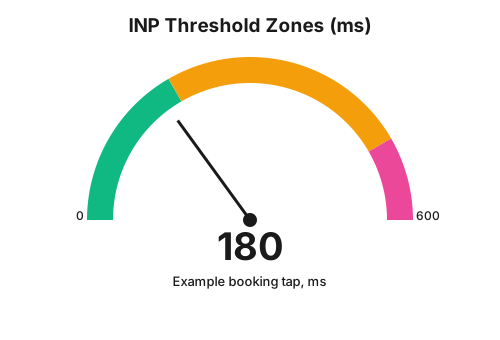
- A booking page passes at 200 milliseconds or under. Between 200 and 500 milliseconds is rated needs improvement. Above 500 milliseconds is poor.
- Google scores INP at the 75th percentile of a page’s real user interactions, not the average.
- Only three interaction types count: mouse clicks, screen taps, and keyboard key presses. Scrolling and hovering are excluded.
- Google discards the single worst interaction for every 50 recorded on a page, so one freak stall does not sink the whole score.
- A booking widget’s date tap, time-slot selection, and payment submit button are exactly the interactions INP measures.
- No regulator enforces INP. The consequence runs through Google’s own field-data pipeline, not a fine or notice.
As at 15 August 2026, Interaction to Next Paint (INP) has been a stable Core Web Vital for over two years, since it replaced First Input Delay on 12 March 2024. A clinic booking page passes when its interactions resolve in 200 milliseconds or under, at the 75th percentile of real visits, according to Google’s own web.dev documentation. Below, what the rule says, what it means for your booking widget’s markup, and where the fix runs out of road.
Takeaway: the 200 millisecond line is not a guideline, it is the exact number Google’s own tooling scores against.
What the rule says
Google’s web.dev INP documentation defines the metric as assessing “a page’s overall responsiveness to user interactions by observing the latency of all click, tap, and keyboard interactions that occur throughout the lifespan of a user’s visit to a page.” Three thresholds apply: good is “below or at 200 milliseconds”, needs improvement is “above 200 milliseconds and below or at 500 milliseconds”, and poor is “above 500 milliseconds”.
The scoring method matters as much as the thresholds. Google does not average every interaction on a page. It takes the 75th percentile of interactions across a page’s real user sessions, and for pages with heavy interaction volume, it discards one of the highest latencies for every 50 interactions recorded, specifically to stop a single outlier session from distorting the score. Only three interaction types are counted toward INP: clicking with a mouse, tapping on a touchscreen, and pressing a key. Scrolling, hovering, and pinch-zoom are explicitly excluded, even though they can feel just as laggy to a visitor.
INP itself replaced First Input Delay (FID) as a Core Web Vital on 12 March 2024, confirmed in Google’s official transition announcement: “INP will officially become a Core Web Vital and replace FID on March 12 of this year, and that FID will be deprecated in this transition.” FID dropped out of Google Search Console immediately, while other tools carried a six-month deprecation window before removing it.
Takeaway: the rule is reported, measured, and dated by Google itself, not inferred from a third-party ranking study.
What that means for the build
INP is the total time from the moment a patient’s finger or click lands on an element to the moment the browser paints the next visual update in response. That total splits into three parts: input delay (the browser is busy with something else when the tap arrives), event handler processing (your JavaScript runs), and presentation delay (the browser paints the result). A slow booking widget is almost always losing time in the middle segment, event handler processing, because calendar and time-slot components tend to run heavy synchronous work on every tap: recalculating available slots, revalidating a form, or firing a tracking pixel before updating the UI.
The concrete build fixes:
- Break up long tasks. Any JavaScript handler running longer than 50 milliseconds blocks the main thread and delays the paint. Split slot-recalculation logic into smaller chunks using
scheduler.yield()orsetTimeout(fn, 0)so the browser can paint between chunks. - Debounce, don’t block, on every keystroke. A patient-details field that re-validates on every keypress synchronously is a common INP killer. Debounce validation and run it off the main interaction path.
- Defer non-critical work off the tap handler. Analytics calls, tracking pixels, and third-party scripts firing inside a click handler add straight to input delay. Move them to
requestIdleCallbackor fire them after the paint, not inside the handler that updates the calendar. - Watch third-party booking widget scripts. If your booking calendar loads as an embedded script from a vendor (Cliniko, HotDoc, Fresha, and similar), its JavaScript runs on your page’s main thread and counts fully against your INP score, even though you did not write the code.
- Measure with the field, not just the lab. Lighthouse and PageSpeed Insights lab scores use synthetic interactions and can miss INP problems entirely, since INP by definition needs a real interaction to occur. Field data from the Chrome User Experience Report (CrUX), surfaced in Search Console’s Core Web Vitals report, is the number Google actually scores.
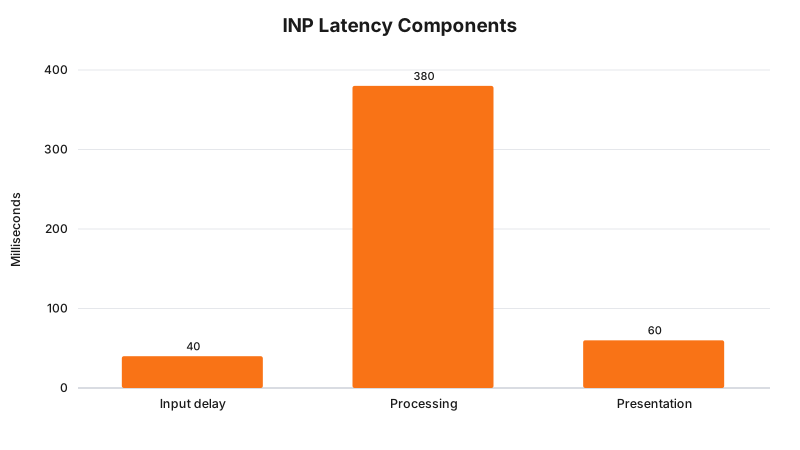
Illustrative example only: the ms split above shows a realistic distribution for a slow booking tap, not a measured statistic from a real site.
Takeaway: most booking-widget INP problems live in the JavaScript handler, not the network or the paint.
Decision matrix: INP score and what to do about it
| INP score (75th percentile) | Rating | What it means on a booking page | Priority action |
|---|---|---|---|
| 0 to 200ms | Good | Taps and keystrokes feel instant | Monitor in Search Console, no rebuild needed |
| 201 to 500ms | Needs improvement | Patients notice a pause after tapping a slot or field | Profile the tap handler, split long tasks, defer trackers |
| 501ms and above | Poor | Patients double-tap, think the widget is broken, or abandon | Treat as a build-blocking issue, audit third-party scripts first |
Takeaway: anything above 500 milliseconds is not a polish item, it is the same experience as a broken button.
Worked examples
Cosmetic clinic, anti-wrinkle booking widget. A Perth injectables clinic embeds a third-party booking calendar as an iframe. Field data in Search Console shows the site’s INP sitting at 640 milliseconds at the 75th percentile, poor. Profiling the tap handler in Chrome DevTools’ Performance panel shows the calendar’s “select time slot” click handler synchronously re-fetches the full day’s availability and fires a Meta Pixel ViewContent event before updating the UI, all inside the same handler. The fix: move the pixel call to fire after the paint using requestAnimationFrame, and cache the day’s availability so a slot tap only re-renders, it does not re-fetch.
Cosmetic dental practice, new-patient exam booking. A dental practice’s custom-built booking form validates the Medicare number field on every keystroke with a synchronous regex and API call combined into one function. Typing a full Medicare number triggers ten separate blocking calls before the next paint. The fix: debounce the validation to fire 400 milliseconds after the last keystroke, and separate the format check (instant, synchronous) from the API lookup (async, only on blur).
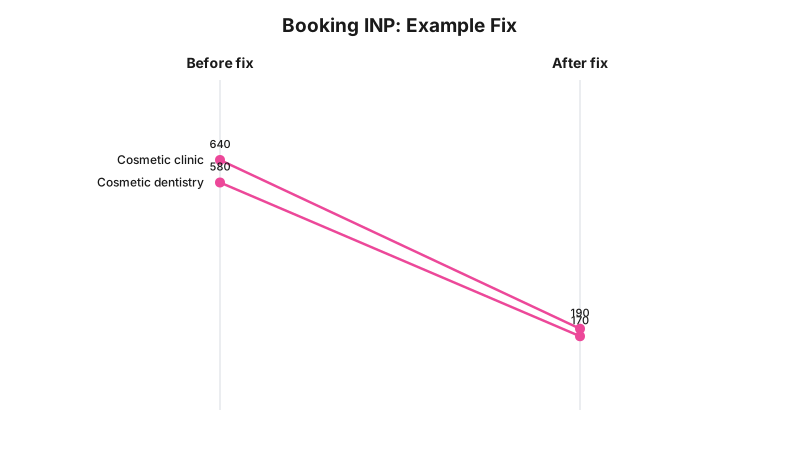
Illustrative example only: these before and after figures represent the kind of improvement the fixes above typically produce, not measured data from a named clinic.
Takeaway: in both cases, the fix is rearranging when code runs, not a redesign.
What to check on your own site
- Open Search Console’s Core Web Vitals report and check your booking pages’ INP band specifically, not just the site-wide average.
- Profile a real tap on your booking calendar in Chrome DevTools’ Performance panel and look for any single task over 50 milliseconds inside the click handler.
- Check whether your booking widget is a third-party embed. If so, ask the vendor directly whether they have published INP benchmarks or a fix timeline.
- Search your booking flow’s JavaScript for analytics or pixel calls sitting inside click or tap handlers, and move them off the critical path.
- Confirm form field validation is debounced, not firing synchronously on every keystroke.
- Test on an actual mid-range Android phone on mobile data, not just a desktop browser with the network throttled.
- Re-check Search Console 28 days after a fix ships. Field data needs a rolling 28-day window to stabilise.
The enforcement anchor
There is no regulator, infringement notice, or determination behind INP. It is not a legal rule; it is a metric Google publishes and scores itself. The closest thing to enforcement is mechanical: your booking pages’ INP scores surface in Google Search Console’s Core Web Vitals report, sourced from the Chrome User Experience Report, and Google’s own documentation frames Core Web Vitals as part of the page experience signals it factors into Search, without publishing the exact ranking weight. No case study, complaint outcome, or penalty exists for a slow booking widget, and none should be invented to fill this section. The consequence a clinic actually feels is patients abandoning a laggy booking flow, which is a conversion problem you can measure directly in your own booking completion rate.
Where this gets hard
Lab tools cannot fully replace field measurement here. Lighthouse and PageSpeed Insights simulate interactions, but INP by design needs a real click, tap, or key press from a real visitor, so a page can score well in the lab and still show a poor INP in the field. Low-traffic clinic sites run into a second wall: CrUX, the data source behind Search Console’s report, needs a minimum volume of real visits before it publishes a score at all, so a small practice with light booking-page traffic may see “not enough data” rather than a number. Third-party booking widgets are the hardest edge of all. If a vendor’s embedded calendar script is the actual source of a slow tap handler, a clinic cannot patch that vendor’s code directly, only raise it with the vendor, wrap the widget differently, or, in the worst case, switch platforms. The regulator says nothing here; the build consequence is real; whether a specific fix is worth the engineering time for your traffic volume is a call for whoever owns your web budget, not a rule anyone hands you.
Status line
INP has been a fully commenced, in-force Core Web Vital since 12 March 2024. It is not a proposal or a passed-but-not-yet-active rule, it is the current live metric Google Search Console reports against today, 15 August 2026.
Frequently Asked Questions
What INP score counts as good for a booking page?
200 milliseconds or under, measured at the 75th percentile of a page’s real user interactions, per Google’s web.dev Interaction to Next Paint documentation. Between 200 and 500 milliseconds is rated needs improvement, and above 500 milliseconds is rated poor.
When did INP become a Core Web Vital?
12 March 2024. Google’s official announcement confirms INP became a stable Core Web Vital on that date, replacing First Input Delay, which was removed from Search Console immediately and from other tools after a six-month deprecation window.
Does INP measure scrolling or hovering on a booking widget?
No. INP only counts three interaction types, mouse clicks, screen taps, and keyboard key presses. Scrolling, hovering, and pinch-zoom gestures are explicitly excluded from the metric, even if they feel laggy to the patient.
Sources and references
- Google, web.dev, Interaction to Next Paint (INP): web.dev/articles/inp (date checked 15 August 2026)
- Google, web.dev blog, INP becomes a Core Web Vital, replacing FID, 12 March 2024: web.dev/blog/inp-cwv-march-12 (date checked 15 August 2026)
Last reviewed: 15 August 2026.
If your booking widget’s field data is sitting in the needs improvement or poor band and you are not sure whether the problem is your code or a vendor’s, sign up with RockingWeb and we will profile the tap handler with you and tell you exactly which line is costing you the milliseconds.
Vikas Thakur
Founder of RockingWeb. 16 years of experience from working at TPG, iiNet and Monadelphous, now building websites, software and digital marketing for local businesses in Rockingham and Perth.