INP Explained: The 200ms Tap Test for Your Website
Interaction to Next Paint replaced First Input Delay as a Core Web Vital. A good score is 200 milliseconds or less at the 75th percentile, and it watches every click, tap and key press, not just the first one.
 Vikas Thakur Founder, RockingWeb 4 min read
Key takeaways
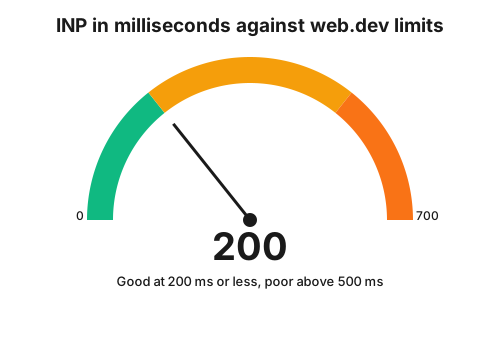
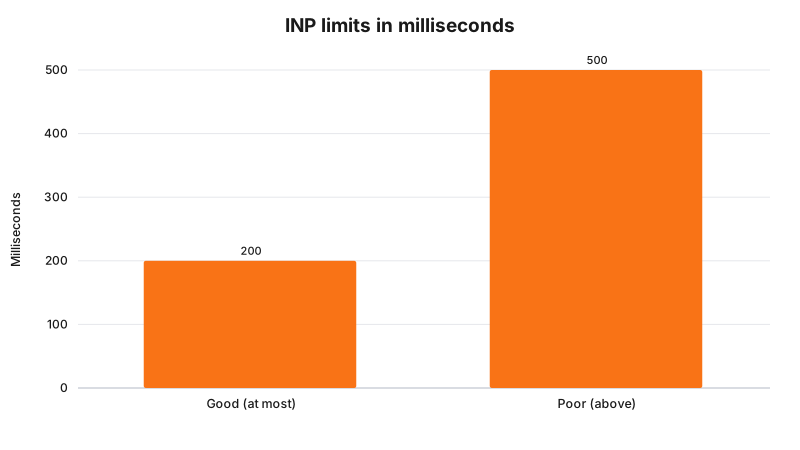
- A good INP is 200 milliseconds or less, needs improvement up to 500 milliseconds, and is poor above that
- INP is measured at the 75th percentile of page loads, split across mobile and desktop
- It counts 3 kinds of interaction: mouse clicks, taps and key presses
- It replaced First Input Delay, which only looked at the first interaction
- The final INP value is the longest interaction observed, sometimes ignoring outliers
According to web.dev, a page has good responsiveness when its Interaction to Next Paint is 200 milliseconds or less, measured at the 75th percentile of page loads.
INP is the “did my tap do anything?” test. A visitor in Cockburn taps your “Call now” button or opens your menu. If nothing visibly changes for half a second, they tap again, or leave. This guide shows what INP counts, what the pass marks are, and the one habit that fixes most slow pages.
What INP counts
web.dev says INP observes the latency of all qualifying interactions during a visit, from input delay, through the event handlers, to the browser painting the next frame. The final INP value is the longest interaction observed, sometimes ignoring outliers.
It counts only these interactions:
- Clicking with a mouse.
- Tapping on a touchscreen.
- Pressing a key on a physical or onscreen keyboard.
Hovering, zooming and scrolling are not observed for INP, although a gesture that includes a click, tap or key press can be.
Takeaway: INP is about the buttons, menus and forms your customers use, not about scrolling.
The pass marks
| INP result | Rating |
|---|---|
| 200 milliseconds or less | Good |
| Over 200 and up to 500 milliseconds | Needs improvement |
| Over 500 milliseconds | Poor |
Why INP replaced FID
web.dev calls INP the successor to First Input Delay. FID only measured the input delay of the first interaction. INP looks at every interaction through the whole visit, so it is a better guide to overall responsiveness whenever a slow moment happens.
What makes it slow
web.dev says the main driver of interactivity is often JavaScript. When long tasks tie up the main thread, an input has to wait until they finish before the handler can run.
Its advice for event callbacks:
- Do as little work as possible inside the callback.
- Break up longer work into separate tasks, so the main thread can answer other interactions sooner.
- Yield to the main thread after updating the screen, so the browser can paint.
On a small business site, the usual suspects are third-party scripts: chat widgets, review sliders, tracking tags and booking embeds. Ask which ones earn their place. We have not measured your site, so we will not guess which one it is.
How to check
Use PageSpeed Insights or the Core Web Vitals report in Search Console, as listed in our Core Web Vitals pass marks guide. Then try your own site on a mid-range phone, tapping your main button and menu.
Frequently Asked Questions
What is a good INP score?
web.dev says an INP at or below 200 milliseconds means good responsiveness. Above 200 and up to 500 milliseconds needs improvement, and above 500 milliseconds is poor, measured at the 75th percentile of page loads.
Which interactions does INP count?
web.dev says clicking with a mouse, tapping on a touchscreen, and pressing a key on a physical or onscreen keyboard. Hovering, zooming and scrolling are not observed for INP.
How is INP different from First Input Delay?
web.dev says FID only measured the input delay of the first interaction. INP observes all interactions on a page, from the input delay through event handlers to the next frame being painted.
What is the simplest way to improve INP?
web.dev’s general advice is to do as little work as possible in event callbacks, and to break up longer work into separate tasks so the main thread can respond to other interactions sooner.
Want it checked?
If your menu or call button feels sluggish, we can review which scripts load on your page. See web design in Rockingham or web design in Mandurah, then contact us.
Sources
web.dev, Interaction to Next Paint (INP)
. Source of the definition, interaction types, thresholds and the FID comparison. Read 3 November 2026.web.dev, Optimize Interaction to Next Paint
. Source of the 75th percentile advice and the event callback guidance. Read 3 November 2026.
Last reviewed: 3 November 2026.
Vikas Thakur
Founder of RockingWeb. 16 years of experience from working at TPG, iiNet and Monadelphous, now building websites, software and digital marketing for local businesses in Rockingham and Perth.