Core Web Vitals Pass Marks: 2.5s, 200ms and 0.1
Google's Core Web Vitals have three pass marks, measured at the 75th percentile of page loads. Here are the exact numbers for LCP, INP and CLS, where to check them for free, and what Google says about ranking.
 Vikas Thakur Founder, RockingWeb 4 min read
Key takeaways
- A good LCP is 2.5 seconds or less, a good INP is 200 milliseconds or less, and a good CLS is 0.1 or less
- web.dev says to measure at the 75th percentile of page loads, split by mobile and desktop
- Poor starts above 4.0 seconds for LCP, 500 milliseconds for INP and 0.25 for CLS
- 3 free tools show real-user data: PageSpeed Insights, the Chrome User Experience Report and Search Console
- Google says it highly recommends good Core Web Vitals for success with Search
According to web.dev, a page has good Core Web Vitals when its Largest Contentful Paint is 2.5 seconds or less, its Interaction to Next Paint is 200 milliseconds or less, and its Cumulative Layout Shift is 0.1 or less, measured at the 75th percentile of page loads.
If you run a local business site in Rockingham, Baldivis, Mandurah or Cockburn, those three numbers are your speed test. They measure loading, response to taps and clicks, and whether the page jumps around. This guide gives you the pass marks, the poor marks, and where to look.
The pass marks
| Metric | Measures | Good | Poor |
|---|---|---|---|
| Largest Contentful Paint (LCP) | Loading | 2.5 seconds or less | Over 4.0 seconds |
| Interaction to Next Paint (INP) | Responsiveness | 200 milliseconds or less | Over 500 milliseconds |
| Cumulative Layout Shift (CLS) | Visual stability | 0.1 or less | Over 0.25 |
Anything between good and poor “needs improvement”.
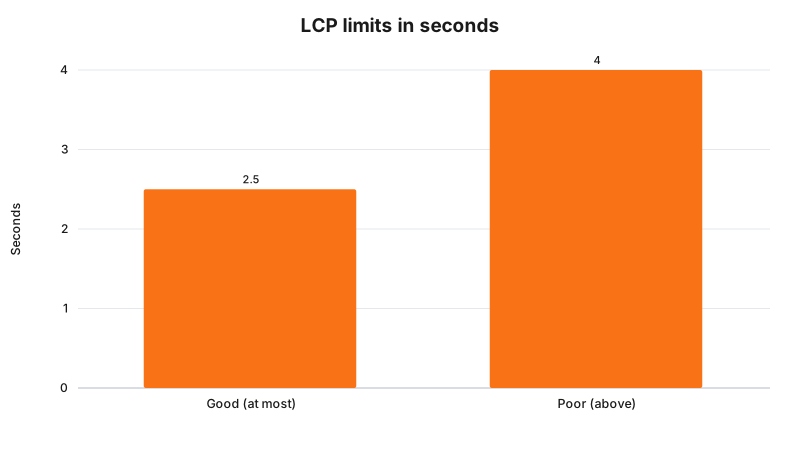
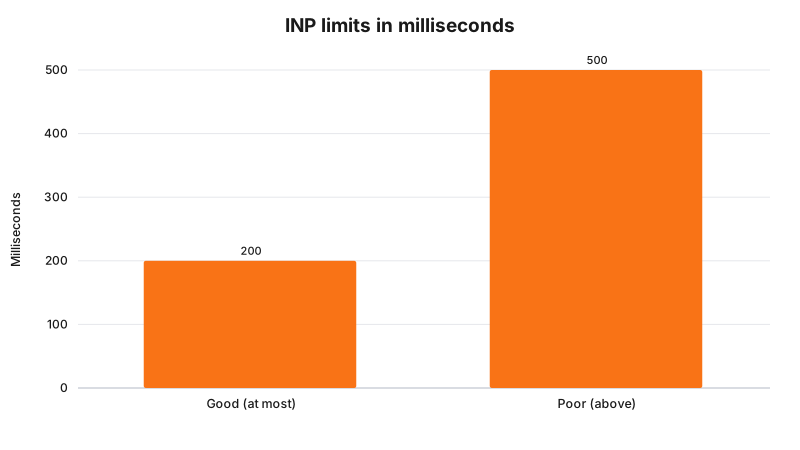
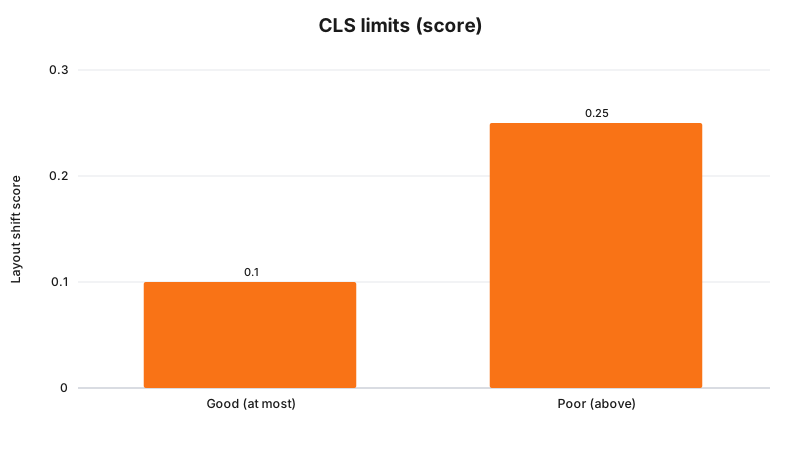
Takeaway: three numbers, one test. Pass all three at the 75th percentile and your page counts as good.
Why the 75th percentile
web.dev says a good threshold to measure is the 75th percentile of page loads, segmented across mobile and desktop. The point is to make sure most of your visitors get the good experience, including people on slower phones and patchy connections.
Where to check your own site
web.dev lists these field tools, which use real visitor data:
- PageSpeed Insights. Paste your address, read the Core Web Vitals box at the top.
- Chrome User Experience Report. The dataset behind the other tools.
- Search Console. The Core Web Vitals report, if your site is verified.
If a tool shows no field data for your page, run a lab test and treat the result as a guide, not a verdict.
What Google says about ranking
Google’s Search Central page says it “highly recommends” site owners achieve good Core Web Vitals “for success with Search” and a great user experience. It says this, along with other page experience aspects, aligns with what its core ranking systems seek to reward. It does not claim Core Web Vitals decide your position on their own, and we will not either.
What to fix first
Each metric has its own cause and its own fix. We cover them one by one:
Frequently Asked Questions
What are the Core Web Vitals pass marks?
Per web.dev, a good Largest Contentful Paint is 2.5 seconds or less, a good Interaction to Next Paint is 200 milliseconds or less, and a good Cumulative Layout Shift is 0.1 or less, each measured at the 75th percentile of page loads.
What does the 75th percentile mean?
web.dev recommends measuring at the 75th percentile of page loads, segmented across mobile and desktop, so that most of your visitors get the good experience, not just the fastest quarter.
Where can I check my own scores for free?
web.dev lists the Chrome User Experience Report, PageSpeed Insights and the Core Web Vitals report in Search Console as field tools that show real-user data.
Do Core Web Vitals decide where I rank?
Google says it highly recommends good Core Web Vitals for success with Search, and that they align with what its core ranking systems seek to reward. It does not say they are the only factor.
Want a speed check on your site?
See web design in Rockingham for how we build, or SEO in Rockingham for local search. To ask about a check, contact us.
Sources
web.dev, Web Vitals
. Source of the three good thresholds, the 75th percentile and the field tools. Read 3 November 2026.web.dev, Largest Contentful Paint
. Source of the 2.5 and 4.0 second marks. Read 3 November 2026.web.dev, Interaction to Next Paint
. Source of the 200 and 500 millisecond marks. Read 3 November 2026.web.dev, Cumulative Layout Shift
. Source of the 0.1 and 0.25 marks. Read 3 November 2026.Google Search Central, Understanding Core Web Vitals and Google search results
. Source of the ranking statement. Read 3 November 2026.
Last reviewed: 3 November 2026.
Vikas Thakur
Founder of RockingWeb. 16 years of experience from working at TPG, iiNet and Monadelphous, now building websites, software and digital marketing for local businesses in Rockingham and Perth.