Server-Side Tagging for Clinics: Cutting Direct Vendor Access to Health Data
A standard client-side tag sends visitor data straight from the browser to Google, Meta and every other vendor you have installed, no stop in between. Server-side tagging inserts your own server as that stop. Here is how the architecture actually works, what it does and does not fix, and what it costs to run.
 Vikas Thakur Founder, RockingWeb 13 min read
Key takeaways
- Server-side tagging moves tag execution from the visitor’s browser to a server container you control, per Google’s own documentation: “Server-side tagging allows you to move some tags off of your website or app and onto a server instead”
- Google’s server-side tagging documentation states plainly: “Only you have access to the data in the server until you choose to send it elsewhere”
- Transformations, a documented server container feature, let you exclude, redact or modify event fields before a tag forwards them to a vendor. This is the actual mechanism that reduces exposure, not the server itself
- A first-party custom subdomain for the server container is what makes its cookies durable and same-origin. The default cloud provider domain runs in a third-party context
- Meta’s Conversions API requires SHA-256 hashing of any email or phone number sent, whether the event arrives via a server container or direct integration
- This is a voluntary architecture decision, not a legal requirement. No regulator mandates server-side tagging. The Privacy Act obligation to handle health information properly applies either way
Open your clinic’s booking confirmation page, open the network tab, and count the domains your browser talks to directly. On a typical client-side setup that is four or five: Google Analytics, Google Ads, Meta, maybe TikTok, maybe a chat widget. Each one gets a direct connection from the visitor’s own device, and each connection carries whatever that vendor’s script is configured to send.
Server-side tagging collapses that to one connection. The browser talks to a single endpoint, on a domain you control, and that server decides what happens next. It is the difference between four strangers reading your mail as it passes through their hands and one person you employ sorting it before any of it leaves the building.
This is not a privacy feature Google built for compliance reasons. It started as a performance and data-ownership product. But the mechanism it provides, an interception point between the browser and every vendor, is exactly the missing piece in the client-side fixes covered in our Meta Pixel, GA4 configuration and Google Ads tag breakdowns. Those posts show you how to stop a client-side tag from sending a treatment name. This one shows you the architecture that stops it from sending anything you have not explicitly allowed, to any vendor, ever again.
What Google’s Own Documentation Says
Google’s server-side tagging overview describes the setup directly: a server container is a Tag Manager deployment that “runs on a server that you control,” and data sent to it is “processed and routed by other tags” from that server, not from the visitor’s browser. The same documentation states that “visitor data is better protected and more secure when collected and distributed in a customer-managed server-side environment,” and that with a server container “you have full control over how that data is shaped, and where it is routed from the server.”
The most direct sentence for a clinic evaluating this is about access: “Only you have access to the data in the server until you choose to send it elsewhere.” That is the entire value proposition in one line. A client-side tag has no such holding point. It fires from the browser and the vendor has the data the instant the request lands. A server container has a holding point, and what happens at that holding point is a deliberate configuration choice, not a default.
Google’s documentation also describes Transformations, a feature that runs inside the server container after your data arrives but before any tag can read it. Three transformation types are documented: Allow parameters, which exposes only the fields you explicitly list; Exclude parameters, which removes named fields from what a tag can see; and Augment event, which edits or adds parameters. Google’s own phrasing is direct: transformations “allow you to include, exclude or modify event parameters output from your client before they are exposed to tags.” That is the mechanism. The server container is the location. Transformations are the tool that does the actual stripping.
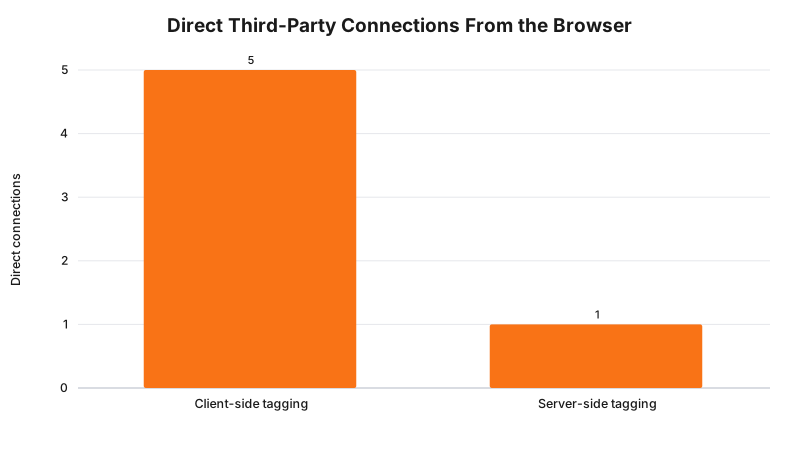
That chart is a build model of a typical clinic tag stack, not a measured audit of any specific site. The point it makes is structural: client-side tagging multiplies the number of parties who receive data directly from the visitor’s own browser, and server-side tagging collapses that back to one connection, regardless of how many vendors sit behind it.
What That Means for the Build
Three pieces, and they have to go in this order or the setup does nothing useful.
1. Stand up a server container and put it on your own subdomain. A server container runs on Google Cloud, most commonly App Engine or Cloud Run, and Google’s default assigns it a shared cloud domain such as metrics-xxxx.run.app. Google’s own custom domain documentation is explicit that this default domain runs in a “third-party context” and “can only set Javascript cookies,” which are shorter-lived and more fragile than server-set ones. Pointing a subdomain you own, such as tagging.yourclinic.com.au, at the container makes it same-origin with your site. Cookies set from that subdomain get the “full access to security and durability benefits” Google’s documentation describes for same-origin serving, and the request no longer looks like third-party tracking traffic to a browser’s built-in tracking protection.
2. Configure transformations before you configure tags. This is the step every rushed implementation skips. A server container with vendor tags added but no transformations set simply relays everything it receives, which changes nothing about exposure and only adds latency. Set an Exclude parameters transformation on every field you do not want a given vendor to see, applied before that vendor’s tag runs. A treatment name captured as a custom event parameter can be excluded from the Meta tag entirely while still reaching your own GA4 property, something a client-side setup cannot do because every vendor’s script reads the same page in the same browser.
3. Decide what genuinely needs to reach each vendor, and hash what does. Not everything can or should be stripped. Meta’s Conversions API, the server-side equivalent of the browser Pixel, requires that any customer information field you do send, an email address or phone number, arrive pre-hashed. Meta’s own Conversions API parameter documentation states plainly that its systems are “designed to not accept customer information that is unhashed,” and specifies SHA-256 as the algorithm, with normalisation rules such as lowercasing an email address before hashing it. A server container is where that hashing step belongs, run once centrally, rather than trusted to whichever script fired last in the browser.
| Setup | What the vendor receives directly | Who decides what leaves |
|---|---|---|
| Client-side tag, default | Full page URL, referrer, browser identifiers, any custom parameter the tag reads | The vendor’s own script, running in the visitor’s browser |
| Server container, no transformations configured | The same fields, relayed unchanged | Nobody. Nothing was stripped |
| Server container, transformations configured | Only the fields explicitly allowed. Sensitive fields excluded or hashed before the tag runs | You, in the container configuration |
| Server container, custom subdomain, transformations configured | As above, plus first-party cookie durability and no third-party-context flag | You |
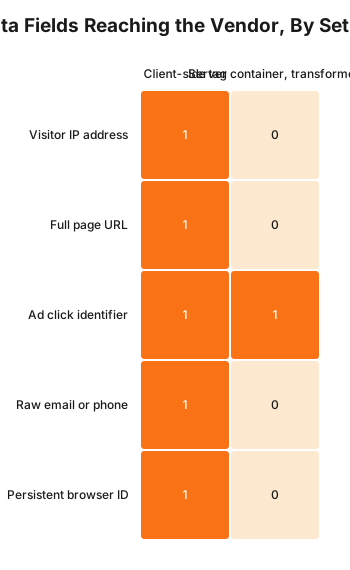
Read the middle row of that heatmap carefully. A raw email or phone number should never reach a vendor unhashed under either setup, since Meta rejects it outright. Server-side tagging does not create that rule. What it adds is a single place to enforce every rule at once, instead of trusting each vendor’s individual script to behave.
A Worked Example
Cosmetic clinic. A Perth clinic runs GA4 for reporting and Meta ads for acquisition, both client-side, both firing on every page including the booking confirmation. The rebuild stands up a Cloud Run server container on tag.theirclinic.com.au, moves the GA4 configuration tag and the Meta Pixel base code to fire through the container’s client, and adds a Conversions API tag inside the container so Meta receives a server-side event alongside the browser one for match-rate purposes. An Exclude parameters transformation strips the treatment-name custom parameter from the outgoing Meta tag while leaving it visible to the GA4 tag, since the clinic wants per-treatment reporting inside its own analytics but not inside the ad platform. The booking confirmation’s dl and page_location values are overridden to a generic path before either tag runs, using the same URL-generalisation approach covered in the Meta Pixel and GA4 posts, now enforced centrally instead of per-vendor.
Cosmetic dental practice. A dental practice offering porcelain veneers alongside general dentistry has a heavier tag stack: GA4, Google Ads conversion tracking, a chat widget’s own analytics call, and a review platform script. The practice’s server container runs all four vendor tags. Chat and review widgets, which need no health inference at all to function, get an Allow parameters transformation that passes through only a session ID and a page category, never the page URL. GA4 and Google Ads keep the fields they need for attribution, with the treatment slug hashed rather than excluded, since the practice wants to confirm match rates without a plaintext treatment name sitting in either vendor’s logs.
Both examples keep every vendor relationship they had before. Neither loses reporting continuity. What changes is that a person at the clinic, not a vendor’s default script behaviour, decided what left the building.
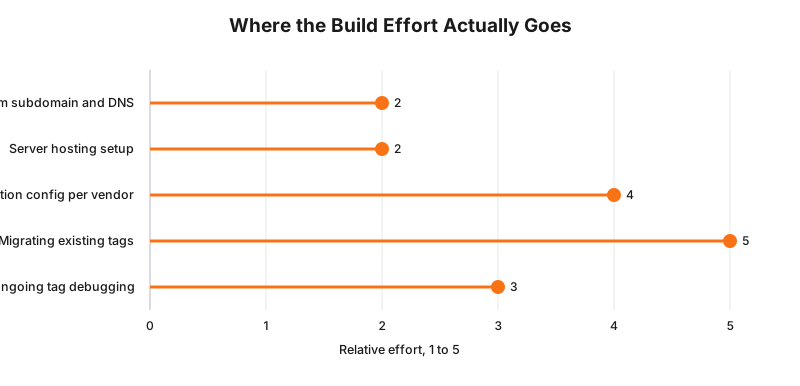
That ranking is a build-model judgement from typical implementation work, not a timed study. Migrating existing tags and configuring transformations per vendor consistently take longer than the server itself, which for most clinics is a few hours of cloud console work.
What to Check on Your Own Site
- Open your network tab on the booking confirmation page and count the distinct domains receiving a direct request from the browser. That count is what server-side tagging would collapse to one.
- If you already run a server container, check whether it sits on a custom subdomain or the default cloud domain. The default domain gives you almost none of the first-party cookie benefit.
- Open the container’s transformations list, if one exists, and check whether any are configured at all. An empty transformations list means the container is relaying data unchanged.
- Check whether your Meta Conversions API tag, if you use one, hashes email and phone fields before sending, or whether it is relying on the Meta Business SDK’s automatic hashing.
- Ask your developer or agency directly whether “server-side tagging” was ever fully configured or only stood up and left with vendor tags added but no transformations set. This is the single most common half-finished implementation.
The Enforcement Anchor
There is no published Australian regulatory action, from the OAIC or otherwise, concerning a clinic’s server-side versus client-side tagging architecture specifically, and none should be implied. Server-side tagging is a technical pattern, not a legal category a regulator inspects by name.
What exists instead is the underlying obligation this architecture responds to. The OAIC’s determinations against Medmate Australia ([2026] AICmr 41) and Monash IVF ([2026] AICmr 40), both dated 11 June 2026, found that a business which commissions a tracking mechanism and controls where it fires is a collector of the resulting data under the Australian Privacy Principles, regardless of whether the data ever touches that business’s own servers. A server container does not remove that collector status. What it does is give a clinic the practical means to control what a mechanism it is legally responsible for actually sends, which is a materially different position than having no control point at all.
Where This Gets Hard
Three honest limits.
Cost is real, not marginal. Cloud hosting for a server container generally runs from roughly $30 to $150 a month depending on traffic volume and instance sizing, before counting the setup time. For a single-location clinic with modest traffic, that recurring cost has to be weighed against a partial exposure reduction, not a guaranteed compliance outcome.
A misconfigured server container is worse than no server container. A container that relays every field unchanged, because nobody configured transformations, adds latency and a second point of failure for no benefit at all. This is the most common failure mode in agency-built implementations: the infrastructure exists, the redaction does not.
Server-side tagging does not touch consent. The regulator says collection of sensitive information generally requires consent that is voluntary, informed, current, specific and given by someone with capacity; the build consequence is that moving a tag server-side changes what a vendor receives, not whether you had a lawful basis to collect it from the visitor in the first place; whether your specific consent flow is valid alongside a server-side setup is a question for your medical defence organisation or your lawyer.
Status
Voluntary architecture, not a legal requirement. No Australian regulator mandates server-side tagging, and none is expected to. The Australian Privacy Principles have applied to health service providers regardless of turnover since March 2014, and that obligation is unchanged by whether a clinic tags client-side or server-side. As at 29 September 2026, nothing described in this piece depends on a proposal or a Bill before Parliament.
Frequently Asked Questions
What is server-side tagging in plain terms?
It is a setup where your tags, the small pieces of tracking code for Google Analytics, Google Ads and Meta, run on a server you control instead of running directly in the visitor’s browser. The browser sends one request to your server, and your server decides what to forward to each vendor and what to leave out.
Does server-side tagging make a clinic website compliant with the Privacy Act?
No. It is a build pattern that reduces what leaves your site directly, not a compliance certificate. The underlying obligation, that health service providers must handle sensitive information under the Australian Privacy Principles regardless of turnover, applies whether you tag client-side or server-side. Server-side tagging changes how much a vendor receives directly. It does not change whether you needed consent to collect it in the first place.
Is server-side tagging expensive to run for a small clinic?
There is a real, ongoing cost. Cloud hosting for a server container typically runs from roughly $30 to $150 a month depending on traffic, plus a domain or subdomain to point at it, plus the setup time to configure each vendor tag inside the container. For a single-site clinic with modest traffic, that is a genuine cost against a genuine but partial exposure reduction, not a free upgrade.
Can I keep Google Analytics and Meta ads running if I move to server-side tagging?
Yes. Server-side tagging does not remove a vendor, it changes the path data takes to reach that vendor. Google Analytics 4 and Meta’s Conversions API both support receiving events from a server container. Reporting continues. What changes is which fields the vendor receives directly, based on how you configure the container’s transformations.
Get Your Tag Stack Checked
Talk to RockingWeb for a written finding on whether your current tag stack is a genuine candidate for server-side tagging, and if it is, exactly which fields a server container and its transformations would need to strip for your specific setup, not a generic checklist.
Sources
Google for Developers
- Server-side tagging overview. Checked 27 September 2026.
Google for Developers
- Control the event parameters available to tags with Transformations. Checked 27 September 2026.
Google for Developers
- Custom domain configuration for a server container. Checked 27 September 2026.
Google Tag Manager Help
- Server-side tagging in Google Tag Manager. Checked 27 September 2026.
Meta for Developers
- Conversions API customer information parameters and hashing requirements. Checked 27 September 2026.
- OAIC determinations, Commissioner Initiated Investigation into Medmate Australia Pty Ltd (Privacy) [2026] AICmr 41 and Commissioner Initiated Investigation into Monash IVF Pty Ltd (Privacy) [2026] AICmr 40, both dated 11 June 2026, corroborated via Gadens. Checked 27 September 2026.
OAIC
- Australian Privacy Principles. Checked 27 September 2026.
Last reviewed: 27 September 2026.
Vikas Thakur
Founder of RockingWeb. 16 years of experience from working at TPG, iiNet and Monadelphous, now building websites, software and digital marketing for local businesses in Rockingham and Perth.