How to Exclude Pages From Your Clinic Pixel Tracking
A tracking pixel that fires on a booking confirmation, an intake form or a patient portal page sends a health inference, not a marketing metric. Here is which pages to exclude and the three enforcement patterns that actually survive a new page being added.
 Vikas Thakur Founder, RockingWeb 11 min read
On this page 14
- Key takeaways
- What the Rule Says
- What That Means for the Build
- Decision Matrix
- A Worked Example: Cosmetic Clinic
- A Worked Example: Cosmetic Dentistry
- What to Check on Your Own Site
- The Enforcement Anchor
- Where This Gets Hard
- Status
- Get the Pixel Exclusion Checklist
- Frequently Asked Questions
- Need a hand with your website?
- Sources
Key takeaways
- Exclude the pixel from four page categories: treatment-specific pages, booking confirmation pages, intake and consent forms, and patient portal or account pages
- An OAIC inspection of 50 Australian health websites found 96% used tracking technology, 52% used a third-party tracking pixel, and 77% of pixel users did not disclose it in their privacy policy
- In June 2026, the OAIC issued its first two determinations specifically against health providers for tracking pixel use: Medmate Australia and Monash IVF, both found to have collected sensitive information without consent
- A URL-regex trigger exception in Google Tag Manager only protects pages that already exist. A data-layer flag set by the page template protects pages that do not exist yet
- Patient portal and account pages need exclusion even with no treatment name in the URL, because authentication itself is the identifying signal
- This is an in-force obligation, not a proposal. The Australian Privacy Principles have applied to health service providers since 2014, and the June 2026 determinations show the regulator now acting on pixel-specific conduct
Open Google Tag Manager on your clinic’s account, click Triggers, and count how many of your marketing tags fire on every page by default. For most clinics the answer is all of them, including the booking confirmation page, the intake form, and the patient login screen. In June 2026 the OAIC published its first two determinations against health providers for exactly this pattern, finding that Medmate Australia and Monash IVF had each collected sensitive information through third-party tracking pixels without consent.
Neither business is a cosmetic clinic. Both determinations rest on the same mechanism a clinic booking flow uses: a persistent identifier paired with a signal that supports a health inference. This piece sets out which pages should never carry a pixel, and the three ways to enforce that exclusion so it survives longer than the next site update.
What the Rule Says
The Office of the Australian Information Commissioner administers the Australian Privacy Principles under the Privacy Act 1988. APP 3 restricts the collection of sensitive information, a category that includes health information, to circumstances where the individual has consented and the collection is reasonably necessary. Health information is not limited to a clinical record. It extends to an inference about a person’s health, which is why a page visit alone can qualify.
That is not a theoretical reading. In its determinations against Medmate Australia and Monash IVF, published 11 June 2026 after a year-long investigation, the Commissioner found both companies contravened APP 3.3 by collecting sensitive information through tracking pixels without consent, APP 5.1 by failing to properly notify individuals, and APP 7.1 by using that information for direct marketing without consent. The determinations state plainly that tracking a visitor to a health-related page, then targeting that visitor with advertising on a social platform, is itself a collection of sensitive information requiring consent.
The same investigation inspected 50 Australian health provider websites and published the results in a separate OAIC blog post. Ninety-six per cent used some form of tracking technology, 52% used a third-party tracking pixel, and of those, 77% did not mention the pixel anywhere in their privacy policy.
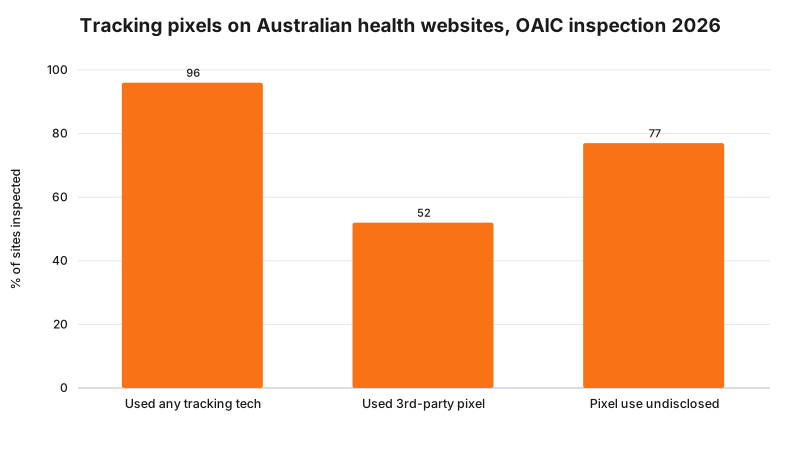
The inspection covered health providers generally, not cosmetic clinics specifically, and it ran in October and November 2024 with results published in June 2026. Treat it as the best available baseline for the sector, not a clinic-specific figure.
What That Means for the Build
Four page categories carry the risk described above. All four share the same shape: a persistent identifier (a cookie, a click ID, a hashed contact field) sitting next to a signal that supports a health inference (a treatment name, a booking status, or authentication itself).
Treatment-specific pages. Any URL, page title or H1 that names a treatment, either a service page or a booking step scoped to one treatment.
Booking confirmation and thank-you pages. These usually name the treatment again, plus a completed-action signal, which is a stronger inference than a browse event.
Intake and consent form pages. These often collect a condition, a medication list or a consent decision before the form is even submitted, so the pixel firing on page load already captures the visit to a page whose sole purpose is gathering health information.
Patient portal and account pages. Reachable only by an authenticated, identified patient. No treatment name in the URL is needed. The authentication event itself is the identifying signal.
None of these require removing the pixel from your site. They require the pixel to stop firing on these specific page categories while continuing to fire everywhere else, which is a trigger-configuration problem, not a script-removal problem.
Decision Matrix
| Page type | Health inference risk | Exclusion mechanism | Survives a new page? |
|---|---|---|---|
| Treatment-specific service or landing pages | High, URL or heading names the treatment | GTM trigger exception on Page Path regex matching your treatment slug list | No, needs the regex updated for every new page |
| Booking confirmation or thank-you pages | High, confirms treatment plus a completed action | Data-layer variable set by the page template, e.g. pageCategory: confirmation | Yes, new confirmation pages inherit the flag from the template |
| Intake and consent form pages | High, page purpose is collecting health detail | Block the entire form path plus a CMP category gate requiring explicit marketing consent | Mostly, provided forms stay under one path prefix |
| Patient portal or account pages | High, authentication is the identifying signal | Suppress all marketing tags behind auth via a server-set data-layer flag or a server-side tag container | Yes, applies to the whole authenticated section by default |
| General and informational pages | Low | No exclusion required | Not applicable |
The pattern in that table is consistent: a URL-based rule protects what exists today, a template-level flag protects what gets built next. Use the flag wherever the page category is stable even if the URL is not.
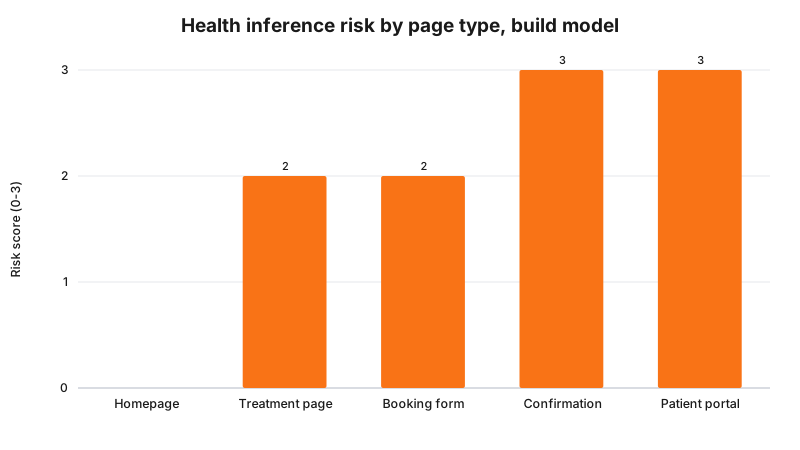
That chart is a build model reflecting the page categories above, not a measured scan of any specific site. Score your own pages against the same four categories before assuming a low score anywhere you have not checked.
A Worked Example: Cosmetic Clinic
A Perth cosmetic clinic runs its booking widget as an embedded panel at a single URL, /book, that never changes as the patient moves through treatment selection, time slot and confirmation. Because the URL is static, the clinic assumed no page-level exclusion was needed. It was wrong for a different reason: the widget pushes a content_name value into the data layer at each step, and at confirmation that value reads “Anti-Wrinkle Injections - Confirmed”. The Meta Pixel’s Schedule event picks up that value automatically.
The fix does not touch the URL. It adds a trigger exception keyed to a bookingStep data-layer variable the widget already sets before firing its postMessage event, so the exception fires on step value rather than URL. The Schedule event itself is edited to drop the dynamic content_name parameter entirely and send a fixed value, “Booking Confirmed”, regardless of treatment. The clinic keeps its booking-volume reporting in the ad platform and loses treatment-level detail there, which now lives only in its practice management software.
A Worked Example: Cosmetic Dentistry
A cosmetic dental practice uses a practice management widget that redirects to /appointments/confirmed?service=porcelain-veneers&patient_ref=8842 after a successful booking. The query string alone, independent of anything else on the page, pairs a treatment name with a patient reference number, and the practice’s GTM container fires every configured tag on that URL by default.
The first fix is a GTM trigger exception matching the Page Path regex ^/appointments/confirmed, which stops every tag configured through the container immediately. That alone is not sufficient, because a client-side history.replaceState() call intended to strip the query string after page load still leaves it exposed to any tag that fires before that script runs, including a pixel’s own base code loading from the page head. The durable fix moves the redirect logic server-side so the booking system never sends the browser a URL containing service or patient_ref in the first place. The confirmation page reads its own state from a session token, not the URL, and the query string never exists to leak.
What to Check on Your Own Site
- Open your booking confirmation page in a fresh browser tab, open the network tab, and filter for
facebook.com/tr,google-analytics.comand any other ad platform domain you use. Look at what fires without you clicking anything. - Open an intake or consent form page the same way. If a pixel fires on load, before any field is completed, the exposure exists regardless of whether the form is ever submitted.
- Log in to your own patient portal or account area if one exists, and repeat the check on an authenticated page.
- In Google Tag Manager, list every trigger with no exceptions configured. Each one fires on every page unless something stops it.
- Search your GTM container for any data-layer variable carrying a treatment name, a booking status, or a patient reference, and check which tags consume it.
The Enforcement Anchor
This is one of the rare cases in this category where a directly relevant enforcement action exists and is recent. The OAIC’s determinations against Medmate Australia Pty Ltd and Monash IVF Pty Ltd, published 11 June 2026, are the first published Australian determinations against health providers specifically for tracking pixel conduct. Neither business is a cosmetic clinic (Medmate provides telehealth services, Monash IVF provides fertility services), so there is still no published determination naming a cosmetic clinic or cosmetic dental practice by this exact conduct. The underlying finding, that pixel-based visitor tracking on a health-related page is a collection of sensitive information requiring consent, applies to the sector generally and does not depend on which kind of health provider runs the site.
Where This Gets Hard
Two places. First, some booking and practice management widgets set data-layer values you do not directly control, as in the cosmetic clinic example above. Fixing the trigger without also fixing the value the widget pushes leaves the exposure in place under a different tag. Audit what the widget itself writes to the data layer, not only what your own GTM container does with it.
Second, consent does not fully solve this on its own. The regulator says collecting sensitive information generally requires consent; the build consequence is that a marketing-consent toggle in your cookie banner is necessary; whether a given consent flow is sufficient for a specific page, given that visiting the page at all can already be the sensitive collection, is a question for your medical defence organisation or your lawyer.
Status
In force. The Australian Privacy Principles have applied to health service providers since March 2014, regardless of turnover. The Medmate and Monash IVF determinations, dated 11 June 2026, are enforcement decisions applying that existing law, not a new obligation and not a proposal. Nothing described here depends on the separate automated decision-making transparency obligation commencing 10 December 2026.
Get the Pixel Exclusion Checklist
Get in touch with RockingWeb for a page-by-page pixel exclusion check: which of your pages currently fire a tracking pixel, which of those fall into the four risk categories above, and a specific list of the trigger exceptions or data-layer flags needed to fix each one.
Frequently Asked Questions
Which pages should a clinic block its tracking pixel from firing on?
At minimum, exclude treatment-specific pages, booking confirmation and thank-you pages, intake and consent form pages, and any patient portal or account page. All four combine a persistent identifier with a signal that supports an inference about a person’s health, which is the exposure the Privacy Act treats as sensitive information regardless of whether the page also includes a name or a diagnosis.
Does a Google Tag Manager trigger exception fully stop a pixel from firing?
Only for the paths the exception matches. A trigger exception keyed to a URL regex protects existing pages but says nothing about a page added next month. The more durable pattern is a data-layer flag set by the page template itself, for example pageCategory, so a new confirmation or intake page inherits the exclusion automatically instead of depending on someone remembering to update the regex.
Is it enough to add pixel use to my privacy policy instead of blocking it on sensitive pages?
No. Disclosure and consent are separate obligations under the Australian Privacy Principles, and the OAIC’s determinations against Medmate Australia and Monash IVF in June 2026 found both failures at once, collecting sensitive information without consent and failing to properly notify individuals. A privacy policy mention does not substitute for either.
Do patient portal and account pages need pixel exclusion even without a treatment name in the URL?
Yes. A portal or account page is reached only by an authenticated, identified patient, so the mere fact of visiting it combined with a persistent ad identifier already supports a health inference, regardless of what the URL contains. Treat every authenticated page as excluded by default rather than checking each one for a treatment name.
Need a hand with your website?
If you want a second pair of eyes on how this applies to your own site, request a callback and we will talk it through.
Sources
OAIC
- Australian Privacy Principles. Checked 11 August 2026.
OAIC
- Privacy Commissioner finds privacy breaches in third-party tracking pixel investigation, 11 June 2026. Checked 11 August 2026.
OAIC
- Your life, pixelated: how tracking pixels watch your every click. Checked 11 August 2026.
OAIC
- Notifiable Data Breaches scheme. Checked 11 August 2026.
Last reviewed: 11 August 2026.
Vikas Thakur
Founder of RockingWeb. 16 years of experience from working at TPG, iiNet and Monadelphous, now building websites, software and digital marketing for local businesses in Rockingham and Perth.