WCAG 2.2 AA in Australia: Advisory, Not a Legal Mandate
WCAG 2.2 Level AA is the Australian Human Rights Commission's benchmark for digital accessibility, not a law with its own penalty schedule. Here's what that split means for a clinic or dental practice website, and where the Disability Discrimination Act still bites.
 Vikas Thakur Founder, RockingWeb 13 min read
On this page 12
- Key takeaways
- What the AHRC’s Guidelines Actually Say
- What This Means for the Build
- Is WCAG 2.2 AA Actually Required? A Decision Matrix
- Two Worked Examples: A Cosmetic Clinic and a Dental Practice
- What to Check on Your Own Site
- Does the DDA Have Teeth? What Maguire v SOCOG Shows
- Where This Gets Hard
- Status: Advisory Guidance, Not a Commenced Obligation
- Frequently Asked Questions
- Need a hand with your website?
- Sources and References
Key takeaways
- WCAG 2.2 Level AA is the Australian Human Rights Commission’s recommended benchmark, not a legislated requirement, set out in Guidelines published 2 April 2025
- The Guidelines sit under section 67(1)(k) of the Disability Discrimination Act 1992, the provision letting the AHRC issue non-binding guidance
- WCAG 2.2, published by the W3C in October 2023, adds 9 new success criteria over WCAG 2.1, taking the total from 78 to 86
- WCAG 2.2’s new Target Size (Minimum) rule requires clickable elements to measure at least 24 by 24 CSS pixels at Level AA
- The binding law is the DDA itself, specifically section 24’s ban on disability discrimination in the provision of goods, services and facilities
- In Maguire v SOCOG (2000), the Sydney Olympics website was found to unlawfully discriminate, and the complainant was awarded 20,000 dollars in damages
- The 2025 Guidelines replace the AHRC’s 2014 World Wide Web Access advisory notes (version 4.1)
WCAG 2.2 Level AA is not a legal requirement in Australia. The AHRC’s Guidelines, published 2 April 2025, recommend it as the benchmark.
Type “wcag 2.2 required australia business” into Google and plenty of agency blog posts answer it flatly: yes, required. It is not, not the way a fire exit sign or a food safety certificate is required. WCAG 2.2 Level AA is the Australian Human Rights Commission’s recommended benchmark for digital accessibility, set out in Guidelines published under the Disability Discrimination Act 1992. That distinction matters more than it sounds. A benchmark with no legislated status can still be the exact standard a court or tribunal points to once a complaint lands, and one already has, decades before WCAG 2.2 existed. This guide covers what the AHRC’s Guidelines actually say, what that means for the markup on a clinic or dental practice website, and where the advisory language stops covering you.
What the AHRC’s Guidelines Actually Say
The Australian Human Rights Commission published its Guidelines on equal access to digital goods and services on 2 April 2025, replacing the older World Wide Web Access: Disability Discrimination Act Advisory Notes (version 4.1, 2014). The Guidelines sit under section 67(1)(k) of the Disability Discrimination Act 1992, the provision that lets the Commission issue guidance for meeting obligations under the Act. That is the whole legal mechanism: the DDA is the binding law, and section 67(1)(k) guidance is the Commission’s explanation of what compliance with it tends to look like online.
Chapter 3 of the Guidelines recommends organisations conform with WCAG 2.2 at a minimum Level AA, and consider select Level AAA criteria as well, including video transcripts, audio description, and clear link text and section headings. The scope is wide. Websites, mobile apps, online booking and intake forms, PDFs, self-service kiosks, and even social media posts and chatbots all sit inside what the Guidelines treat as a digital good or service covered by the DDA.
None of that is styled as a mandate. Guidance issued under section 67(1)(k) is not legally binding on its own, and conforming with it does not automatically shield a business from a discrimination finding under the DDA itself. The Guidelines are the Commission’s best current statement of reasonable practice. The DDA, not the Guidelines, is what a complainant actually invokes.
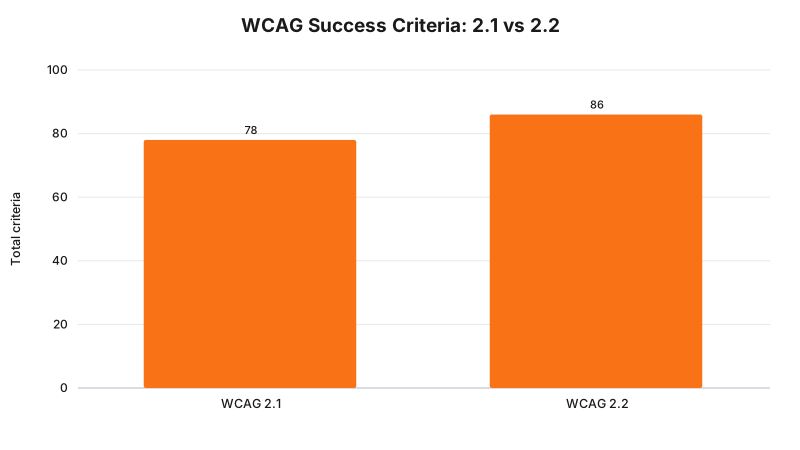
WCAG 2.2 adds nine new success criteria and removes one (4.1.1 Parsing, made obsolete by modern browsers), a net gain of eight.
Takeaway: the AHRC’s Guidelines name WCAG 2.2 AA as the benchmark, but the Guidelines are advisory. The DDA carries the legal weight.
What This Means for the Build
For the people who actually build and maintain a clinic or practice website, the Guidelines translate into specific markup and design decisions, not a policy statement to file away.
Start with what changed in WCAG 2.2 itself, since these are the criteria older accessibility checklists floating around the industry tend to miss entirely. WCAG 2.2, published by the W3C in October 2023, added nine new success criteria on top of WCAG 2.1 and dropped one, for a net total of 86.
Two of the new criteria hit clinic and dental sites hardest:
- Target Size (Minimum), Level AA, criterion 2.5.8: every clickable or tappable element needs a target area of at least 24 by 24 CSS pixels, with limited exceptions for inline text links and elements where an equivalent larger target sits elsewhere on the page. A booking widget’s calendar day cells, a gallery’s next and previous arrows, and a mobile nav’s icon buttons are the usual failures.
- Focus Not Obscured (Minimum), Level AA, criterion 2.4.11: a keyboard user’s focus indicator cannot be fully hidden behind a sticky header, a cookie banner, or a chat widget. Any fixed-position element sitting over form fields or nav links needs its z-index and scroll margin checked against keyboard tab order, not just mouse hover.
Beyond what is new in 2.2, the baseline AA criteria that keep tripping up clinic sites are the same ones that have applied since WCAG 2.0: colour contrast of at least 4.5:1 for body text and 3:1 for large text and UI components (criteria 1.4.3 and 1.4.11), a programmatic <label for> tied to every form id rather than a placeholder standing in as the only label (criteria 1.3.1 and 4.1.2), and alt text on every image that carries information, including before and after treatment photos (criterion 1.1.1).
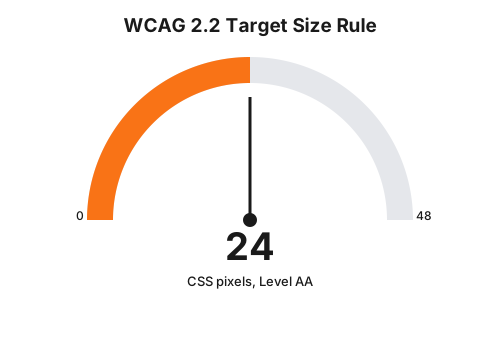
WCAG 2.2’s Target Size (Minimum) criterion sets 24 by 24 CSS pixels as the smallest acceptable clickable area at Level AA.
Takeaway: WCAG 2.2’s new rules target the exact interactive elements a booking flow lives or dies on: small tap targets and focus indicators hidden under overlays.
Is WCAG 2.2 AA Actually Required? A Decision Matrix
| Your situation | Legal position | What actually applies |
|---|---|---|
| General clinic or dental website, no complaint on file | No statute names WCAG 2.2 as mandatory | AHRC Guidelines recommend Level AA as the benchmark; DDA section 24 remains the underlying law |
| A patient or visitor lodges a DDA complaint about your site | The DDA itself, not the Guidelines, is what they invoke | AHRC conciliation first; unresolved complaints can proceed to the Federal Circuit and Family Court or the Federal Court |
| Your practice tenders for, or holds, a government or health-department contract | Contract terms can require WCAG 2.2 AA directly, independent of the DDA | Check the specific tender or service agreement, not the AHRC Guidelines |
| You use a third-party booking, intake or payment widget | The Guidelines’ scope covers your whole booking flow, including embedded vendor widgets | Vendor accessibility is your exposure too; ask booking software providers for an accessibility statement |
Takeaway: the only row in that table with a hard legal trigger is a lodged complaint. Everything else sits in the advisory column until then.
Two Worked Examples: A Cosmetic Clinic and a Dental Practice
Picture a Perth cosmetic clinic’s homepage. The “Book a Consultation” button sits inside a 32 by 18 pixel pill graphic, styled with a tight line height and no padding, because the designer wanted it flush against a hero image. On a phone, that is a target well under the 24 by 24 CSS pixel floor WCAG 2.2 sets for Level AA. A patient with limited fine motor control, or using a switch device, can miss it entirely, tap the adjacent Instagram icon by mistake, or give up. The build fix is two lines of CSS: a minimum height and width of 24px, and 8px of clear space around each tap target so a missed tap lands on nothing instead of the wrong link.
Picture a dental practice’s new-patient intake form, built as one long page with grey placeholder text sitting inside each field instead of a visible label. The placeholder reads “Medicare number” until the patient starts typing, then it disappears, and a screen reader user who tabs into the field after autofill has already populated it hears nothing describing what the field is for. That fails criteria 1.3.1 (Info and Relationships) and 4.1.2 (Name, Role, Value), both baseline criteria that predate WCAG 2.2 and that the 2.2 update did not touch. The fix: a real <label for="medicare-number"> above or beside the field, with the placeholder, if kept at all, used only as a supplementary hint rather than the label itself.
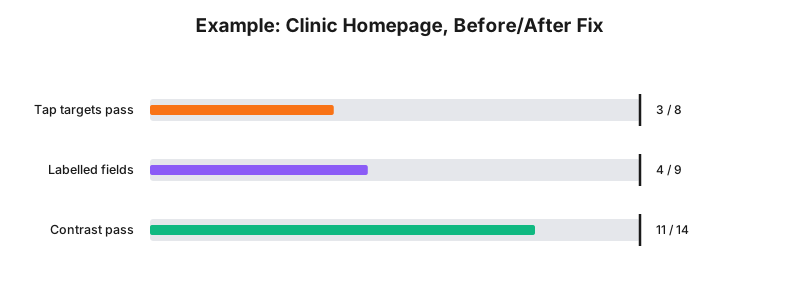
Illustrative example only, based on a hypothetical clinic site, not audit data from a real business: a homepage with 8 tap targets, an intake form with 9 fields, and 14 text elements checked for contrast, before a remediation pass.
Takeaway: the failures that cost the most patient goodwill, a missed tap target, an unlabelled field, are usually a CSS or markup fix measured in minutes, not a redesign.
What to Check on Your Own Site
- Every clickable or tappable element measures at least 24 by 24 CSS pixels, or has 24px of clear space around a smaller visual target
- Every form field has a real
<label for>linked to itsid, not a placeholder standing in alone - Body text holds at least 4.5:1 contrast against its background; large text and UI icons hold at least 3:1
- Focus indicators are visible on every interactive element and never hidden behind a sticky header, cookie banner, or chat widget
- Before and after treatment photos, and any other meaningful image, carry real alt text, not a filename or a blank alt attribute used to suppress it
- The booking flow, including any third-party widget, can be completed with a keyboard alone, with no mouse or drag gesture required
- An automated scan (axe DevTools or WAVE) plus one manual keyboard-only pass runs before any new page goes live
Takeaway: most of this checklist is markup and CSS, not content strategy. A developer can clear the first five items in an afternoon on a typical clinic site.
Does the DDA Have Teeth? What Maguire v SOCOG Shows
No AHRC determination or Federal Court judgment naming WCAG 2.2 specifically as the standard breached turned up in the research for this guide. What does exist, and still gets cited by accessibility practitioners as the reason the DDA is not a paper tiger, is Maguire v Sydney Organising Committee for the Olympic Games (2000). Bruce Maguire, who is blind, complained to the then Human Rights and Equal Opportunity Commission that the Sydney 2000 Olympics website was inaccessible to his refreshable Braille display: no alt text on key images, and no accessible version of the printed information he needed to order tickets. SOCOG argued a fix would cost 2.2 million dollars and take 368 days. The Commissioner preferred expert evidence putting an accessible rebuild at around 30,000 dollars and four weeks, found SOCOG had unlawfully discriminated, ordered the site fixed, and awarded Maguire 20,000 dollars in damages.
That case predates WCAG 2.2 by more than two decades. WCAG had not even reached version 1.0 until months after the complaint was lodged. The relevance is not the specific standard, it is the demonstrated willingness of the DDA’s complaint and determination process to order a website rebuilt and award real damages over accessibility failures most businesses at the time assumed were nobody’s legal problem. Nothing in the current 2025 Guidelines suggests that willingness has gone away.
Takeaway: the DDA has already produced a five-figure damages award and a forced rebuild over website accessibility, and the underlying law hasn’t changed since.
Where This Gets Hard
The honest limit here is that nobody, including the AHRC, hands a clinic a pass or fail certificate for WCAG 2.2 AA conformance. Automated scanners such as axe or WAVE catch a meaningful share of real-world accessibility failures, mostly the ones with a clean programmatic signature: missing alt text, unlabelled form fields, insufficient contrast. Failures like an illogical reading order, a confusing error message, or a booking calendar that technically passes contrast checks but is still hard to operate with a screen reader need a person testing with a keyboard and, ideally, real assistive technology.
Third-party booking and payment widgets make this harder again. A clinic can rebuild every page it controls to Level AA and still ship a site that fails the moment a patient reaches an embedded booking iframe from a vendor that has never run an accessibility audit. The Guidelines’ scope covers that iframe as part of “digital goods and services”. Whether the AHRC or a court would treat the clinic as responsible for a vendor’s failure, versus the vendor itself, is not settled by anything published so far.
Full Level AA conformance, tested against every one of the 86 success criteria across every template and page state a real clinic site produces, is a genuinely large undertaking for a small practice. The regulator says WCAG 2.2 AA is the benchmark; the build consequence is a prioritised, ongoing remediation programme rather than a single project with a finish line; whether that standard applies to your circumstances is a question for your medical defence organisation or your lawyer.
Status: Advisory Guidance, Not a Commenced Obligation
As at 15 August 2026, WCAG 2.2 Level AA has no independent legal force in Australia. The AHRC’s Guidelines recommending it, published 2 April 2025 under section 67(1)(k) of the Disability Discrimination Act 1992, are current and unrevised, but they remain advisory. The binding obligation is the DDA itself, particularly section 24’s prohibition on disability discrimination in the provision of goods, services and facilities, which has applied since the Act commenced in 1992 and does not name WCAG or any other technical standard directly.
If your web developer or agency wants a second opinion on where a clinic or dental practice site sits against the AHRC’s Guidelines, the RockingWeb contact page is the fastest way to start that conversation.
Frequently Asked Questions
Is WCAG 2.2 Level AA legally required for business websites in Australia?
No single statute names WCAG 2.2 as mandatory. The Australian Human Rights Commission’s Guidelines, published 2 April 2025, recommend WCAG 2.2 Level AA as the benchmark for meeting Disability Discrimination Act obligations, but the Guidelines themselves are not legally binding. The Disability Discrimination Act 1992 is the binding law.
What is new in WCAG 2.2 that was not in WCAG 2.1?
WCAG 2.2 adds nine success criteria, including a 24 by 24 CSS pixel minimum tap target size and a rule that keyboard focus indicators cannot be hidden behind sticky headers or overlays. It also removes one criterion (4.1.1 Parsing), for a net total of 86 success criteria against WCAG 2.1’s 78.
Has an Australian business ever been penalised for an inaccessible website?
Yes. In Maguire v Sydney Organising Committee for the Olympic Games (2000), the then Human Rights and Equal Opportunity Commission found the Sydney Olympics website unlawfully discriminated against a blind complainant, ordered it fixed, and awarded 20,000 dollars in damages, though that case predates WCAG 2.2 by more than two decades.
Need a hand with your website?
If you want a second pair of eyes on how this applies to your own site, request a callback and we will talk it through.
Sources and References
- Australian Human Rights Commission, “Guidelines on equal access to digital goods and services”, Chapter 3: Standards and guidelines for digital accessibility (published 2 April 2025). humanrights.gov.au. Date checked: 15 August 2026.
- Disability Discrimination Act 1992 (Cth), Federal Register of Legislation. legislation.gov.au. Date checked: 15 August 2026.
- World Wide Web Consortium, “What’s New in WCAG 2.2”. w3.org. Date checked: 15 August 2026.
- World Wide Web Consortium, “Web Content Accessibility Guidelines (WCAG) 2.2”. w3.org. Date checked: 15 August 2026.
- Maguire v Sydney Organising Committee for the Olympic Games [2000] HREOCA 1. Case summary, Wikipedia. Date checked: 15 August 2026.
- Justice and Equity Centre, “Beating discrimination at the Sydney Olympics”. jec.org.au. Date checked: 15 August 2026.
Last reviewed: 15 August 2026.
Vikas Thakur
Founder of RockingWeb. 16 years of experience from working at TPG, iiNet and Monadelphous, now building websites, software and digital marketing for local businesses in Rockingham and Perth.