The DDA Applies to Clinic Websites: WCAG 2.2 AA Test
The Disability Discrimination Act never mentions websites, but a 2000 ruling found a website is a service under the Act, and the AHRC's 2025 guidelines name WCAG 2.2 Level AA as the benchmark it expects. Here is what that means for your clinic's booking flow and forms.
 Vikas Thakur Founder, RockingWeb 11 min read
Key Takeaways
- The Disability Discrimination Act 1992 (DDA) never uses the word “website”, but HREOC ruled in Maguire v SOCOG (2000) that a website is a “service” under section 24 of the Act
- That case ended in $20,000 in damages against the Sydney 2000 Olympics organising committee for an inaccessible site
- The AHRC’s Guidelines on equal access to digital goods and services, published 2 April 2025, name WCAG 2.2 Level AA as the benchmark it expects
- Those guidelines are issued under section 67(1)(k) of the DDA and are advisory, not a standalone legal requirement, so the real exposure sits in the Act itself
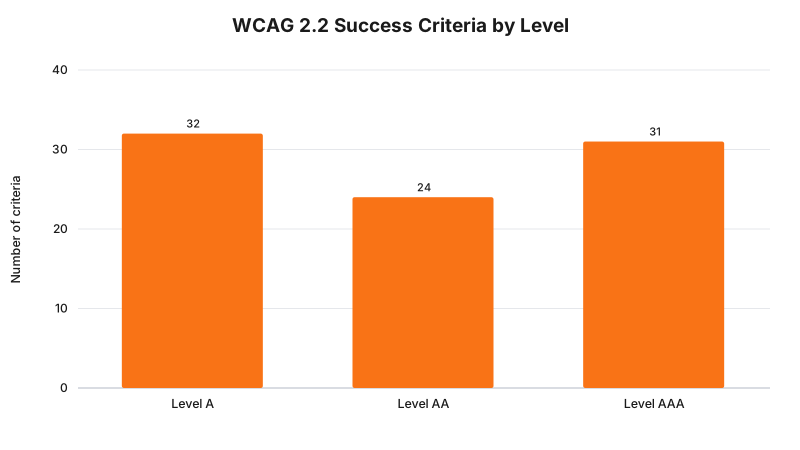
- WCAG 2.2 has 87 success criteria in total: 32 at Level A, 24 at Level AA, 31 at Level AAA
- In 2024-25, the AHRC resolved 78 percent of access-to-premises-and-services complaints through conciliation, against 47 percent for employment complaints
- A defence of “unjustifiable hardship” exists under section 11 of the DDA, and HREOC rejected it in Maguire because the fix was judged low-cost against the benefit
- There is no register of DDA complaints specifically about cosmetic clinic or dental practice websites, so treat the exposure as real but unmeasured, not as a known volume
The Disability Discrimination Act 1992 was written before most businesses had a website. It still applies to one.
In 2000, a blind man named Bruce Maguire complained that the Sydney Olympics website locked him out of ticket information available to every sighted visitor. The Human Rights and Equal Opportunity Commission (HREOC, the AHRC’s predecessor) agreed, ruled that a website counts as a “service” under the DDA, and ordered $20,000 in damages. That finding has stood for 25 years and nothing in the Act has been amended to narrow it since.
In April 2025, the AHRC updated its guidance for the modern web: apps, booking widgets, chatbots, the works. It names WCAG 2.2 Level AA as the standard it expects. That guidance is not itself a law your clinic can be fined under. But it tells you exactly what a court or a conciliator would point to if a patient complained that your booking form, your before-and-after gallery, or your online consult intake was unusable with a screen reader.
What the Rule Says
The DDA does not contain a section titled “websites”. What it contains is section 24, which makes it unlawful for a business providing goods, services or facilities to discriminate against a person because of disability, including by imposing a requirement the person cannot meet where that requirement is not reasonable. HREOC’s decision in Maguire v SOCOG found that providing information through “computer technology” on a website is covered by that section, in the same way a physical reception desk or a printed form would be.
Separately, the AHRC has statutory power under section 67(1)(k) of the DDA to issue guidelines on what compliance looks like. It used that power on 2 April 2025 to publish the Guidelines on equal access to digital goods and services, chapter 3 of which names the W3C’s WCAG 2.2 at Level AA as the accessibility benchmark. The guidelines themselves say they are not legally binding. What that means in practice: nobody can cite “you failed WCAG 2.2 AA” as a standalone offence. What they can do is complain under section 24 that your site discriminated against them, and the AHRC guidelines are the document a conciliator or a court will reach for to decide what “reasonable” looked like.
The Act also gives businesses a defence. Section 11 lets a provider argue that fixing the problem would impose “unjustifiable hardship”, weighing the cost of the fix against the benefit to the person affected and against the size of the business. HREOC considered that defence in Maguire and rejected it, on the basis that captioning and structuring a website for screen readers was a modest cost against a considerable benefit.
Takeaway: the DDA’s own discrimination provisions are what create legal exposure. WCAG 2.2 AA is the reference point everyone, including the regulator, will use to judge whether your site met a reasonable standard.
What That Means for the Build
WCAG 2.2 Level AA is not a single checkbox. It is 56 success criteria (32 at Level A plus 24 at Level AA) covering four areas: content that can be perceived, controls that can be operated, information that is understandable, and code that is robust enough for assistive technology to parse. For a clinic website, most of the practical work sits in four places.
Booking widgets. Third-party booking embeds (Cliniko, Nookal, HotDoc and similar) are the single most common accessibility failure point on clinic sites, because the clinic does not control the widget’s markup. Test the embedded flow with keyboard-only navigation (tab, shift-tab, enter, no mouse) before you assume the vendor has this covered.
Forms. Every input needs a programmatically associated <label>, not just placeholder text that disappears on focus. Error messages need to be announced to screen readers (aria-live or role="alert"), not just shown as a red border, which a screen reader user never sees.
Images. Before-and-after galleries, staff photos and treatment diagrams all need meaningful alt text. “Patient result” is not meaningful; “Lip filler result, before and after, 2ml, six weeks post-treatment” is.
Colour and contrast. WCAG 2.2 AA requires a contrast ratio of at least 4.5:1 for normal text against its background, and 3:1 for large text and for the visual boundaries of interactive controls like buttons and form fields. Brand palettes built around pale pastels against white are the most common fail here.
| Build area | WCAG 2.2 AA requirement | Common clinic-site failure |
|---|---|---|
| Booking widget | Fully operable by keyboard, focus order matches visual order | Third-party iframe traps keyboard focus |
| Forms and intake | Labels programmatically linked to inputs, errors announced | Placeholder-only labels, silent validation |
| Images and galleries | Meaningful alt text on every informative image | Alt text left blank or set to the filename |
| Colour and contrast | 4.5:1 for body text, 3:1 for large text and UI components | Light grey text on white, pastel buttons with no border |
| Video content | Captions for pre-recorded video | Treatment explainer videos with no captions |
A Worked Example
Cosmetic clinic. A Perth injectables clinic runs its booking flow through an embedded third-party widget. A patient using a screen reader tabs into the “select treatment” dropdown and the widget’s focus jumps to a hidden element, stranding the keyboard user with no way to proceed. The clinic did not write that code, but section 24 does not distinguish between a discriminatory barrier the business built and one it licensed from a vendor. The fix is not rebuilding the widget; it is testing it with a keyboard before launch and, where it fails, either raising it with the vendor or wrapping a compliant custom form around the same booking API.
Cosmetic dental practice. A dental practice’s before-and-after smile gallery uses a lightbox plugin with no alt text and no keyboard-accessible close button. A low-vision patient using a screen magnifier cannot tell which “before” image pairs with which “after” image once zoomed in, because the pairing relies purely on visual proximity. The fix: pair each before/after set with a text label (“Case 4 of 12, before”) that survives magnification and gets read aloud, and make the lightbox’s close control reachable and operable by keyboard.
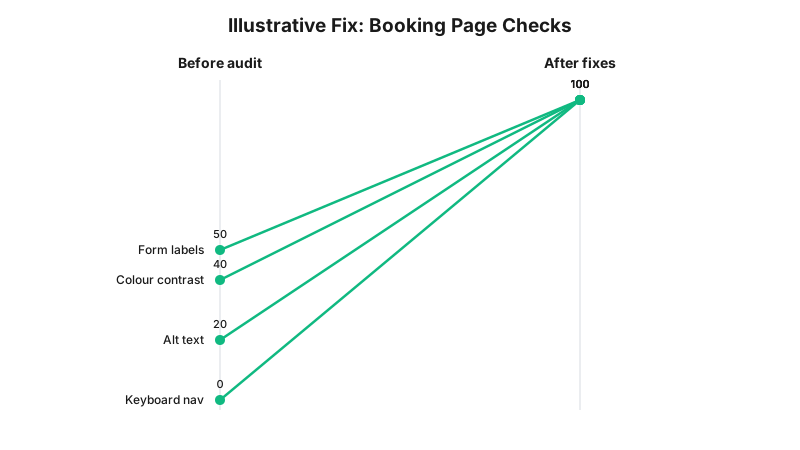
These before and after figures are an illustrative example built for this article, not a measured statistic from a real clinic audit. Use it as a template for what your own before/after numbers might look like once you run the checklist below.
Takeaway: the barrier is rarely one obvious thing. It is usually a vendor widget or plugin nobody has tested without a mouse.
What to Check on Your Own Site
- Unplug your mouse and tab through your booking flow from the homepage to a confirmed appointment. Note every point where focus disappears or jumps somewhere unexpected.
- Run every treatment page, gallery and intake form through a free contrast checker and flag anything below 4.5:1 for body text.
- Open your browser’s accessibility inspector (built into Chrome and Firefox dev tools) and check that every form field has an associated label, not just a placeholder.
- Search your image library for blank
alt=""attributes on informative images (this excludes purely decorative images, which should legitimately be blank). - Play every treatment explainer or testimonial video with the sound off and check whether captions are present.
- Ask your booking platform vendor directly whether their embedded widget has been tested against WCAG 2.2 AA, and get the answer in writing.
The Enforcement Anchor
Maguire v SOCOG is the anchor case here: a real HREOC determination, published by the Commission itself, that found a website inaccessible to a blind user unlawfully discriminated against him under the DDA, rejected the organisation’s unjustifiable hardship defence, and ordered $20,000 in damages. It predates WCAG 2.2 and the 2025 guidelines by decades, which matters: the underlying finding, that a website is a service and inaccessibility can be discrimination, does not depend on any guideline that has since been updated.
What does not exist, as far as this article can verify, is a published AHRC determination naming a cosmetic clinic or dental practice website specifically. That is a genuine gap, not a reason to assume the risk is low. The AHRC does not publish a public complaint register broken down by industry or by website versus premises, so the absence of a named clinic case is not evidence that no clinic has faced one; it is evidence that this is not (yet) a well-documented enforcement pattern in this sector the way, say, AHPRA advertising complaints are.
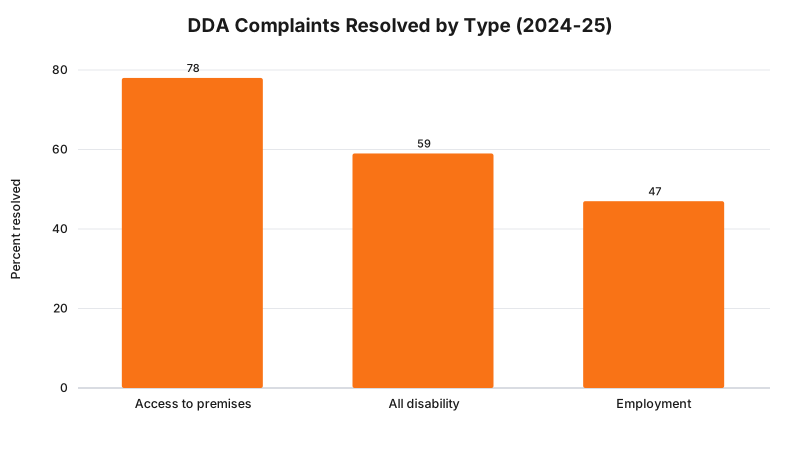
Takeaway: most disability discrimination complaints never reach a court. Most reach a conciliation meeting first, which is still a real cost in time and reputation, whatever the outcome.
Where This Gets Hard
Two things make this harder than a checklist can fully solve. First, third-party embeds. Your booking system, payment gateway and review widget are all code you did not write and often cannot edit, and section 24 does not care whose code caused the barrier. Vendor accessibility statements vary wildly in honesty and detail, and testing the live embed yourself is the only way to know.
Second, “reasonable” is a judgment call, not a number. WCAG 2.2 AA gives you a defensible standard to aim at, but meeting every one of its 56 Level A and AA criteria does not create a guarantee against a complaint, any more than falling short of one automatically creates liability. The regulator says WCAG 2.2 AA is the benchmark it expects; the build consequence is that your site should be tested against it end to end; whether a specific gap on your specific site would be found to breach section 24 of the DDA is a question for your medical defence organisation or your lawyer, not a web developer.
Status
In force, with an advisory layer on top. The Disability Discrimination Act 1992 and its section 24 discrimination provisions are enacted law and have been since 1992. The AHRC’s Guidelines on equal access to digital goods and services, naming WCAG 2.2 Level AA, took effect 2 April 2025 as advisory guidance issued under section 67(1)(k) of the Act, not as a separate binding rule. As at 15 August 2026, nothing has changed either position.
Frequently Asked Questions
Does the Disability Discrimination Act mention websites specifically?
No. The DDA 1992 does not name websites anywhere in its text, but the Human Rights and Equal Opportunity Commission found in Maguire v SOCOG (2000) that a website is a service under section 24 of the Act, and ordered $20,000 in damages after the Sydney 2000 Olympics website was found inaccessible to a blind user.
Is WCAG 2.2 Level AA a legal requirement for Australian clinic websites?
Not directly. The AHRC’s Guidelines on equal access to digital goods and services, published 2 April 2025 under section 67(1)(k) of the DDA, name WCAG 2.2 Level AA as the benchmark it expects, but the guidelines themselves are advisory, not a separate statutory requirement. A DDA complaint is assessed against the Act’s own discrimination provisions, not against the guidelines directly.
What happens if someone lodges a DDA complaint about a clinic website?
The AHRC investigates and usually offers conciliation between the complainant and the practice. In 2024-25, 78 percent of complaints about access to premises and services were resolved this way, and if conciliation fails or is discontinued, the complainant has 60 days to take the matter to the Federal Court.
Get Your Booking Flow Tested Properly
A keyboard-only pass through your own booking widget takes ten minutes and tells you more than any accessibility plugin badge. Get in touch and RockingWeb will run that pass on your site, including the vendor widget you did not build.
Sources
- Australian Human Rights Commission - Guidelines on equal access to digital goods and services, chapter 3, standards and guidelines for digital accessibility. Checked 15 August 2026.
- Australian Human Rights Commission - Maguire v SOCOG determination summary. Checked 15 August 2026.
- Federal Register of Legislation - Disability Discrimination Act 1992, sections 11, 24 and 67. Checked 15 August 2026.
- World Wide Web Consortium - Web Content Accessibility Guidelines (WCAG) 2.2 specification. Checked 15 August 2026.
- Australian Institute of Health and Welfare - Discrimination complaints resolved, citing AHRC complaint data for 2024-25. Checked 15 August 2026.
Last reviewed: 15 August 2026.
Vikas Thakur
Founder of RockingWeb. 16 years building for companies like TPG, iiNet and Monadelphous, now focused on websites and marketing that comply with AHPRA's advertising guidelines and still book patients.