51% of Web Forms Fail This WCAG Accessibility Rule
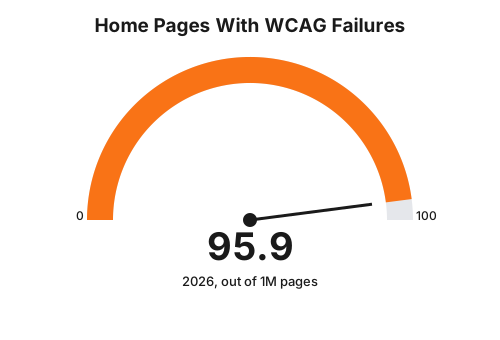
WebAIM's 2026 Million report found missing form labels on 51% of home pages, the most common form-level WCAG failure. Here is what that means for a clinic booking form, ranked, with the build fix for each.
 Vikas Thakur Founder, RockingWeb 11 min read
Picture a patient booking a filler appointment on her phone, on the bus, using a screen reader because she has low vision. She reaches the date picker. The calendar loads. The screen reader says nothing at all, because the developer built it as a row of unlabelled <div> elements instead of buttons. She gives up and calls the clinic instead, if she calls at all.
That is not a rare bug. It is the single most common accessibility failure on the web.
Key takeaways
- Missing form input labels sit on 51% of the top 1,000,000 home pages, the most common form-level WCAG failure, per WebAIM’s 2026 Million report.
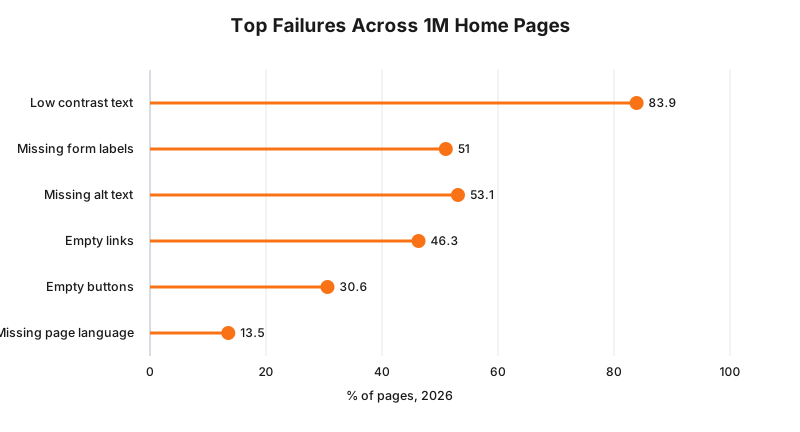
- Low contrast text is the most common failure of any type, found on 83.9% of pages, and it hits field labels and error messages hardest.
- WCAG 2.2 added six new success criteria beyond version 2.1, several aimed directly at multi-step forms like a booking flow.
- The AHRC’s guidelines, published 2 April 2025, recommend WCAG 2.2 Level AA as the benchmark for Disability Discrimination Act compliance, but the guidelines are advisory, not a legislated standard.
- HREOC, now the AHRC, awarded $20,000 in Maguire v SOCOG (2000) after finding a website inaccessible under the DDA, still the leading Australian digital accessibility case.
- WCAG 2.2’s new criterion 2.5.8 sets a 24 by 24 CSS pixel floor for tap targets like calendar day buttons.
- Empty buttons appear on 30.6% of home pages, a pattern that shows up as icon-only submit and date-navigation buttons in booking widgets.
As at August 2026, missing input labels are the single most common web form accessibility failure, found on 51% of the top 1,000,000 home pages by WebAIM’s 2026 Million report. Several of the underlying failure patterns, unlabelled inputs, icon-only buttons with no accessible name, and error text that only shows as a colour change, turn up constantly in clinic booking widgets, because most of those widgets are built from the same handful of third-party components. Fixing them is markup work, not a redesign.
What the rule actually says
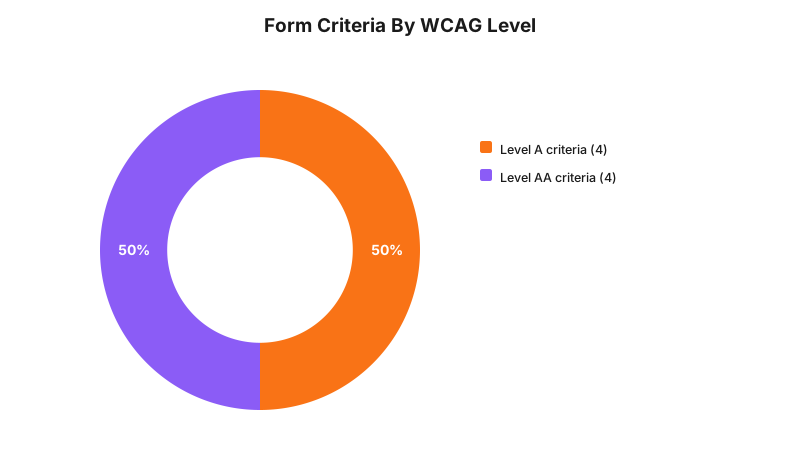
The Web Content Accessibility Guidelines, now at version 2.2, sets out testable success criteria at three conformance levels: A, AA and AAA. For forms, four criteria do the heavy lifting. WCAG 2.2 (W3C) states 3.3.1 Error Identification (Level A) as “errors are identified and described to the user in text”, 3.3.2 Labels or Instructions (Level A) as “labels or instructions are provided when content requires user input”, 3.3.3 Error Suggestion (Level AA) as requiring correction suggestions where an input error is detected, and 3.3.4 Error Prevention for legal, financial or data commitments (Level AA), which requires that submissions be reversible, checked or confirmed.
WCAG 2.2, finalised after 2.1, added six new criteria that did not exist before. Three matter directly for a booking form: 3.3.7 Redundant Entry (Level A), which says information the user already entered should not have to be typed again; 2.4.11 Focus Not Obscured (Level AA), which says a keyboard-focused field cannot be hidden entirely behind something like a sticky header; and 2.5.8 Target Size Minimum (Level AA), which sets a 24 by 24 CSS pixel floor for most interactive controls.
In Australia, none of this is a binding technical standard by itself. The Australian Human Rights Commission’s guidelines on equal access to digital goods and services, published 2 April 2025 under section 67(1)(k) of the Disability Discrimination Act 1992, recommend WCAG 2.2 Level AA as the benchmark organisations should meet. The guidelines themselves say they are advisory and sit alongside the Act, not inside it. That distinction matters. WCAG 2.2 AA is the standard a court or the AHRC would most likely point to when assessing whether a website discriminated against someone with disability, but there is no separate statute that makes a specific success criterion mandatory the way, say, a building code clause is.
Takeaway: WCAG 2.2 AA is the benchmark the regulator points to, not a law with its own penalty schedule.
What that means for the build
Four WCAG 2.2 criteria account for most of what breaks in a real booking flow, and each has a specific, checkable fix.
Labels (3.3.2). Every input in the flow, including ones rendered inside a third-party iframe widget, needs a programmatic label: a <label for="field-id"> tied to the input’s id, or aria-label/aria-labelledby where a visible label is not practical. A placeholder attribute is not a label. Screen readers announce placeholder text inconsistently and it disappears the moment the user starts typing.
Error identification and suggestion (3.3.1, 3.3.3). A red border alone fails 3.3.1, because colour is not text. Every validation error needs a text message, and that message needs to be programmatically tied to the field with aria-describedby so a screen reader announces it when focus lands on the field, not just visually next to it. 3.3.3 goes one step further and asks for a suggestion: “Enter a mobile number as 04XX XXX XXX” beats “Invalid number.”
Redundant entry (3.3.7). Multi-step booking flows that ask for name, phone or email on step 1 and then ask again on step 3 fail this criterion. Carry the values forward in state, or prefill and let the user confirm.
Target size (2.5.8). Calendar day cells and time-slot buttons are the usual offender. Measure the rendered tap target on an actual phone, not the desktop browser. Anything under 24 by 24 CSS pixels needs either a bigger hit area (padding counts) or spacing that gives it an equivalent effective target.
Decision matrix: WCAG 2.2 criteria for a booking form
| WCAG success criterion | Level | What breaks in a booking form | Build fix |
|---|---|---|---|
| 3.3.2 Labels or Instructions | A | Date or time field with no visible or programmatic label | Add <label for> or aria-label, including inside third-party widget iframes |
| 3.3.1 Error Identification | A | Invalid phone field shown only as a red border | Add inline error text tied to the field with aria-describedby |
| 3.3.3 Error Suggestion | AA | ”Invalid date” with no expected format shown | State the expected format in the error text itself |
| 3.3.4 Error Prevention | AA | One-tap submit on a paid-deposit booking, no review step | Add a review or confirm step before the charge is taken |
| 3.3.7 Redundant Entry | A | Patient re-types name and phone on booking step 3 | Carry values forward in state or prefill from step 1 |
| 2.4.11 Focus Not Obscured | AA | Sticky header hides the focused field on mobile | Add scroll-margin-top so focus scrolls clear of fixed headers |
| 2.5.8 Target Size Minimum | AA | Calendar day buttons under 24px on a mobile date picker | Increase the tap target to at least 24 by 24 CSS pixels |
| 3.2.6 Consistent Help | A | ”Need help?” link only on step 1 of a 4-step flow | Repeat the same help link or phone number on every step |
Worked examples
Cosmetic clinic, anti-wrinkle booking widget. A Perth injectables clinic runs a three-step booking widget: treatment select, calendar and time, then patient details. On audit, the calendar renders as a grid of <div> elements with onclick handlers and no role="button" or accessible name, so a screen reader reads nothing when the user tabs into the grid. The fix is markup, not a redesign: change each cell to a real <button>, add aria-label="Tuesday 3 November, 10:30am" per slot, and confirm keyboard arrow-key navigation moves focus between cells the way a native calendar does.
Cosmetic dental practice, new-patient exam booking. A dental practice’s intake form asks for Medicare and private health fund numbers on one step, then re-asks for the patient’s name and date of birth on the next step to “confirm identity.” That is a 3.3.7 Redundant Entry failure. The build fix is to carry the name and date of birth entered on step 1 into a read-only confirmation line on step 2, rather than a second empty input.
Takeaway: the fix in both cases sits in the widget’s markup, not in a fresh design.
What to check on your own site
- Run the booking widget’s iframe through a screen reader, not just the parent page. Automated scanners frequently skip iframe content entirely.
- Tab through the whole booking flow with the mouse unplugged. Confirm the focused element is never hidden under a sticky header or cookie banner.
- Trigger a validation error on purpose (wrong phone format, empty required field) and confirm a screen reader announces the error text, not just a colour change.
- Check every calendar day and time-slot button reports an accessible name in the browser’s accessibility inspector, not just a visible label.
- Measure calendar buttons on a real phone. Anything smaller than 24 by 24 CSS pixels fails 2.5.8.
- Confirm details typed on step 1 of a multi-step form are not asked for again on a later step.
- Check contrast on field labels, placeholder text and error messages against their background, not only on body copy.
- Confirm a help link or phone number appears on every step of the flow, not only the first.
The enforcement anchor
There is no AHRC determination specific to a clinic booking form. The closest real precedent is Bruce Lindsay Maguire v Sydney Organising Committee for the Olympic Games (2000), where HREOC, now the AHRC, found the Sydney 2000 Olympics website discriminated against a blind complainant under the DDA by failing to provide accessible alternative text and accessible results tables. The Commission ordered the site fixed and later awarded $20,000 in damages after SOCOG did not comply by the set deadline. It is a 26-year-old case about alt text and data tables, not form fields, but it remains the clearest example that an Australian tribunal has treated an inaccessible website as unlawful discrimination, and it is the case AHRC guidance still points back to.
Where this gets hard
Passing WCAG 2.2 AA is a technical test, and DDA liability is a legal one, and they are not the same question. The AHRC says WCAG 2.2 AA is the benchmark it would apply when assessing whether a digital service discriminates against someone with disability; the build consequence is that every booking form component should be checked against the relevant success criteria before launch; whether the DDA applies to your specific circumstances is a question for your medical defence organisation or your lawyer. A booking widget can also pass every automated scanner check and still fail for a real screen reader user, because tools like axe and WAVE catch missing labels reliably but cannot judge whether an error suggestion is actually useful, or whether focus order matches the visual layout. Third-party booking platforms are the other hard edge: if the vendor’s widget fails 3.3.2 inside its own iframe, a clinic cannot patch that code directly and has to either raise it with the vendor or wrap the widget with an accessible custom layer.
Status line
WCAG 2.2 has been a W3C Recommendation since October 2023 and is the current version referenced by the AHRC’s guidelines, which took effect 2 April 2025. Neither WCAG 2.2 nor the AHRC guidelines are legislated technical standards in Australia; they operate as the benchmark referenced under the existing Disability Discrimination Act 1992, which has applied to digital services since the Maguire finding in 2000.
Frequently Asked Questions
What is the most common web accessibility failure in booking forms?
Missing form input labels. WebAIM’s 2026 Million report found 51% of the top 1,000,000 home pages have at least one unlabelled form field, the single most common form-level failure and a direct breach of WCAG 2.2’s Labels or Instructions criterion, 3.3.2.
Is WCAG 2.2 Level AA legally required for an Australian clinic website?
No. The Australian Human Rights Commission’s April 2025 guidelines recommend WCAG 2.2 AA as the benchmark it would apply under the Disability Discrimination Act, but the guidelines are advisory, issued under section 67(1)(k) of the Act, not a binding technical standard.
What tap target size does WCAG 2.2 require for booking-form buttons?
WCAG 2.2’s new Target Size (Minimum) criterion, 2.5.8, sets a floor of 24 by 24 CSS pixels for interactive elements like calendar day buttons and time-slot selectors, at Level AA, with limited exceptions for inline text links and equivalent alternative targets.
Sources and references
- W3C, WCAG 2.2 specification: w3.org/TR/WCAG22 (date checked 15 August 2026)
- Australian Human Rights Commission, Guidelines on equal access to digital goods and services, 2 April 2025: humanrights.gov.au (date checked 15 August 2026)
- WebAIM, The WebAIM Million, 2026 report: webaim.org/projects/million (date checked 15 August 2026)
- Australian Human Rights Commission (formerly HREOC), Bruce Lindsay Maguire v Sydney Organising Committee for the Olympic Games, H 99/115 (2000): humanrights.gov.au (date checked 15 August 2026)
- Federal Register of Legislation, Disability Discrimination Act 1992 (Cth), section 67: legislation.gov.au (date checked 15 August 2026)
Last reviewed: 15 August 2026.
Booking forms are the highest-stakes page on a clinic site: it is where a browsing visitor turns into an appointment. If your build team needs a hand auditing or fixing a booking widget’s accessibility markup, sign up with RockingWeb and we will walk through it with you.
Vikas Thakur
Founder of RockingWeb. 16 years of experience from working at TPG, iiNet and Monadelphous, now building websites, software and digital marketing for local businesses in Rockingham and Perth.