What Your Intake Form Can (and Cannot) Pre-Fill
A booking link that pre-selects a treatment, or a referral URL that pre-fills a medical reason, both collect and use personal information before the patient has said a word. Here is exactly which intake fields a compliant build can pre-fill, and which ones it cannot.
 Vikas Thakur Founder, RockingWeb 13 min read

On this page 13
- Key takeaways
- What the Rule Actually Says
- What That Means for the Build
- Field-by-Field Decision Matrix
- A Worked Example: Cosmetic Clinic
- A Worked Example: Cosmetic Dentistry
- What to Check on Your Own Site
- The Enforcement Anchor
- Where This Gets Hard
- Status
- Frequently Asked Questions
- Get Your Intake Form Checked
- Sources
Key takeaways
- APP 3 requires collection to be reasonably necessary, judged as an objective test, not “the field was already on the form”
- APP 6 limits use of information already held to the primary purpose it was collected for, unless an exception applies
- Health information is sensitive information under the Privacy Act, and collecting it needs consent, even by inference
- A 2026 OAIC determination against a rental platform explicitly rejected “it was a default field” as a justification for collection
- Name, email and mobile from a logged-in patient account are safe to pre-fill without re-collection concerns
- A treatment type guessed from an ad click or referral link should be a suggestion the patient confirms, not a silent pre-selection
- The automated decision-making transparency obligation commences 10 December 2026 and is not yet in force
- APP 3 and APP 6 are enacted, in-force obligations today, not a proposal
A clinic intake form that pre-fills a patient’s name from their account is convenience. One that silently pre-selects a treatment type from the ad the patient clicked, or pre-fills a medical reason for visit from a referral link, has already collected and used personal information before the patient has confirmed anything themselves. Under APP 3 and APP 6 of the Privacy Act 1988, that gap between “convenient” and “collected without a proper basis” is exactly where a booking flow gets into trouble. This guide sets out, field by field, what a compliant intake form can pre-fill and what it has to leave for the patient to confirm.
What the Rule Actually Says
Two of the thirteen Australian Privacy Principles govern this directly. APP 3 says an entity can only collect personal information that is “reasonably necessary for one or more of the entity’s functions or activities”, assessed as an objective test of what a reasonable, properly informed person would agree is necessary. Collection also has to happen “only by lawful and fair means”, and where the entity is not collecting directly from the individual, the guidelines expect it to consider whether the individual is aware collection is occurring and whether they would reasonably expect it. Sensitive information, and health information counts as sensitive information under the Act, carries a further requirement: the individual has to consent to its collection, with only narrow exceptions.
APP 6
governs what happens once information exists in the system. An entity that holds personal information “can only use or disclose the information for a particular purpose for which it was collected (known as the ‘primary purpose’ of collection), unless an exception applies.” A secondary use is only permitted where the individual consented, where the secondary purpose is related to the primary purpose and the individual would reasonably expect it, or where a specific legal exception applies. Neither principle is written with intake forms in mind. Both apply directly the moment a form auto-populates a field from data the patient did not supply on that screen.
What That Means for the Build
Every value that appears in an intake field before the patient types it came from somewhere, and where it came from decides whether pre-filling it is safe.
Data from the patient’s own confirmed account is the safe category. If a returning patient is logged in and the system already holds their name, mobile number, email and preferred clinic location because they gave that information for exactly this purpose, showing it back to them for confirmation is not a new collection under APP 3 and not a new use under APP 6. It is the same information, for the same purpose, displayed for the patient to verify rather than retype.
Data inferred from a click, a link or a referral is the risky category. A landing page for a specific treatment, an ad with a UTM parameter naming a procedure, or a referral link from a GP or another practitioner, all carry a signal about what the patient might want. Turning that signal into a pre-filled, already-selected field skips the step where the patient actively confirms it themselves. The field should still use the signal, just not as a silent default. Show it as a suggestion the patient has to click or tick, the same distinction covered in consent sequencing across a booking flow: a step that has to happen has to actually happen, not be assumed on the patient’s behalf.
Health and clinical fields should never auto-populate from an inference. A medical history field, a “reason for visit” field, or a skin condition field pre-filled from anything other than the patient’s own direct entry is collecting sensitive information without the consent APP 3 requires for it. This holds even when the guess is accurate. Accuracy is not consent.
Consent and marketing checkboxes must never arrive pre-ticked. A checkbox is a record of a decision, not an administrative fact like a mobile number. Defaulting it to ticked assumes the answer instead of collecting it.
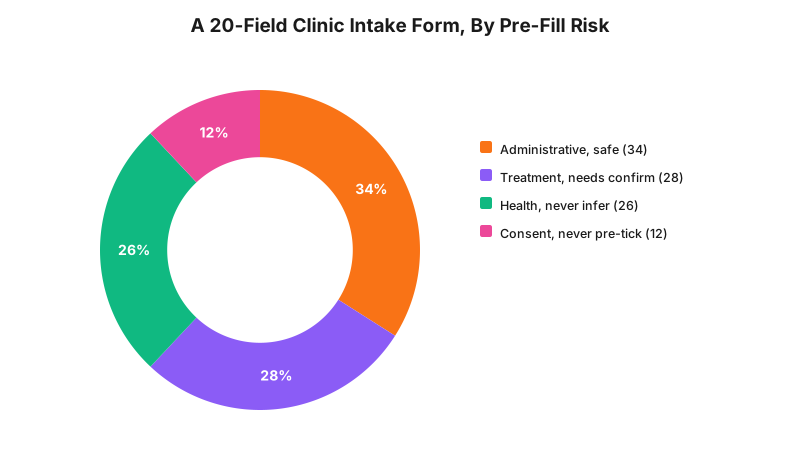
This split is a build-experience estimate across the intake forms RockingWeb has reviewed, not an audited sample. Roughly a third of fields on a typical intake form are genuinely administrative and safe to pre-fill. The rest need either active confirmation or should never be pre-filled at all.
Field-by-Field Decision Matrix
| Field | Safe to pre-fill? | Why |
|---|---|---|
| Name (logged-in account) | Yes | Same purpose it was collected for, patient already confirmed it once |
| Mobile or email (logged-in account) | Yes | Existing account data, same identity, same purpose |
| Preferred clinic location (returning patient) | Yes | Administrative fact, not health or treatment-linked |
| Assigned practitioner (from a direct booking link) | Yes, shown and editable | Scheduling fact, not an inference about the patient |
| Date of birth (previously entered) | Yes, re-displayed for confirmation | Reduces re-entry but must stay editable, never assumed silently |
| Treatment type (from an ad click or landing page) | No, suggest and require a click to confirm | An inferred choice is not the patient’s confirmed choice |
| Treatment type (from a referral link) | No, suggest and require a click to confirm | Assumes the referral is accurate and the patient agrees with it |
| Reason for visit or symptom description | Never auto-populate | Health information is sensitive information, needs the patient’s own words |
| Medical history or condition fields | Never auto-populate | Sensitive information under APP 3, consent required to collect |
| Marketing or SMS consent checkbox | Never pre-ticked | A consent record, not an administrative fact |
A Worked Example: Cosmetic Clinic
A cosmetic clinic ran separate landing pages for anti-wrinkle injections, lip filler and skin needling, each with its own ad campaign and a tracking parameter naming the treatment. The booking form linked from every campaign was the same form, and it read the URL parameter to silently pre-select the matching treatment radio button and pre-fill a line reading “I am interested in [treatment] and understand this is right for me.” A patient who clicked the anti-wrinkle ad out of curiosity, then decided on the form that lip filler suited them better, still submitted an enquiry with the anti-wrinkle box ticked and the assumption already written into the request, unless they noticed and corrected it themselves.
The rebuild kept the tracking parameter, because knowing which ad a patient clicked is legitimate operational data, but stopped using it to pre-select anything. The landing page’s treatment now appears above the form as a suggestion chip labelled “Looking into [treatment]? Confirm below,” with the actual treatment field left blank until the patient picks one. The “I understand this is right for me” line was removed entirely. It described a clinical judgement the form had no basis to make on the patient’s behalf, and it is not required by any Australian Privacy Principle for the clinic to include it at all.
A Worked Example: Cosmetic Dentistry
A cosmetic dental practice accepted referral links from general dentists, each carrying a coded parameter for the referral reason, such as a veneer consultation or a whitening enquiry. The intake form auto-filled a free-text “reason for referral” field directly from that code, and separately, a retargeting segment attached to some of those links caused the form to also pre-tick a box reading “I have sensitivity concerns,” inferred from the referring practice’s typical patient profile rather than anything the patient had said.
The fix split the two signals apart. The referral reason still pre-fills, because it originates from another practitioner’s direct communication about that specific patient, a materially different source from an inferred marketing segment. The sensitivity checkbox was removed from pre-fill entirely and turned into a question the patient answers themselves during intake. Guessing a patient’s symptoms from which ad segment a link came from is exactly the kind of inference APP 3’s consent requirement for sensitive information exists to stop, regardless of how often the guess happens to be right.
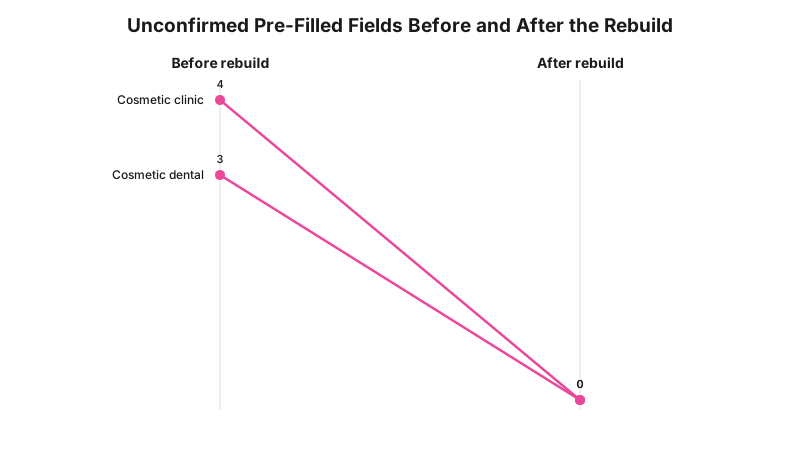
Both practices went from several fields a patient could submit without actively confirming them, down to zero. Every field that remains pre-filled after the rebuild is either administrative data the patient already gave for that purpose, or a suggestion the patient still has to click to accept.
What to Check on Your Own Site
- Open your booking form from an ad or a treatment landing page and check whether a treatment field is already selected before you touch anything.
- Look for any checkbox that loads pre-ticked, including consent, marketing or “I understand” style statements.
- Check your form’s URL handling. Does it read parameters into free-text or dropdown fields without a whitelist of which fields are allowed to auto-populate?
- For logged-in patients, confirm that only administrative fields pre-fill, not clinical or treatment fields.
- Ask your CRM or booking vendor whether pre-fill behaviour is configurable per field, or whether it is an all-or-nothing setting you inherited by default.
- If a referral link carries a coded reason or segment, trace exactly which field it populates and whether that field is health information.
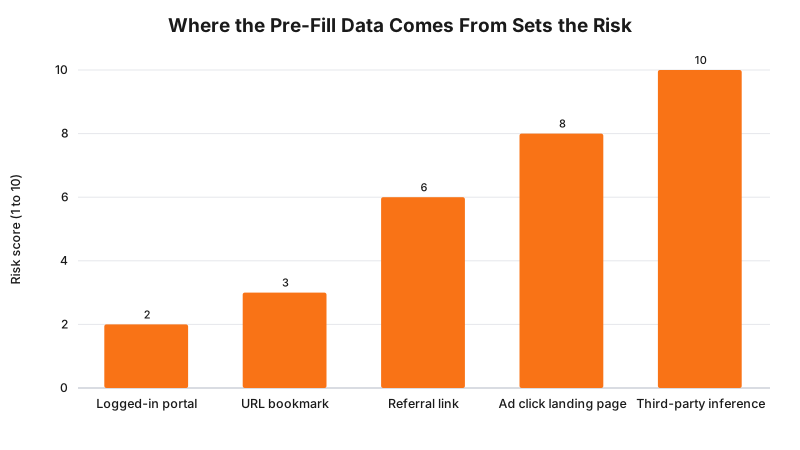
The risk scores here are a build-experience ranking, not a regulator’s scale. The pattern holds regardless of the exact numbers: the closer the data source sits to the patient’s own direct, confirmed action, the safer it is to pre-fill from it.
The Enforcement Anchor
There is no published Australian determination we can point to that turns specifically on a clinic or dental practice’s intake form pre-fill. What exists is a determination on the same underlying question. In IRE Pty Ltd (Privacy) [2026] AICmr 24, dated 1 April 2026, the Privacy Commissioner found that a rental technology platform had collected personal information that was not reasonably necessary for its functions and had collected some of it by unfair means. The determination is significant here for one specific reason: it rejected the idea that a field being included as a default on a form is itself a justification for collecting it. That reasoning was decided in the rental technology sector, not health, and is under review at the Administrative Review Tribunal at time of writing. It is still the closest real, verifiable enforcement outcome on the exact question a pre-filled intake field raises: a default is not a purpose.
Where This Gets Hard
Most practice management and booking platforms were not built to distinguish between a field a patient typed and a field the system guessed. They store a value, and the form displays it, with no metadata attached about where the value came from or whether the patient actively confirmed it. Building that distinction properly usually means a custom layer over the booking widget’s API, separate handling for suggestion fields versus confirmed fields, and a decision about which URL parameters your marketing team is allowed to feed into the form at all. None of that is free, and marketing teams generally want the frictionless version, because a pre-selected treatment field converts better than a blank one asking the patient to choose again.
The regulator says collection has to be reasonably necessary and, for sensitive information, has to be consented to; the build consequence is that an inferred treatment or health field belongs in a suggestion the patient confirms, not a field that arrives pre-selected; whether your particular form’s pre-fill behaviour satisfies the obligation in your circumstances is a question for your medical defence organisation or your lawyer.
Status
In force now. APP 3 and APP 6 are enacted, current obligations under the Privacy Act 1988, not a proposal and not pending commencement. Separately, the automated decision-making transparency obligation, which could become relevant if a clinic starts making automated decisions about what to display to a patient based on inferred data, commences 10 December 2026 and is not yet in force. Do not treat the two as the same timeline.
Frequently Asked Questions
Can a clinic pre-fill a patient’s name and contact details on an intake form?
Yes, when the data comes from the patient’s own logged-in account or a booking they already confirmed. The information was collected directly from the individual for that purpose, and displaying it back to them for re-entry is not a new collection or a new use under the Australian Privacy Principles.
Is it a privacy breach to pre-select a treatment type from an ad click?
Pre-selecting is not automatically a breach on its own, but silently locking in a choice the patient has not actively made pushes past what APP 3 treats as reasonably necessary collection and skips the confirmation an informed decision needs. The safer build shows the guessed treatment as a suggestion the patient has to click to confirm, not a field that arrives already ticked.
Does health information get special treatment under the Privacy Act?
Yes. Health information is sensitive information under the Privacy Act, and APP 3 requires consent to collect it, with limited exceptions. Inferring a health detail, such as a condition or treatment need, from an ad click, a referral link or a browsing pattern is not the patient consenting to its collection, even if the guess happens to be correct.
What happened in the IRE Pty Ltd determination and does it apply to clinics?
The Privacy Commissioner found that a rental technology platform collected personal information that was not reasonably necessary and by unfair means, and rejected the argument that a field being a form default was itself a justification. No published Australian determination yet turns specifically on a clinic intake form, but the same reasoning, that a default is not a purpose, applies directly to a pre-filled treatment or health field.
Get Your Intake Form Checked
RockingWeb can trace every field on your intake form back to where its value comes from and return a written finding on which fields are safe as they are and which need to move behind a confirmation step.
Sources
OAIC
- Australian Privacy Principles. Checked 11 August 2026.
OAIC
- APP Guidelines, Chapter 3: APP 3 Collection of solicited personal information. Checked 11 August 2026.
OAIC
- APP Guidelines, Chapter 6: APP 6 Use or disclosure of personal information. Checked 11 August 2026.
AustLII
- IRE Pty Ltd (Privacy) [2026] AICmr 24, 1 April 2026. Checked 11 August 2026.
Last reviewed: 11 August 2026.
Vikas Thakur
Founder of RockingWeb. 16 years of experience from working at TPG, iiNet and Monadelphous, now building websites, software and digital marketing for local businesses in Rockingham and Perth.