Third-Party Scripts on Your Clinic Website: The Full Inventory Audit
A third-party scripts inventory is a written list of every external script on your website, what each one sends, and where it goes. Most clinic and dental practice sites carry scripts nobody has checked against the Australian Privacy Principles, and the fix starts with a browser tab, not a lawyer.
 Vikas Thakur Founder, RockingWeb 13 min read
Key Takeaways
- A third-party script inventory is a written list of every external script, what it sends, and where it sends it. Most clinic sites have never had one built
- Analytics, ad pixels, chat widgets, booking embeds, review widgets, and font or CDN hosts are the six categories that show up on nearly every clinic and dental practice site
- Under Australian Privacy Principle 1.4, a privacy policy must state whether personal information is likely to be disclosed to overseas recipients and, where practicable, which countries
- A browser network tab and a tag manager container audit each miss scripts the other one catches. A full inventory needs both
- Health service providers are covered by the Privacy Act regardless of annual turnover. The small business exemption does not apply
- This is an in-force obligation, not a proposal. The Australian Privacy Principles have applied to health service providers since 2014
Open your booking page. Open the browser network tab. Filter by nothing at all, and just watch what loads. On most cosmetic clinic and dental practice sites, somewhere between six and a dozen different domains fire off requests before the page finishes rendering, and almost nobody who runs the site could name all of them from memory.
That gap between what is running and what anyone has written down is the actual problem. Not one rogue pixel, not one bad actor vendor. A privacy policy that was accurate the day it was published, and has not been touched since a booking widget, a chat tool and a review plugin were each added by three different people at three different times.
A third-party scripts inventory closes that gap. It is a plain document: every external script, what each one is for, what data it sends by default, and where that data goes. Once it exists, writing an accurate privacy policy is a formatting exercise. Before it exists, the policy is a guess.
What the Rule Actually Says
The Australian Privacy Principles sit in Schedule 1 of the Privacy Act 1988 and apply to any organisation that provides a health service, regardless of annual turnover. A cosmetic clinic or dental practice does not get the small business exemption that many other Australian businesses rely on, because health service providers are carved out of it specifically. That has been the position since the Act’s current structure came into force in March 2014, and it is not affected by any proposal to change the exemption for other businesses.
Four of the thirteen principles, set out on the OAIC’s Australian Privacy Principles page, do the heavy lifting for a script inventory:
- APP 1 requires an organisation to manage personal information in an open and transparent way, including keeping a clearly expressed, up to date privacy policy.
- APP 3 governs when personal information can be collected, and applies a stricter standard when the information is sensitive, which includes health information.
- APP 6 sets out the circumstances in which personal information already held can be used or disclosed, including disclosure to a third-party vendor.
- APP 8 requires steps to protect personal information before it is disclosed to an overseas recipient.
APP 1.4 is the specific clause that gives a script inventory its shape. It requires a privacy policy to set out the kinds of personal information the entity collects and holds, the purposes for which it collects, holds, uses and discloses that information, and whether the entity is likely to disclose personal information to overseas recipients and, if practicable, the countries in which those recipients are likely to be located. A script that sends a page URL and a cookie identifier to a server in the United States is exactly the kind of disclosure that clause is written to cover, and a privacy policy that stays silent on it is very likely falling short of what APP 1.4 requires, though whether a specific policy meets the standard is a call for the OAIC or a lawyer, not this article.
What That Means for the Build
Building the inventory is a technical task before it is a legal one. Three methods catch different things, and none of them catches everything on its own.
A browser network tab, opened on every page type including the booking flow and confirmation page, shows every request that actually fires during your test session. It misses anything gated behind a consent choice you did not make, anything that only fires on a step you did not complete, such as a real booking confirmation, and anything sent from your booking platform’s own server rather than from code running in the visitor’s browser.
A tag manager container audit, done from inside Google Tag Manager or whichever container your site uses, lists every configured trigger whether or not it has fired for you. This catches the scripts a network tab misses because they are conditional, but it does not catch anything that was hard-coded into a page template outside the container, which is common for booking widgets and chat tools installed by a developer rather than a marketer.
A vendor documentation check, reading the privacy or data-processing page each vendor publishes, tells you what the vendor says it collects by default and what is optional. This is where you confirm whether a chat widget captures typed message content, and whether a booking platform’s server relays patient-selected treatment and appointment time to its own systems even when nothing shows up client-side.
| Category | What it typically sends by default | Where it usually goes |
|---|---|---|
| Analytics tag | Page URL, referrer, a persistent client identifier | Vendor’s own servers, often overseas |
| Ad or marketing pixel | Page URL, referrer, click identifier, browser cookie | Ad platform, overseas |
| Live chat widget | Page URL, referrer, visitor cookie, typed message content if enabled | Vendor’s servers, often overseas |
| Booking or scheduling widget | Page URL, referrer, session identifier, selected treatment and time | Booking platform’s servers, jurisdiction varies |
| Review widget | Page URL, referrer, session identifier | Review platform, often overseas |
| Font or CDN host | Visitor IP address, browser user agent | CDN provider, jurisdiction varies |
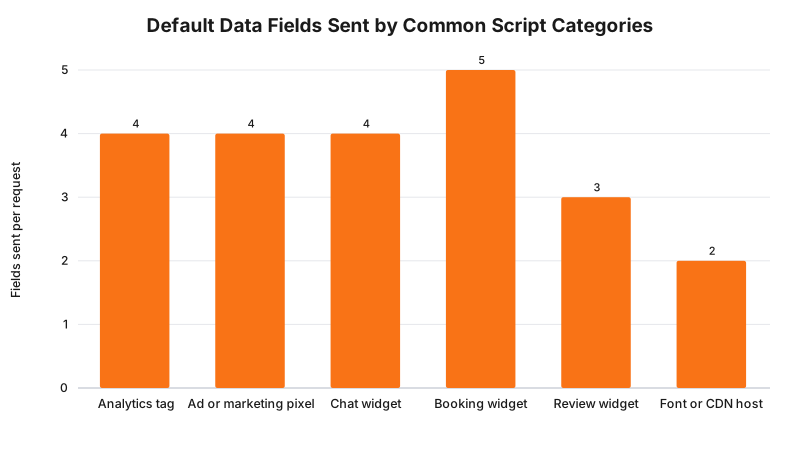
This is a build model based on each category’s publicly documented default behaviour, not a measured scan of any specific site. The analytics figure reflects Google’s own documented parameters for a page view event, page_location, page_referrer, and a client identifier set by cookie. The ad pixel figure reflects the Meta Pixel’s default fields, covered in detail in our Meta Pixel breakdown. Chat, booking and review figures are typical, not vendor-specific, because default behaviour varies by product and should be confirmed against your own vendor’s documentation, not assumed from this chart.
Where Each Principle Attaches
Not every script engages every principle the same way. Mapping category against principle is what turns a script list into a privacy policy draft.
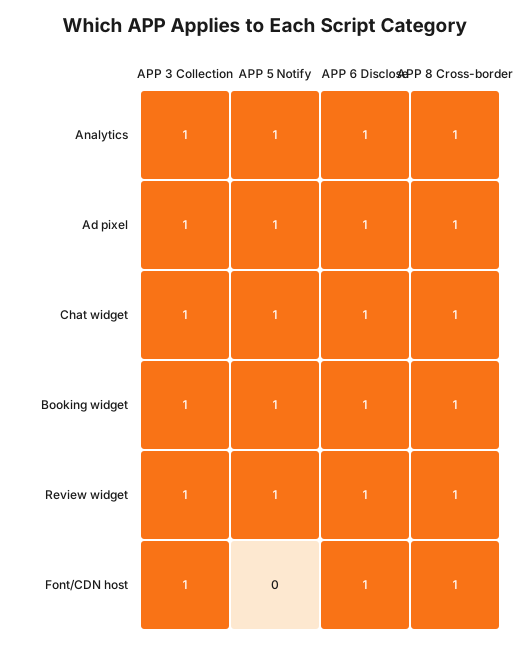
Read the font or CDN host row against APP 5. A font loaded from an external CDN collects an IP address and sends it overseas the same as any other script, but it is the category most often left out of a privacy policy’s notification obligations, because nobody thinks of a font as data collection. The gap is not malicious. It is just the one category nobody remembers to write down.
A Worked Example
Cosmetic clinic. A Rockingham clinic runs Google Analytics for traffic reporting, a Meta Pixel for ad conversions, a third-party booking widget embedded as an iframe, and a chat bubble in the corner of every page. The network tab audit catches Analytics, the pixel and the chat widget on the first pass. It does not catch the booking widget’s server-side confirmation call, because that call is triggered only after a patient completes a real booking, which the auditor does not do. The tag manager container audit fills that gap by showing the confirmation trigger configured but unfired. The privacy policy is rewritten to list all four categories, name the overseas disclosure where it applies, and drop a vague line that previously said only “we may use cookies and analytics.”
Cosmetic dentistry practice. A dental practice in the same audit runs a review widget pulling Google reviews onto the homepage, a patient portal login embedded via iframe, Google Fonts loaded from Google’s CDN rather than self-hosted, and a scheduling tool. The fonts are the surprise: nobody on the practice’s team considered them a script worth auditing, and they were absent from the original privacy policy entirely. Self-hosting the fonts removes that disclosure requirement outright, the same principle as changing a URL structure to remove an exposure rather than working around it.
What to Check on Your Own Site
- Open every distinct page type, including the booking flow and confirmation step, with the network tab open, and list every domain that receives a request.
- Open your tag manager container, if you use one, and list every configured trigger whether or not it fired during your test.
- For each script identified, find the vendor’s own documentation and note what it says is collected by default versus what requires a setting to be turned on.
- Check whether fonts, icon libraries or other assets load from an external CDN rather than being self-hosted.
- Compare the finished list against your current privacy policy, line by line, and note every category the policy does not mention.
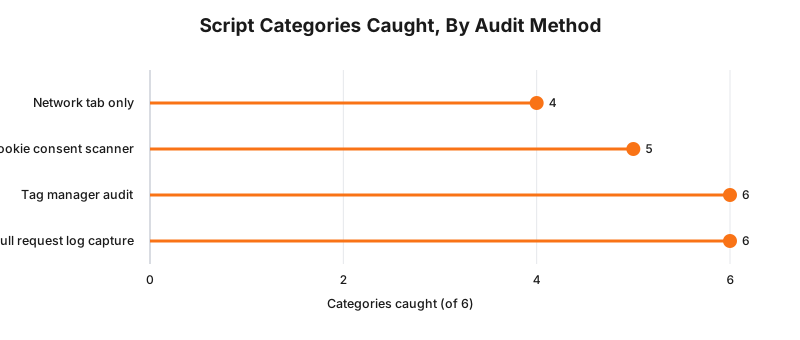
None of the four methods above is measured against a real clinic site. It is a working comparison of what each method structurally can and cannot see: a network tab only shows what fired during your session, a cookie scanner adds anything setting a cookie whether or not you triggered it, and a tag manager audit adds configured-but-unfired triggers. A full request log, captured across an entire booking journey including a real confirmation, is the only method that reliably reaches all six categories.
The Enforcement Anchor
There is no published OAIC determination against an Australian cosmetic clinic or dental practice specifically for an incomplete or inaccurate third-party script disclosure. It would be wrong to claim otherwise, and any competitor content that names a specific script-inventory enforcement case against a clinic should be treated with scepticism until the source is checked.
What does exist is the general enforcement structure this sits inside. The Notifiable Data Breaches scheme requires an eligible data breach to be reported where it is likely to result in serious harm, and a breach caused by a misconfigured or compromised third-party script is assessed on the same basis as any other breach. The absence of a script-specific determination is a gap in enforcement history, not evidence that the underlying disclosure obligation is unenforced.
Where This Gets Hard
The honest limit is that no scanner substitutes for reading your own vendor contracts. A tool can tell you a domain received a request. It cannot tell you what that vendor’s data processing agreement permits it to do with the information once received, and vendor terms change without notice.
The regulator says a privacy policy must state whether personal information is likely to be disclosed overseas and, where practicable, name the countries; the build consequence is that “we use third-party tools” is not a compliant sentence once you have actually built the inventory and know which vendors, and which countries, are involved; whether your specific policy wording meets that standard is a question for your medical defence organisation or your lawyer.
Status
In force. The Australian Privacy Principles, including APP 1.4’s overseas disclosure requirement, have applied to health service providers regardless of turnover since March 2014. As at 29 August 2026, nothing described here depends on a proposal or a Bill still before Parliament. The separate automated decision-making transparency obligation added by the Privacy and Other Legislation Amendment Act 2024, due to commence 10 December 2026, is a different requirement, unrelated to script disclosure, and does not change anything above.
Frequently Asked Questions
What counts as a third-party script on a clinic website?
Any code your site loads from a domain you do not control. That includes analytics tags, ad and social conversion pixels, live chat widgets, booking and scheduling embeds, review widgets, and fonts or libraries pulled from an external content delivery network. If the browser makes a request to a domain other than your own to render or track something, it is a third-party script.
How do I find every third-party script running on my site?
Start with your browser’s network tab on every page type, including the booking flow and confirmation page. Then check your tag manager container for triggers that have not fired during your test session, since those will not appear in the network tab at all. A full audit combines both, because each method misses scripts the other one catches.
Does the Privacy Act require me to list every script in my privacy policy?
Not by name. Australian Privacy Principle 1.4 requires your privacy policy to describe the kinds of personal information you collect, the purposes of collection, and whether you are likely to disclose information to overseas recipients and, where practicable, which countries. A script-by-script list is the working document that lets you write that policy accurately, not a legal requirement in itself.
Is a two-chair cosmetic clinic covered by the Privacy Act if it turns over less than $3 million?
Yes. Businesses that provide a health service are covered by the Privacy Act regardless of annual turnover. The small business exemption under section 6D of the Privacy Act, which the OAIC states currently applies to businesses with an annual turnover of $3 million or less, does not apply to a clinic or dental practice providing a health service, so the size of the practice makes no difference here.
How often should I redo the script inventory?
Whenever you add a new booking platform, chat widget, review tool, or ad campaign, and at minimum once a year even if nothing has visibly changed. Vendors change their default data collection without announcing it on your site, and a script added by a marketing contractor eighteen months ago rarely makes it back onto anyone’s list.
Get Your Script Inventory Done For You
Get in touch with RockingWeb for a full third-party script inventory for your site: every domain that receives a request, what it sends, and a written finding you can hand to whoever drafts your privacy policy. If you have already read our breakdowns of the Meta Pixel, Google Ads conversion tags, or whether tracking pixels breach the Privacy Act, this is the inventory step that comes before any of those fixes.
Sources
- OAIC - Australian Privacy Principles. Checked 29 August 2026.
- Federal Register of Legislation - Privacy Act 1988, Schedule 1, Australian Privacy Principle 1.4. Checked 29 August 2026.
- OAIC - Notifiable Data Breaches scheme. Checked 29 August 2026.
- Google Analytics Help - Automatically collected events and parameters. Checked 29 August 2026.
- OAIC - Small business (Privacy Act exemption threshold, an annual turnover of $3 million or less, under Privacy Act s6D). Checked 29 August 2026.
- Federal Register of Legislation - Privacy and Other Legislation Amendment Act 2024, automated decision-making transparency amendments, commencing 10 December 2026. Checked 29 August 2026.
Last reviewed: 29 August 2026.
Vikas Thakur
Founder of RockingWeb. 16 years building for companies like TPG, iiNet and Monadelphous, now focused on websites and marketing that comply with AHPRA's advertising guidelines and still book patients.