GA4 on a Clinic Website: The Six Settings That Reduce Exposure
Google Analytics 4 does not log or store IP addresses by default, but Enhanced Measurement still sends the full page URL on every event, and a URL like /book/dermal-fillers carries the same kind of health inference the OAIC targeted in its June 2026 tracking-pixel determinations. Six settings, checked in the right order, change how much of that leaves your property.
 Vikas Thakur Founder, RockingWeb 13 min read
Key Takeaways
- GA4’s Enhanced Measurement sends the full page URL on page views by default, and page views cannot be turned off
- Google Signals is off by default. Turning it on links visitors to Google’s cross-device ad identity graph, and the safer default is to leave it off
- GA4’s event-level retention window is a two or fourteen month choice, made under Admin, Data Settings, and it does not touch standard aggregated reports
- Setting the property’s industry category to Health disables the “Google products and services” data-sharing toggle outright, per Google’s own documentation
- The OAIC’s June 2026 determinations against Medmate Australia and Monash IVF establish the legal theory for tracking mechanisms generally. No published determination names GA4 specifically
- None of the six settings covered here require a developer. All are Admin-panel changes an owner or practice manager can make in one sitting
Open your GA4 property, go to Admin, Data Streams, and click into your web stream. Enhanced Measurement is almost certainly on, and page view tracking inside it cannot be switched off. Every page view sends page_location, the full current URL, as a parameter. If that URL is /book/dermal-fillers or /treatments/porcelain-veneers, the treatment name leaves your site on every load, attached to a client identifier GA4 sets in a first-party cookie.
That is not a bug and nobody configured it deliberately. It is GA4’s documented default behaviour, and it sits inside a property most clinics set up once, at launch, and never open again. This piece is about the handful of settings inside that same Admin panel that change how much identifiable, treatment-linked data your GA4 property collects, stores and shares, without touching a line of tracking code.
What the Privacy Principles Actually Say
The Office of the Australian Information Commissioner’s Australian Privacy Principles are the rules a Privacy Act entity follows when it collects, uses or discloses personal information, covering everything from how information is collected (APP 3) through to what an entity must tell people about that collection (APP 5) and the conditions attached to using or disclosing it (APP 6). Health information sits inside the Act’s category of sensitive information, which attracts a higher standard than ordinary personal information, and the definition covers an inference about a person’s health, not only a clinical record a practitioner writes down.
Health service providers are covered by the Privacy Act regardless of annual turnover. The small business exemption that shields many businesses under $3 million from the Act does not apply where a health service is provided, and that has been the position since 2014. This is a separate matter entirely from the proposed broader removal of the small business exemption for other industries, which remains unlegislated with no commencement date as at 31 August 2026.
Two OAIC determinations dated 11 June 2026, against Medmate Australia ([2026] AICmr 41) and Monash IVF ([2026] AICmr 40), applied APP 3 and APP 5 to third-party tracking pixels for the first time. The Commissioner’s reasoning was that a business which commissions a tracking mechanism, controls where it fires and can configure what it captures is a collector of the resulting data, whether or not the raw data ever touches that business’s own servers. Neither business ran a cosmetic clinic. Neither faced a monetary penalty; both were ordered to stop the non-compliant collection within 60 days unless they could bring it into line with the Act. GA4’s own architecture, an analytics property you configure, that fires on pages you control, that sends identifiable event data to Google’s servers, fits the same description.
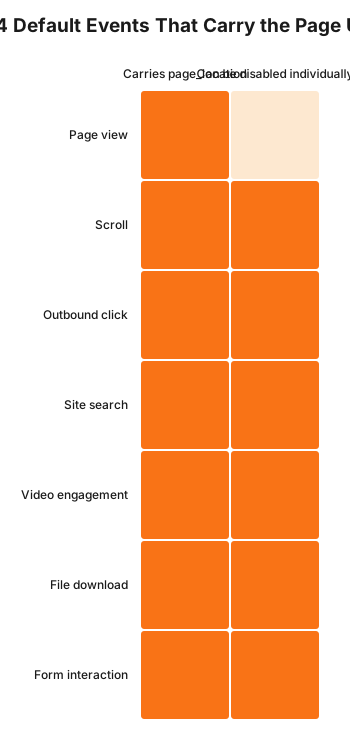
Page view is the one row where the second column reads zero. Every other Enhanced Measurement event can be switched off individually in the data stream settings. Page view cannot, which is why the fix downstream has to work on the URL itself rather than on the event.
What That Means for the Build
Six settings, checked in this order, change what a GA4 property collects, retains and shares.
Industry category, first. Under Admin, Property Settings, the account carries an industry category field. According to Google’s own data-sharing documentation, the “Google products and services” data-sharing toggle is unavailable for accounts categorised as Health or Finance. Setting this correctly is a five-second change that closes one sharing channel outright, independent of how any other toggle is set.
Google Signals stays off. Google Signals is a feature you switch on under Admin, Data Collection, not one you switch off. It is off by default. Turning it on merges your GA4 data with signed-in Google users who have Ads Personalisation enabled, building what Google’s own help documentation describes as a view of how those users interact with a property across multiple browsers and devices. For a site where a page URL can carry a treatment name, that is the cross-device identity layer added on top of the exposure already described above. Leave it off.
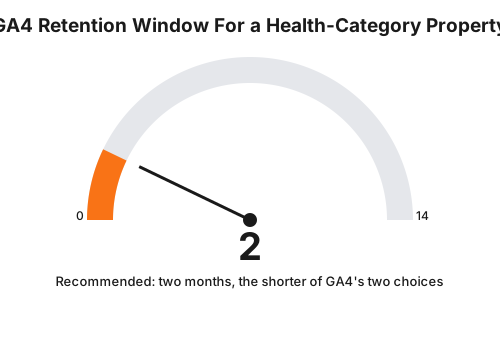
Event-level retention set to two months. Under Admin, Data Settings, Data Retention, GA4 offers a choice of two or fourteen months for the event-level data used in explorations and funnel reports. Google’s documentation is explicit that this setting does not affect your standard aggregated reports, so shortening it to two months costs you nothing in the dashboards you actually look at day to day, while reducing how long identifiable event-level records sit in the property.
Redact treatment paths before they reach page_location. This is the one GA4 has no native toggle for. Enhanced Measurement’s page view event sends the full current URL, and there is no setting in the GA4 interface that strips a path segment before it is logged. The fix runs through your tag manager: override the page_location parameter on a Google Tag Manager trigger or in your gtag configuration for booking and treatment-specific URLs, replacing the treatment slug with a generic placeholder before the event fires.
Never put a patient identifier in User-ID. GA4’s User-ID feature lets you stitch a logged-in visitor’s sessions together across devices using an ID you supply. The Google Analytics Terms of Service, section 7, prohibit passing to Google any information Google could use or recognise as personally identifiable information. A booking-system record ID, an MRN, or anything traceable back to a named patient breaches that term directly. If you use User-ID at all, generate an opaque, unlinkable token for the purpose.
Data-sharing toggles, reviewed individually. Admin, Account Settings carries four separate toggles: Google products and services, Modelling contributions and business insights, Technical support, and Recommendations for your business. Each authorises a different use of your data. None of them needs to be on for GA4 itself to keep working.
| Setting | Default | Recommended for a health-category property | Where to change it |
|---|---|---|---|
| Industry category | Often unset or generic | Health | Admin, Property Settings |
| Google Signals | Off, opt-in | Leave off | Admin, Data Collection |
| Event-level retention | Property’s choice, two or fourteen months | Two months | Admin, Data Settings, Data Retention |
| page_location on treatment URLs | Full URL, unredacted | Generic placeholder via tag override | Google Tag Manager or gtag config |
| User-ID | Not set | Opaque token only, never a patient ID | Data stream or property config |
| Google products and services sharing | Optional at setup | Off (blocked automatically if category is Health) | Admin, Account Settings |
A Worked Example
Cosmetic clinic. A two-injector clinic in Perth ran GA4 out of the box since launch: no industry category set, Google Signals switched on during a well-meaning “get more insights” prompt eighteen months earlier, fourteen-month retention left at whatever the property defaulted to, and booking confirmation URLs of the form /book/confirm?treatment=anti-wrinkle. Every one of those confirmations sent a treatment name, a client identifier and, because Signals was on, a link into Google’s cross-device advertising profile for that visitor. The fix took under an hour: industry category set to Health, Signals switched off, retention dropped to two months, and a Tag Manager variable that rewrites page_location to /book/confirm with no query string before the GA4 configuration tag fires. Conversion counts were unaffected. Per-treatment breakdown inside GA4 itself was lost, and moved into the clinic’s own booking software instead, where it belongs.
Cosmetic dental practice. A dental practice offering porcelain veneers alongside general dentistry had a single GA4 property covering the whole site, treatment pages included, with User-ID configured against the patient portal’s internal record number so the practice could see repeat-visit behaviour across devices. That record number is exactly the identifier the Google Analytics Terms of Service prohibit sending. The rebuild kept User-ID, but generated it from a random token stored in a first-party cookie unrelated to the practice management system, so cross-device stitching still works without a patient record number ever leaving the practice’s own database.
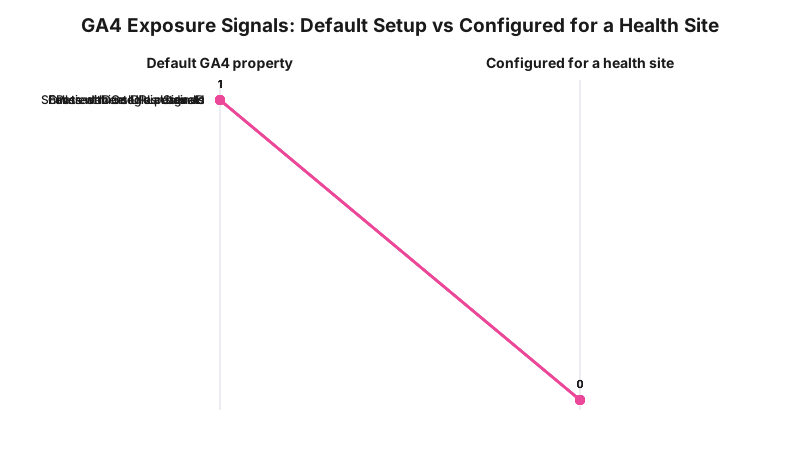
This chart is a build model showing which signals are present before and after the six changes above, not a measured audit of any specific property. The pattern held identically across both worked examples: nothing here required new code, only different values in settings that already existed.
What to Check on Your Own Site
- Open Admin, Property Settings and check the industry category field is set to Health.
- Open Admin, Data Collection and confirm Google Signals reads off.
- Open Admin, Data Settings, Data Retention and set the window to two months.
- Load a booking confirmation page, open your browser’s network tab, and read the
page_locationparameter on the GA4 request. Does it carry a treatment name or query string? - If you use User-ID, trace where the value comes from. Is it a patient record number, or an opaque token?
- Open Admin, Account Settings and review each of the four data-sharing toggles individually.
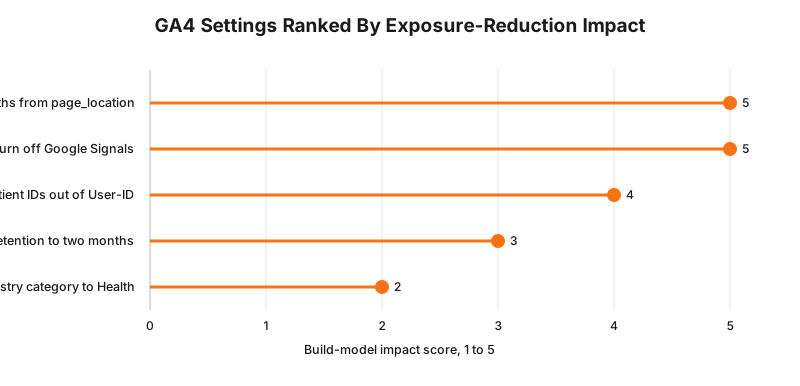
That ranking is a build-model judgement, not a scored study: redacting the URL and leaving Signals off remove an identity link outright, while retention and the industry category field reduce exposure at the margins rather than closing it.
The Enforcement Anchor
The Medmate ([2026] AICmr 41) and Monash IVF ([2026] AICmr 40) determinations, both dated 11 June 2026, are the clearest enforcement precedent available for tracking mechanisms on a health-service website. The Commissioner found both organisations had interfered with individuals’ privacy through their use of third-party tracking pixels and directed both to stop the non-compliant collection within 60 days. Neither determination named Google Analytics, and no published OAIC determination as at 31 August 2026 concerns GA4 by name.
The OAIC says a business that commissions a tracking mechanism, controls where it fires and can configure what it captures is a collector of the resulting data under the Privacy Act; the build consequence is that a self-hosted analytics configuration you control sits inside the same description as a third-party pixel, even though nobody has litigated that specific extension yet; whether that reasoning applies to your particular GA4 setup is a question for your medical defence organisation or your lawyer.
Where This Gets Hard
Two limits are worth stating plainly. First, GA4 genuinely has no native setting that redacts a URL path before page_location is logged. The fix always runs through a tag manager layer, which means a clinic with no Tag Manager container and no developer relationship has real friction between “knowing the fix” and “shipping it.” Second, turning off Google Signals and shortening retention cost you real reporting depth: demographic overlays, cross-device attribution and the longer historical exploration window all shrink. That is a genuine trade, not a free win, and a clinic running significant paid acquisition will feel the loss in its reporting more than it feels the exposure reduction in any tangible way day to day.
Consent Mode, and whether Google’s consent signals change any of the analysis above, is a separate and more involved question this piece deliberately leaves out; it deserves its own treatment rather than a paragraph tacked on here.
Status
In force, applied to an adjacent mechanism, not yet to GA4 by name. The Australian Privacy Principles have applied to health service providers regardless of turnover since 2014, and the Medmate and Monash IVF determinations, both dated 11 June 2026, are the first published application of that framework to a tracking mechanism, as at 31 August 2026. No published determination addresses Google Analytics specifically, and the broader small business exemption removal referenced above remains unlegislated with no commencement date.
Frequently Asked Questions
Does Google Analytics 4 send my patients’ health information to Google?
Not as a database extract, but its default settings can. GA4’s Enhanced Measurement automatically captures the full page URL on page views and several other event types, and it cannot be turned off for page views. If your booking or treatment pages carry the treatment name in the URL, that name leaves your site attached to a persistent identifier every time the page loads, which supports a health inference under the Privacy Act.
Should a cosmetic clinic turn off Google Signals in GA4?
Google Signals is off by default and has to be switched on deliberately in Admin, Data Collection. Leaving it off is the safer default for a clinic property, because turning it on links your site visitors to Google’s cross-device advertising identity graph, which is exactly the kind of identity linkage regulators have scrutinised in recent tracking determinations.
What GA4 data retention setting should a health-category property use?
GA4 offers a choice of two months or fourteen months for event-level data used in explorations and funnel reports, set under Admin, Data Settings, Data Retention. Two months is the shorter of the two and reduces how long identifiable event-level data sits in the property, without affecting your standard aggregated reports.
Does setting GA4’s industry category to Health actually change anything?
Yes, in one specific and verifiable way. Google’s own documentation states that the Google products and services data-sharing toggle is unavailable for accounts whose industry category is set to Health or Finance, meaning that category alone blocks one channel of data use regardless of how the toggle would otherwise be set.
Has the OAIC taken enforcement action over Google Analytics specifically?
Not against GA4 by name, as at 31 August 2026. The OAIC’s June 2026 determinations against Medmate Australia and Monash IVF concerned third-party tracking pixels, not Google Analytics, but the legal reasoning, that a business which controls what a tracking mechanism collects is a collector of that data, is not written to exclude analytics platforms.
Get Your GA4 Property Checked
RockingWeb can check your GA4 property against the six settings above and return a written finding of what is currently switched on, what is leaving your site, and what to change first.
Sources
- OAIC, Australian Privacy Principles. Checked 31 August 2026.
- OAIC determinations, Commissioner Initiated Investigation into Medmate Australia Pty Ltd (Privacy) [2026] AICmr 41 and Commissioner Initiated Investigation into Monash IVF Pty Ltd (Privacy) [2026] AICmr 40, both dated 11 June 2026, corroborated via Gadens. Checked 31 August 2026.
- Google Analytics Help, Enhanced Measurement events and what each captures. Checked 31 August 2026.
- Google Analytics Help, Google Signals data collection. Checked 31 August 2026.
- Google Analytics Help, Data retention settings. Checked 31 August 2026.
- Google Analytics Help, IP address handling. Checked 31 August 2026.
- Google Analytics Help, Data-sharing settings. Checked 31 August 2026.
- Google Analytics Terms of Service, section 7, Privacy. Checked 31 August 2026.
Last reviewed: 31 August 2026.
Vikas Thakur
Founder of RockingWeb. 16 years building for companies like TPG, iiNet and Monadelphous, now focused on websites and marketing that comply with AHPRA's advertising guidelines and still book patients.