Why Google Blocks 'Botox' From Ad Copy And Pages
Google's restricted drug terms policy stops Australian cosmetic clinics using prescription drug names in Google Ads copy and on the linked landing page. Here is what the policy allows, what it blocks, and how certification changes the keyword side of the equation.
 Vikas Thakur Founder, RockingWeb 12 min read
On this page 12
- Key takeaways
- What Google’s Restricted Drug Terms Policy Says
- What That Means for the Build
- Decision Matrix: What Is Allowed Where
- Worked Example: A Cosmetic Clinic’s Anti-Wrinkle Campaign
- What to Check on Your Own Site and Ad Account
- Enforcement Anchor
- Where This Gets Hard
- Status
- Frequently Asked Questions
- Get Your Ad Account and Landing Pages Checked
- Sources and References
Google’s restricted drug terms policy, published under its Advertising Policies help centre, stops advertisers in Australia using prescription drug terms in ad copy or on the landing page a Google Ad points to. Keyword targeting for those same terms is a separate question, gated behind a certification process rather than blocked outright. As at 15 August 2026, this is a live Google Ads platform rule, not an Australian law, and it sits alongside, not instead of, AHPRA and TGA advertising requirements.
Key takeaways
- Google’s restricted drug terms policy bans prescription drug terms from ad copy and landing pages for every location except Canada, New Zealand and the United States
- Australia falls into that “all other locations” group. There is no promotional carve-out for ad text or the landing page itself
- Non-promotional uses, such as regulatory warnings, public health campaigns and academic content, remain allowed even in the restricted group
- Certification through Google can unlock keyword targeting for prescription drug terms for a qualifying Australian business. It does not unlock using the term in the ad or on the page
- Google’s separate healthcare and medicines policy states that all Australian healthcare advertisers must obtain Google certification, a requirement wider than the drug terms rule alone
- Botulinum toxin products used in cosmetic injectable treatments are prescription-only medicines in Australia, which puts their brand and generic names squarely inside this policy’s scope
- The policy also covers Display & Video 360, so a campaign built outside the standard Google Ads interface is not exempt
What Google’s Restricted Drug Terms Policy Says
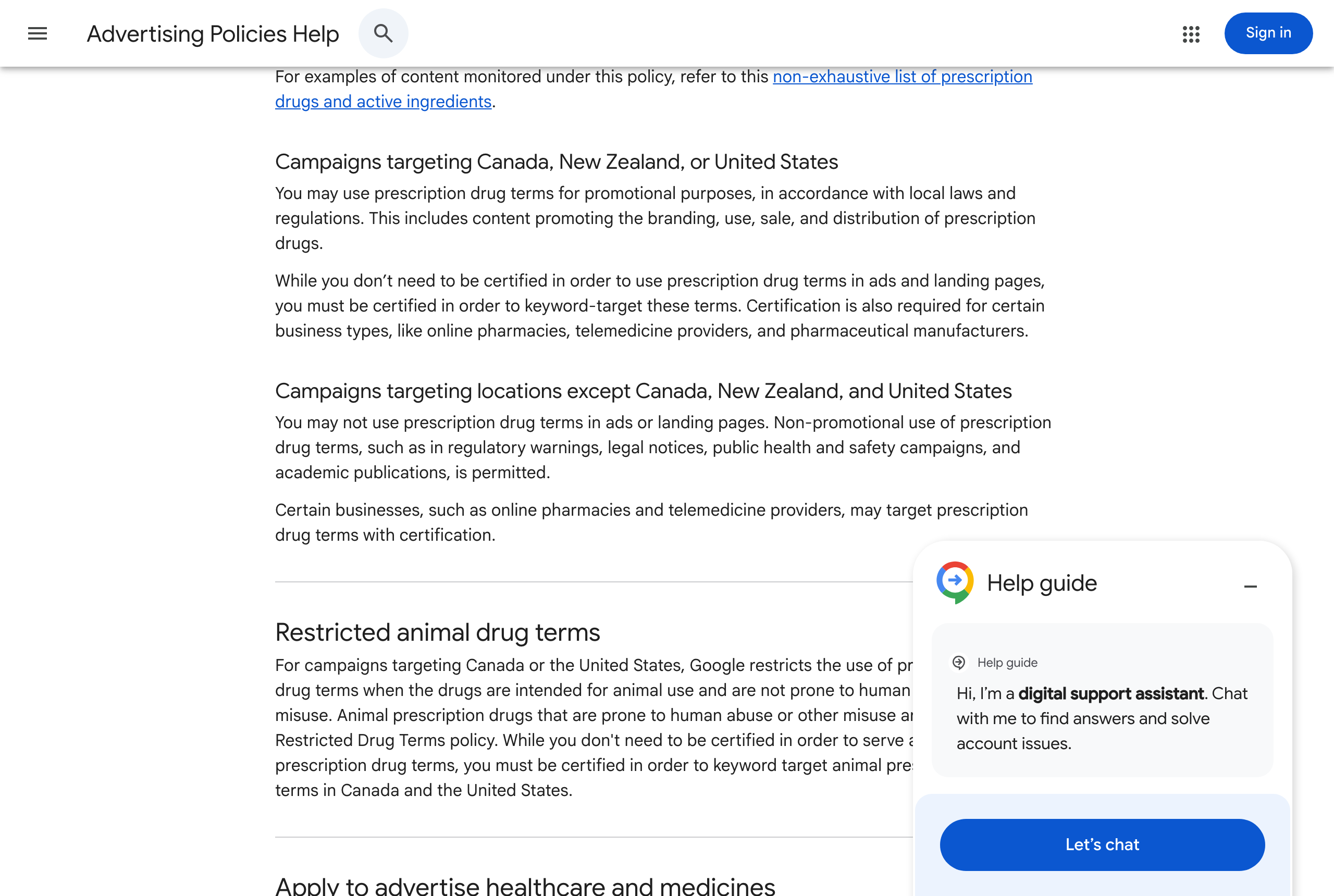
Google publishes its restricted drug terms rule as a standalone entry in the Advertising Policies help centre. Reported in Google’s own words, the policy restricts prescription drug terms in ads, landing pages, and keywords, and points advertisers to a separate, non-exhaustive list of restricted prescription drugs and active ingredients rather than printing the full list on the same page.
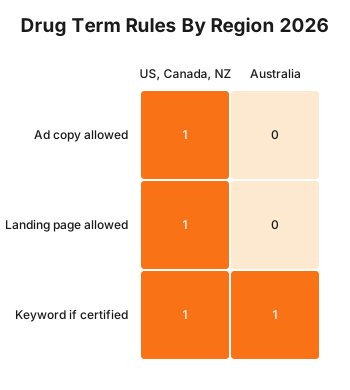
The policy splits the world into two groups. In Canada, New Zealand and the United States, prescription drug terms are permitted for promotional purposes under local law, though certification is still required to target those terms as keywords, and is mandatory for online pharmacies, telemedicine services and pharmaceutical manufacturers regardless of certification status elsewhere. Everywhere else, which includes Australia, the rule is blunter: advertisers may not use prescription drug terms in ads or landing pages. Non-promotional uses, such as a regulatory warning, a public health campaign or academic content, stay allowed. Certification can still open up prescription drug term keyword targeting for a qualifying business, even in the restricted group, but that certification does not extend to using the term in the ad copy itself or on the page the ad links to.
Google’s related healthcare and medicines policy adds an Australia-specific layer on top. It states that Australian healthcare advertisers, as a category, must obtain Google certification, and it sets out specific requirements for online pharmacies and telemedicine services, including LegitScript’s Healthcare Merchant Certification Program or proof of registration with the relevant state or territory pharmacy authority. Addiction service ads are limited to recovery-oriented drug and alcohol services run by government entities. Neither policy page names cosmetic procedures, dermal fillers or botulinum toxin specifically. The rule is written around the general category of “prescription drug term,” and it is Australia’s own medicines scheduling, not Google’s policy text, that determines which specific product names fall inside that category.
Takeaway: in Australia, a prescription drug term is off-limits in ad copy and on the landing page regardless of certification, and certification only ever reopens the keyword side of the equation.
What That Means for the Build
A Google Ads account and the landing pages it points to are two build surfaces this policy touches at once, and each needs a different fix.
Audit your keyword lists against a prescription-drug-term filter, not just a brand-name filter. The policy covers both trade names and active ingredients. For a clinic advertising anti-wrinkle injections, that means checking not only obvious brand terms but also the generic active ingredient name, since Google’s restricted list works from both angles.
Separate your ad group structure so restricted terms never sit in headline or description fields. Google Ads headline and description fields (Headline 1 through Headline 15, Description 1 and Description 2 in the standard responsive search ad builder) are the exact fields this policy checks. A prescription drug term typed into any of those fields, even inside a longer phrase, is what triggers a policy violation, not just a standalone exact-match term.
Check your landing page copy, not only your ad copy. The policy explicitly covers the landing page, so a compliant headline pointing to a page that still says the restricted term in its H1, meta title, or body copy fails the same rule. Run a plain-text search across your treatment page’s rendered HTML for the term, not just the CMS draft, since a templated snippet or a testimonial block can reintroduce it after the main copy is fixed.
Apply for Google’s healthcare advertiser certification if you have not already. Google’s healthcare and medicines policy states this applies to Australian healthcare advertisers as a category, which is a wider net than the drug terms rule alone. The certification form sits inside Google Ads’ policy centre under the account’s Billing and Policy settings, and approval is what unlocks keyword-level targeting for prescription drug terms once it comes through.
Set exact-match and phrase-match keywords for restricted terms to negative, not just paused, if you are not certified. A paused keyword can still be reactivated by an automated bidding rule or a bulk upload months later. A negative keyword list scoped at the account level is the safer default until certification is in place.
Takeaway: the fix touches ad group fields, landing page markup, and account-level policy settings together, not any single one of them in isolation.
Decision Matrix: What Is Allowed Where
| Location | Ad copy | Landing page | Keyword targeting |
|---|---|---|---|
| Canada, New Zealand, United States | Allowed under local promotional law | Allowed under local promotional law | Certification required; mandatory for online pharmacies, telemedicine, and manufacturers |
| Australia and all other locations | Not allowed | Not allowed | Allowed only for a certified, qualifying business |
| Non-promotional use (any location) | Allowed, e.g. a regulatory warning or public health campaign | Allowed | Not applicable |
Worked Example: A Cosmetic Clinic’s Anti-Wrinkle Campaign
Take a cosmetic clinic in Perth running a Google Ads campaign for anti-wrinkle injections. The account has one campaign, three ad groups, and a keyword list of 40 terms built up over two years, mixing brand names, the generic active ingredient, treatment category phrases, and outcome-focused phrases like “smoother forehead lines.”
Running that keyword list through a restricted-term audit, split by category, might turn up something like this illustrative breakdown for a 40-keyword list:
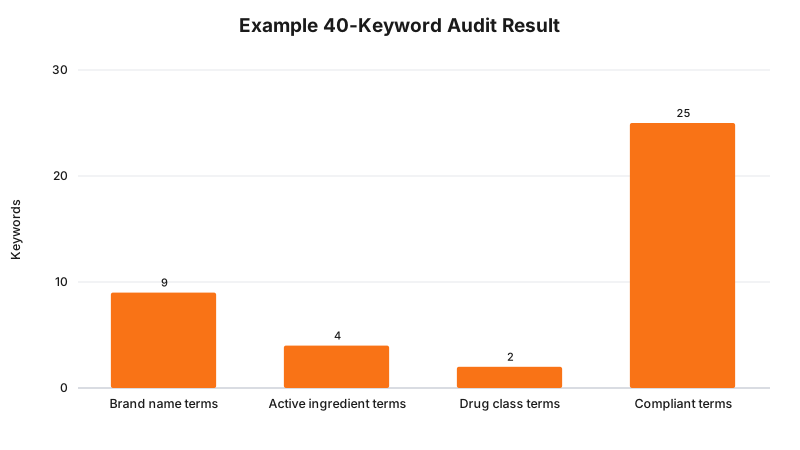
These are illustrative example numbers for one hypothetical clinic’s keyword list, not a published statistic. The pattern they show is the useful part: brand name and active ingredient terms are usually the biggest restricted bucket, and outcome-focused, treatment-category language (the “compliant terms” column) is already doing most of the heavy lifting in a well-built account.
The fix for this example clinic is not to delete the fifteen restricted keywords outright, since some of that traffic is valuable. Instead: move the fifteen restricted terms into a separate ad group with no live ads attached, mark them as negative at the account level so they cannot serve, and apply for healthcare advertiser certification in parallel. Once certification comes through, those fifteen terms can be reactivated for keyword targeting, on the condition that the ads themselves and the landing page they point to still use only the compliant, category-level language.
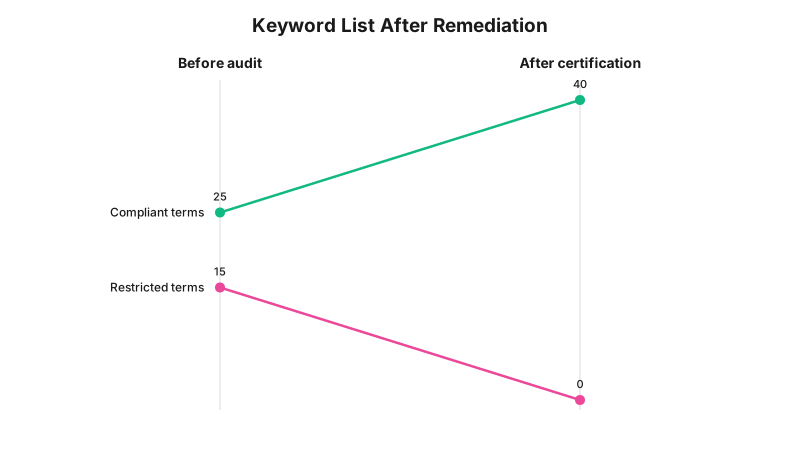
Again, these are illustrative figures for the same hypothetical 40-keyword list, showing the shape of the fix rather than a benchmark result. The “after” state assumes certification succeeds and every keyword is reassigned to compliant ad copy, which is the target state, not a guaranteed outcome for every applicant.
Takeaway: the fifteen restricted keywords in this example do not have to be abandoned. They have to move behind certification while the ad copy and landing page stay clean regardless of certification status.
What to Check on Your Own Site and Ad Account
- Pull your full keyword list, including paused and negative keywords, and search it for prescription drug brand names and active ingredient names, not just the obvious ones.
- Search your live ad copy, every headline and description variation, for the same terms, including inside longer phrases where the term is embedded rather than standalone.
- Search the rendered HTML of every landing page your ads point to, including templated blocks like testimonials, FAQs, and footer text, not just the main body copy.
- Confirm whether your Google Ads account has completed healthcare advertiser certification, and if not, whether any currently live keyword is a prescription drug term that depends on it.
- Check your account’s negative keyword list for restricted terms if certification is not yet approved, rather than relying on paused status alone.
- Review any dynamic keyword insertion or ad customiser feeds for prescription drug terms, since a dynamically inserted term can trigger the same policy even when it never appears in the static ad text.
Enforcement Anchor
No published, named case of an Australian cosmetic clinic’s Google Ads account being suspended specifically over the restricted drug terms policy turned up in this research pass, and none should be invented to fill that gap. Google’s own enforcement for this policy runs through its standard ad review pipeline: an ad using a restricted term is typically disapproved before it serves, and a pattern of violations can escalate to account-level suspension, both of which are account-management events rather than public determinations, so they do not produce a public register the way a regulator’s infringement notice does.
The closer, still-adjacent evidence that Australian regulators are actively policing this exact advertising category sits with the Therapeutic Goods Administration rather than Google. Per the project’s verified source register, the TGA’s social media advertising guidance and a run of infringement actions through late 2025 and 2026 have targeted cosmetic injectable advertisers directly, including several AHPRA-registered nurses and one dentist, alongside more than 12,000 social media removal requests in one financial year, over 2,500 of them relating to cosmetic injectable products. That is a different enforcement body acting on different legislation, not a Google Ads enforcement record, but it shows the underlying advertising claims this policy is designed to catch are the same ones a regulator is actively removing elsewhere. Note: tga.gov.au blocks automated fetching, so this figure is cited from the project’s verified source register rather than a direct page fetch performed for this post; check the live page before treating the exact figure as current.
Where This Gets Hard
Google’s non-exhaustive restricted term list is exactly that: non-exhaustive. A clinic cannot audit against a complete published list, because Google does not publish one. That means the practical audit process is judgment-based, checking brand names and active ingredients you know apply to your treatments, rather than matching against a fixed dictionary the way a spam filter would.
The line between a “prescription drug term” and a general treatment category term is not always obvious either. A specific botulinum toxin brand name is clearly inside scope. A generic phrase like “anti-wrinkle injections” describes the same treatment without naming the drug, and reads as compliant under the policy as published, but that is a reading of Google’s stated rule, not a guarantee about how a specific ad will be reviewed. Google’s own automated and human review process, not this article, is the final word on any individual ad.
The regulator says nothing here, because this is a platform policy, not a law. But a parallel point matters: passing Google’s ad review does not mean the same ad copy or landing page automatically satisfies AHPRA’s advertising guidelines or the Therapeutic Goods Advertising Code. Google’s restricted drug terms policy is enforced by Google against your ad account. AHPRA and the TGA enforce their own, separate rules against your business directly. Whether your specific ad copy and landing page satisfy all three systems at once is a question for your medical defence organisation or your lawyer, not a platform policy summary.
Status
As at 15 August 2026, Google’s restricted drug terms policy is a current, in-force Google Ads platform policy, enforced through Google’s own ad review and account management processes. It is not Australian legislation, has no commencement date, and can change at any time at Google’s discretion without a legislative process behind it.
Frequently Asked Questions
Can I use the word “Botox” in my Google Ads headline in Australia?
No. Google’s restricted drug terms policy blocks prescription drug terms from ad copy and the linked landing page for advertisers outside Canada, New Zealand and the United States, and Australia sits in that “all other locations” group.
Can I still target the keyword “Botox” if I cannot use it in my ad?
Yes, but only once Google has approved your account through its healthcare advertiser certification process. Certification unlocks keyword targeting for prescription drug terms. It does not unlock using those terms in your ad copy or on your landing page outside the three exempt countries.
Does this Google Ads policy replace AHPRA or TGA advertising rules?
No. Google’s restricted drug terms policy is a private platform rule enforced through ad disapproval or account suspension, separate from AHPRA’s advertising guidelines and the Therapeutic Goods Advertising Code, both of which a clinic must satisfy independently.
Get Your Ad Account and Landing Pages Checked
RockingWeb reviews cosmetic clinic Google Ads accounts and the landing pages behind them against Google’s current restricted drug terms policy, and flags exactly which keywords, fields, and page blocks need to change before certification or a policy review catches them first.
Sources and References
- Google Ads Advertising Policies - Restricted drug terms policy, covering ads, landing pages and keywords, and the Canada/New Zealand/United States versus all-other-locations split. Date checked: 15 August 2026.
- Google Ads Advertising Policies - Healthcare and medicines policy, including the Australia-specific certification requirement and online pharmacy and telemedicine rules. Date checked: 15 August 2026.
- Therapeutic Goods Administration - social media advertising guidance and infringement actions against cosmetic injectable advertisers through late 2025 and 2026, named per the project’s verified source register. Date checked: 15 August 2026 (tga.gov.au does not permit automated fetching; content named per the project’s verified source register, not a direct page fetch).
Last reviewed: 15 August 2026.
Vikas Thakur
Founder of RockingWeb. 16 years of experience from working at TPG, iiNet and Monadelphous, now building websites, software and digital marketing for local businesses in Rockingham and Perth.