Tap Target Size: WCAG 2.2 Asks for 24px, Not 44px
WCAG 2.2 added a Level AA rule that buttons and links be at least 24 by 24 CSS pixels, with five exceptions. The older 44 pixel rule is Level AAA. Here is how to check your phone menu, call button and footer links.
 Vikas Thakur Founder, RockingWeb 4 min read
Key takeaways
- WCAG 2.2 Level AA requires pointer targets of at least 24 by 24 CSS pixels (success criterion 2.5.8)
- The 44 by 44 pixel rule is Level AAA, not AA
- There are 5 exceptions: spacing, equivalent, inline, user agent control and essential
- 2.5.8 is marked new in WCAG 2.2, published as a W3C Recommendation on 12 December 2024
- Level AA conformance means meeting every Level A and Level AA criterion
According to the W3C, WCAG 2.2 success criterion 2.5.8 (Level AA) says the target for a pointer input must be at least 24 by 24 CSS pixels, unless one of five exceptions applies.
Many people think the bar is 44 pixels. That number is real, but it sits in the higher AAA tier. This guide separates the two so you know what to ask your developer for, and where thumbs on a phone in Perth tend to miss.
The two rules side by side
| Criterion | Level | Minimum target | Status |
|---|---|---|---|
| 2.5.8 Target Size (Minimum) | AA | 24 by 24 CSS pixels | New in WCAG 2.2 |
| 2.5.5 Target Size (Enhanced) | AAA | 44 by 44 CSS pixels | Earlier criterion |
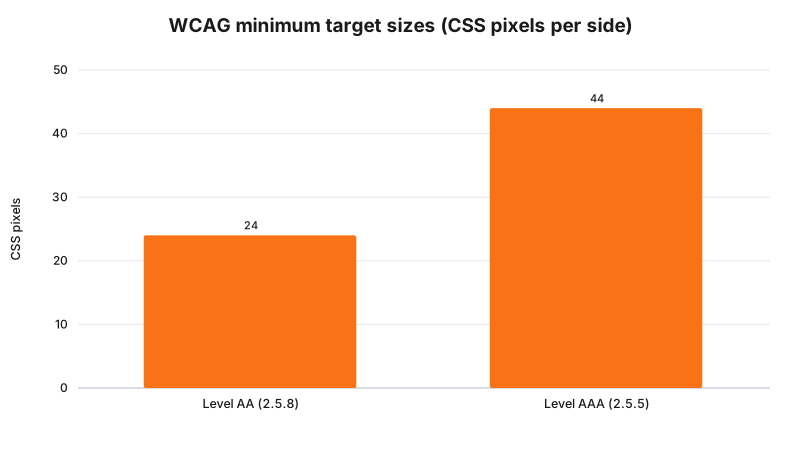
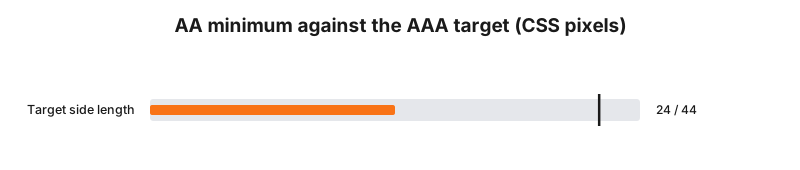
The W3C says Level AA conformance means meeting all the Level A and Level AA criteria. It also says requiring Level AAA for a whole site as a general policy is not recommended, because some AAA criteria cannot be met for some content.
Takeaway: aim for 24 pixels as the floor, and go bigger on the buttons people use most.
The five exceptions to 24 pixels
The W3C lists these. A target under 24 pixels can still pass if:
- Spacing. A 24 pixel circle centred on each undersized target does not overlap another target or its circle.
- Equivalent. The same function is available through another control on the page that meets the size.
- Inline. The target sits in a sentence, or its size is constrained by the line height of non-target text.
- User agent control. The browser sets the size and the author does not change it.
- Essential. A particular presentation is essential to the function.
So a link in the middle of a paragraph is fine. A row of tiny icons packed together is not.
What to check on your own site
- Open your site on your phone and try the menu button with one thumb.
- Tap your phone number and your main enquiry button.
- Look at the footer. Are the links stacked close with small text?
- Check close icons on pop-ups and banners.
- Ask your developer to confirm the pixel size of each icon button, using the browser inspector.
We have not tested your site, so we will not guess which of these fails.
Why local sites should care
A call button a thumb can hit first time is one less thing to go wrong when someone is on a phone. This is a design point as much as a rules point. We do not make legal claims here, and the W3C document is a technical standard. If you need to know whether it applies to your business as a legal matter, that is a question for your lawyer.
Frequently Asked Questions
What size must a tap target be under WCAG 2.2?
Success Criterion 2.5.8 Target Size (Minimum), Level AA, says pointer targets must be at least 24 by 24 CSS pixels, except where spacing, an equivalent control, inline placement, user agent control or an essential presentation applies.
Is the 44 pixel rule still in WCAG?
Yes, as Success Criterion 2.5.5 Target Size (Enhanced), but it is Level AAA, the highest level. W3C notes that it is not recommended to require Level AAA conformance as a general policy for whole sites.
Was 2.5.8 in WCAG 2.1?
No. The W3C marks 2.5.8 as new in WCAG 2.2, which became a W3C Recommendation on 12 December 2024.
Do small links inside a sentence have to be 24 pixels?
No. The inline exception says a target in a sentence, or one whose size is otherwise constrained by the line height of non-target text, is exempt.
Need a hand?
If your phone menu or buttons feel fiddly, we can measure them and fix the worst ones. See web design in Rockingham or web design in Baldivis, then contact us.
Sources
W3C, Web Content Accessibility Guidelines (WCAG) 2.2
, W3C Recommendation 12 December 2024. Source of success criteria 2.5.8 and 2.5.5, the exceptions and the conformance levels. Read 3 November 2026.
Last reviewed: 3 November 2026.
Vikas Thakur
Founder of RockingWeb. 16 years of experience from working at TPG, iiNet and Monadelphous, now building websites, software and digital marketing for local businesses in Rockingham and Perth.