How to Embed Timely Booking on a Clinic Website
A walk-through of Timely's own booking button embed steps for a clinic website, plus the cross-border data question most medispa owners never check before the script goes live.
 Vikas Thakur Founder, RockingWeb 13 min read
On this page 13
- Key takeaways
- What Timely’s help centre says about embedding the widget
- What that means for your website’s build
- Where your booking data actually goes
- Embed method decision matrix
- Worked example: embedding Timely on a medispa website
- What to check on your own clinic website
- Has anyone been penalised for this?
- Where this gets hard
- Status: is this rule in force right now?
- Frequently Asked Questions
- Need a hand with your website?
- Sources and References
It’s 9pm and the owner of a medispa in Joondalup is staring at her website admin panel, trying to work out why the Timely “Book Now” button she pasted in that afternoon has broken the mobile menu. She copied the script from her Timely dashboard, dropped it near the header, and now half her navigation bar is missing on phone screens.
This happens more often than any booking software vendor admits. Timely gives every account a working embed option in four clicks. Getting that script to sit cleanly in a real website, without breaking layout, slowing the page down, or quietly sending booking enquiries to a server outside Australia, takes a bit more care than copy and paste.
Key takeaways
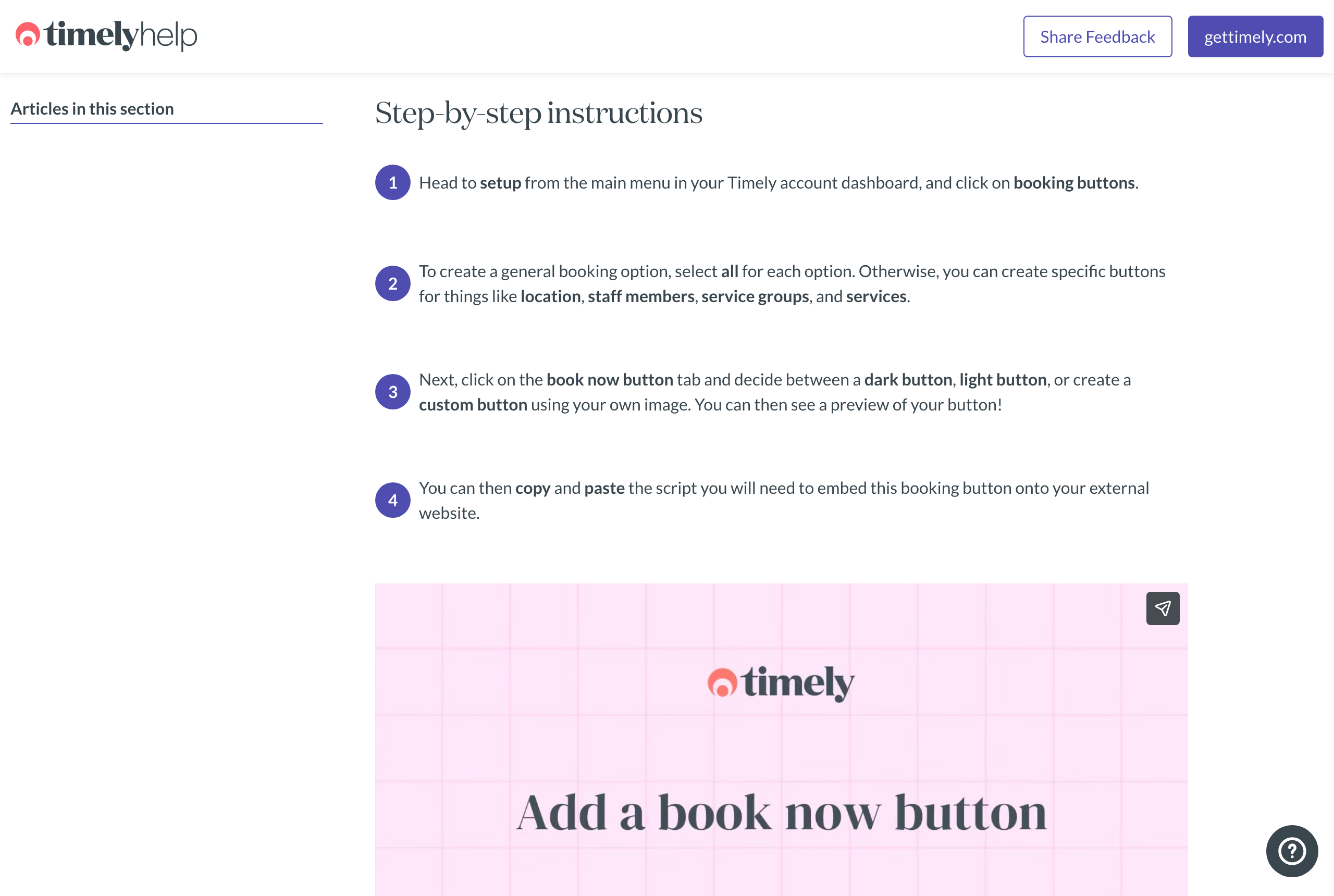
- Timely generates a copy-paste script for a dark, light, or custom “Book Now” button, created from Setup, then Booking buttons, in the Timely dashboard, according to Timely’s own help centre.
- Timely’s privacy policy states client data is hosted in the United States and in Australia, which brings Australian Privacy Principle 8 into play for any Australian clinic using the widget.
- The Office of the Australian Information Commissioner recorded 1,205 data breach notifications across the 2025 calendar year, with health service providers the most affected sector at 225 notifications, 19 per cent of the total.
- 716 of those 1,205 notifications, the majority, were attributable to malicious or criminal activity, according to the OAIC.
- Timely also offers a hosted “mini website” booking page and native Facebook and Instagram “Book Now” buttons as alternatives to a script embed, per Timely’s help centre categories.
- Loading the Timely script in the page head instead of near the closing body tag is the most common cause of the layout and speed problems clinics report after adding a booking button.
As at 15 August 2026, a Timely booking button embedded on an Australian clinic website sends booking enquiry data, name, contact details, and often the treatment requested, to Timely’s servers. Timely’s own privacy policy places those servers in the United States and Australia, not exclusively onshore.
What Timely’s help centre says about embedding the widget
Timely’s support article, How to add a booking button to your own website, sets out the process in four steps. Head to Setup from the main dashboard menu and click Booking buttons. Choose whether the button covers all locations, staff, and services, or a specific subset. Pick a button style, a dark button, a light button, or a custom button built from your own image, with a live preview. Then copy and paste the script Timely generates to embed the button on your site.
That’s the whole official process. Timely also documents two other ways to take bookings without a developer: a hosted “mini website” (a Timely-assigned booking page you link to from your own site) and native “Book Now” buttons for Facebook and Instagram, both listed as separate categories in Timely’s help centre.
The script itself is a short piece of JavaScript that renders the button and opens the booking flow, either in a popup or embedded inline, depending on the style chosen. Timely doesn’t publish the raw script format publicly. You only see it once you’re logged into your own account and have generated a button.
Takeaway: Timely’s documented embed process is four clicks and a paste, not a plugin install or a developer ticket.
What that means for your website’s build
A pasted script tag is where the actual work starts, not ends. Three build decisions matter more than the copy-paste step Timely documents.
First, placement. Put the script tag just before the closing </body> tag, not in the <head>, and add async or defer if Timely’s generated script supports it. A script in the head blocks the browser from rendering the rest of the page until it downloads and runs, which is the exact fault pattern in the Joondalup example above: a header menu that renders after a third-party script has already claimed space in the layout.
Second, containment. Wrap the button in its own <div> with a fixed minimum height that roughly matches the rendered button size. Without this, the button popping in after the script loads pushes surrounding content down, a layout shift that Google’s Core Web Vitals measures directly.
Third, and the one most clinic sites skip: what happens to the data once someone clicks it. The button hands the visitor to Timely’s own booking interface, either a popup layer or an embedded frame, and from that point the enquiry details belong to Timely’s infrastructure, not your website’s.
Takeaway: the script tag is the easy part. Placement, containment, and where the data goes are the part that actually takes work.
Where your booking data actually goes
Timely’s privacy policy states plainly: “We host data in the United States and in Australia.” It goes on to note that personal data may be “transferred to, stored, or processed in the United States and in Australia and maintained on computers or servers located outside of your state, province, country.” For Australian clients specifically, Timely commits to “take reasonable steps to secure a contractual commitment from United-States-based recipients to handle your information in accordance with the Australian Privacy Principles.”
That last sentence is doing real work. Australian Privacy Principle 8, the cross-border disclosure rule, requires an entity to “take such steps as are reasonable in the circumstances to ensure that the [recipient] does not breach the APPs in relation to that information,” according to the OAIC’s APP 8 guidelines, updated 3 October 2025. Under section 16C of the Privacy Act, an entity that discloses personal information to an overseas recipient stays accountable for what that recipient does with it. If Timely’s US-hosted infrastructure mishandles a booking record, the clinic that embedded the widget carries the compliance exposure, not just Timely.
This is a build decision disguised as a legal one. Every third-party embed on a clinic website, booking widgets included, is a cross-border data question the moment any part of the vendor’s infrastructure sits outside Australia. Timely’s own privacy policy answers that question for you, in writing, if you read it before you paste the script rather than after.
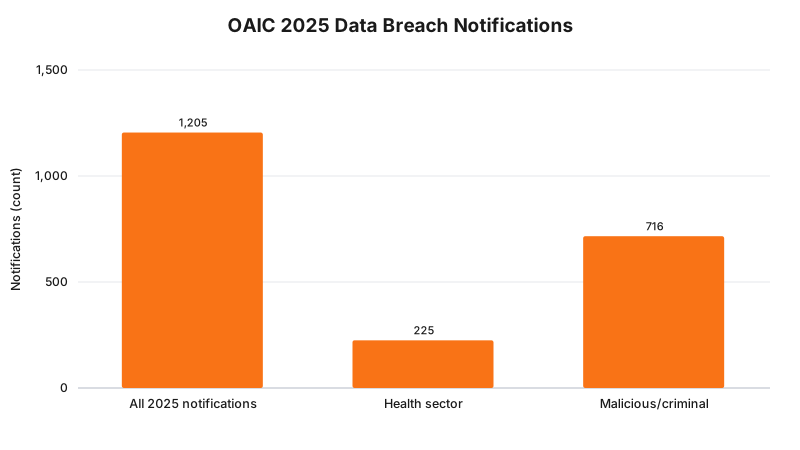
The Office of the Australian Information Commissioner’s 2025 Notifiable Data Breaches figures, published 6 July 2026, recorded 1,205 notifications for the calendar year. Health service providers were the most commonly affected sector, 225 notifications, 19 per cent of the total. 716 of the 1,205, the majority, were attributable to malicious or criminal activity rather than human error or system fault. None of those figures are specific to booking widgets. They show the regulator is watching a sector that clinic booking data sits inside.
Takeaway: read the vendor’s privacy policy before the embed script, not after a breach notification lands in your inbox.
Embed method decision matrix
| Method | What it is | Where it lives | Best for |
|---|---|---|---|
| Booking button (script embed) | A Book Now button generated in Setup, Booking buttons, embedded via a copied script | Directly on your own site’s HTML | Clinics that want full control over placement and styling |
| Timely mini website | A hosted booking page at a Timely-assigned web address | Off your own domain, linked from a Book Now nav item | Clinics without a developer or CMS access |
| Social booking buttons | A native Book Now button on a Facebook page or Instagram profile | Facebook and Instagram, not your website | Capturing bookings from social traffic directly |
| CMS-specific widget | A platform guide for WordPress and Weebly, documented separately in Timely’s help centre | Inside your CMS page editor | Clinics on WordPress or Weebly without custom development |
Takeaway: the script embed gives you the most control and the most responsibility. The mini website and social buttons give you neither.
Worked example: embedding Timely on a medispa website
Back to the Joondalup medispa. Here’s the fix, step by step, using the exact process Timely documents plus the build corrections above.
- In the Timely dashboard, go to Setup, then Booking buttons, and select the treatments and staff the clinic wants bookable online, rather than leaving it on “all” while a new injectable service is still being credentialed.
- Choose the light button style to match the clinic’s white and sage colour scheme, and preview it before generating the script.
- Copy the generated script and paste it into the site’s HTML just before the closing
</body>tag, not inside the header where it was originally placed. - Wrap the button in a
<div style="min-height: 48px;">so the layout doesn’t jump when the script finishes loading. - Read the Timely privacy policy’s data hosting clause, and add a line to the clinic’s own privacy policy noting that booking enquiries are processed by a third-party platform that may store data outside Australia.
The following figure is an illustrative example built from typical third-party script behaviour, not a measurement of any specific clinic’s site. It shows the kind of shift a script relocation produces on page load time.
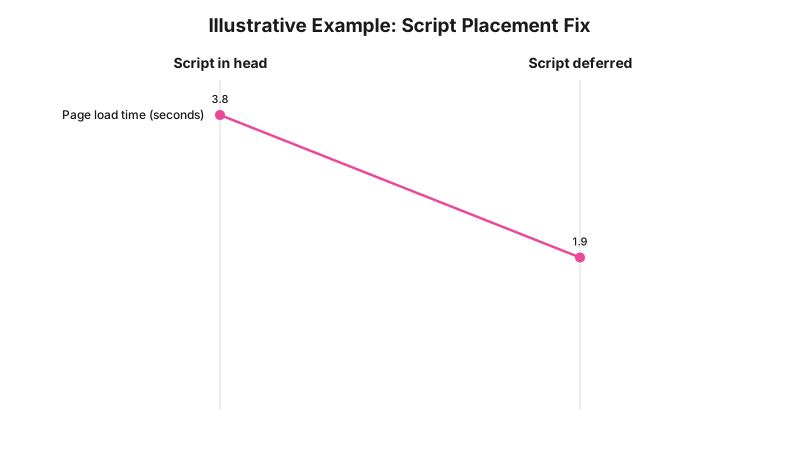
Moving the script and adding a fixed-height container removed the header-jumping problem. The booking button still works exactly as Timely built it. The only thing that changed was where the script sits in the page and what surrounds it.
Takeaway: the same four-step Timely process produces a different result depending on where in your HTML the script lands.
What to check on your own clinic website
- Open your site on a phone and check the button doesn’t push the header or navigation menu out of place when the page finishes loading.
- View page source and confirm the Timely script sits near the closing body tag, not inside the head.
- Time your homepage load with the button present versus a version without it, using your browser’s network tab, to see how much the third-party request adds.
- Read Timely’s current privacy policy and confirm your own clinic privacy policy mentions the booking platform as a third party that may process data outside Australia.
- Check whether the booking button is set to the correct locations, staff, and services after adding or removing a treatment.
- Confirm the button still works with cookies blocked or a strict browser privacy mode turned on, since some booking widgets rely on third-party cookies to track the session.
The following chart is an illustrative example of a checklist scorecard, not a measured average across real clinic sites.
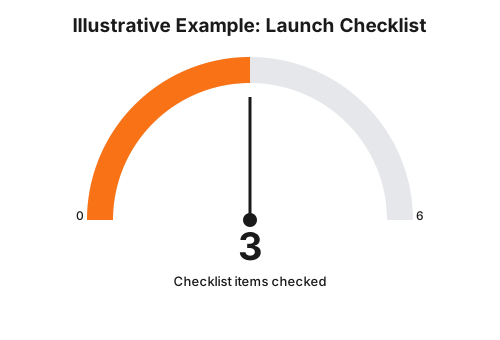
Most clinic sites we’ve reviewed complete the button setup step and stop there, leaving the placement, performance, and privacy policy items unchecked. That’s the gap this checklist is built to close.
Takeaway: the button working is not the same as the button being checked.
Has anyone been penalised for this?
No. We could not find an infringement notice, OAIC determination, or public enforcement outcome tied specifically to a clinic’s use of a Timely booking button, or any third-party booking widget’s cross-border data handling. That’s a genuine gap, not a claim we’re avoiding.
What does exist is the OAIC’s broader enforcement posture around cross-border disclosure and the Notifiable Data Breaches scheme, the 1,205 notifications and 225 health-sector notifications cited above. The regulator has the figures and the legal basis under APP 8 and section 16C to act on a health provider’s cross-border disclosure failure. It simply hasn’t, publicly, over a booking widget specifically, as at the date this post was checked.
Takeaway: the absence of an enforcement case is not the same as the absence of exposure.
Where this gets hard
A clinic embedding a Timely booking button has no way to independently verify what security controls sit behind Timely’s US-based infrastructure, and no visibility into the specific contractual terms Timely has struck with its US-based server providers. The privacy policy states Timely takes “reasonable steps” to secure a contractual commitment from those recipients. What counts as reasonable, and what those contracts actually say, isn’t published.
That means a clinic doing everything right at the build level, script placement, containment, an updated privacy policy, still can’t audit the vendor sitting behind the button. The regulator says an APP entity that discloses personal information to an overseas recipient stays accountable for that recipient’s handling of it; the build consequence is that choosing a booking platform hosted partly outside Australia puts the compliance burden on the clinic, not the vendor. Whether that arrangement satisfies APP 8 for your specific clinic and patient population is a question for your medical defence organisation or your lawyer.
Takeaway: you can fix every line of HTML and still be relying on a vendor’s word for the part that matters most.
Status: is this rule in force right now?
Australian Privacy Principle 8 and the Notifiable Data Breaches scheme under the Privacy Act 1988 are already in force, not proposed or pending, and apply the moment a clinic’s booking data leaves Australia through a third-party embed such as Timely’s booking button. This is an existing obligation being applied to a build choice, not a new rule.
Frequently Asked Questions
How do I add a Timely booking button to my clinic website?
In your Timely dashboard, go to Setup, then Booking buttons. Choose a dark button, light button, or a custom button using your own image, then copy the script Timely generates and paste it into your website’s HTML, according to Timely’s own help centre.
Does the Timely booking widget send patient booking data overseas?
Yes. Timely’s privacy policy states client data is hosted in the United States and in Australia, which brings Australian Privacy Principle 8 (cross-border disclosure) into play for any Australian clinic using the widget.
Will embedding the Timely widget slow down my clinic website?
It can, if the script loads in the page head and blocks rendering before the rest of the page appears. Loading it asynchronously, closer to the closing body tag, avoids most of the layout and speed problems clinics report.
Need a hand with your website?
If you want a second pair of eyes on how this applies to your own site, request a callback and we will talk it through.
Sources and References
- Timely Help Centre, “How to add a booking button to your own website”, help.gettimely.com, date checked 15 August 2026.
- Timely Blog, “Booking buttons, links and widgets”, gettimely.com/blog, published 7 October 2015, date checked 15 August 2026.
- Timely, Privacy Policy, gettimely.com/privacy-policy, date checked 15 August 2026.
- Timely, About page, gettimely.com/about, date checked 15 August 2026.
- Office of the Australian Information Commissioner, Australian Privacy Principles Guidelines, Chapter 8: APP 8 Cross-border disclosure of personal information, oaic.gov.au, updated 3 October 2025, date checked 15 August 2026.
- Office of the Australian Information Commissioner, “Data breach notifications increase to all-time high in 2025, new NDB stats show”, oaic.gov.au, published 6 July 2026, date checked 15 August 2026.
- Privacy Act 1988 (Cth), including Australian Privacy Principle 8 and section 16C, legislation.gov.au, date checked 15 August 2026.
Last reviewed: 15 August 2026.
If your clinic’s booking button is already live and you haven’t checked where the script sits or what the vendor’s privacy policy says, that’s a fifteen minute fix, not a rebuild. Get in touch with RockingWeb if you’d rather have someone check it for you.
Vikas Thakur
Founder of RockingWeb. 16 years of experience from working at TPG, iiNet and Monadelphous, now building websites, software and digital marketing for local businesses in Rockingham and Perth.