Adding Cliniko Bookings to a Website: 3 Ways Compared
Cliniko gives clinics three ways to put online booking on a website: an embed code snippet, a direct redirect link, or a custom build on its REST API. Here is what each one actually costs you in developer time, analytics continuity and compliance control.
 Vikas Thakur Founder, RockingWeb 11 min read
Cliniko, one of the practice management platforms used across Australian cosmetic clinics and dental practices, gives you three ways to put online booking on your website: paste an embed code snippet, link out to a hosted booking page, or build your own interface on its REST API. As at 15 August 2026, Cliniko’s own help documentation describes the embed code as the default path, with the API positioned as a developer-only option for teams that need something the widget cannot do. The choice affects developer time, whether your analytics tools can see the booking steps, and how much of your AHPRA advertising compliance you control directly on your own domain versus inside a vendor’s widget.
What Cliniko’s Own Documentation Says
Cliniko’s help and support page routes account holders to three places: unlimited email and chat support, a help guide library at help.cliniko.com, and a developer API reference at docs.api.cliniko.com. The help guides describe the embed path in plain terms.
Cliniko’s article on embedding online bookings in your website states that embedding “is only available to Administrators” in your Cliniko account, and that once you go to Settings, then Online bookings, you will find a field called “Code to embed in your website” with a “Copy code” button next to it. You either paste that snippet into your website yourself or hand it to your web designer. Cliniko also publishes platform-specific versions of the same guide for Wix, Squarespace and GoDaddy, which tells you where most of its customers actually build their sites.
The set up online bookings guide lists four settings that must all be switched on before any integration method works, embed, redirect or API:
- Settings, then Business information: toggle “Display this business in online bookings” on for each business location.
- Settings, then Users & practitioners: toggle “Show this practitioner in online bookings” on for each practitioner who takes bookings.
- Settings, then Online bookings: check “Allow your patients to book appointments online”.
- Settings, then Appointment types: check “Show in online bookings” on each treatment you want bookable.
Cliniko’s marketing page for the feature also states a running total of “20,047,906 bookings taken via Cliniko online bookings and counting” (figure as displayed on the page checked 15 August 2026, a live counter rather than a fixed annual statistic) and describes typical setup as taking “usually less than 15 minutes”, which matches the four-toggle sequence above rather than anything involving code.
The developer side lives at docs.api.cliniko.com, not on the main help site. Cliniko’s REST API is served from region-specific base URLs such as https://api.au1.cliniko.com/v1, and the endpoints most relevant to a custom booking build are GET /businesses/{business_id}/practitioners/{practitioner_id}/appointment_types/{appointment_type_id}/available_times, the equivalent next_available_time endpoint, and POST /individual_appointments to actually create a booking. All three respect the same online booking settings above: the API will not return available times for a business, practitioner or appointment type you have not switched on in the four steps.
Takeaway: the four booking toggles are not optional infrastructure behind the embed code. They gate the API too, so get them right before you touch any integration method.
What That Means for the Build
If you are choosing embed, redirect or API for a clinic site, here is what each one actually asks of you.
Embed code. You paste a short snippet from Settings, then Online bookings into a page on your own domain. The visitor never leaves your site’s URL bar. This is the fastest path and the one Cliniko’s own platform guides assume you will use. The tradeoff is that the booking steps run inside Cliniko’s widget, so your website’s own JavaScript cannot see individual booking-flow events unless Cliniko exposes them, and you inherit whatever cookie and script behaviour the widget loads.
Redirect link. You link a “Book now” button straight to your Cliniko-hosted booking URL. Setup is close to zero, since there is no code to paste, only a link to place. The cost shows up in two places: the patient physically leaves your domain to book, which is a bigger break in on-page analytics than an embed, and your site’s branding stops at the click, since the booking page is Cliniko’s own hosted page rather than your site’s design.
API build. You call Cliniko’s REST API directly and build your own booking screens on your domain. This is the only option where you fully control the UI, the analytics events, and exactly what compliance-relevant content (practitioner names, treatment names, prices) appears next to the booking widget. It is also the only option that requires ongoing developer maintenance: your build has to handle the same edge cases (fully booked days, cancelled slots, appointment type visibility) that Cliniko’s own widget already handles for you.
None of the three changes what still applies once the widget or booking page is live. AHPRA’s guidelines for registered health practitioners who perform non-surgical cosmetic procedures took effect on 2 September 2025 and cover all registered health practitioners except medical practitioners, who remain under the Medical Board of Australia’s separate 2023 cosmetic guidelines. If your booking flow displays a practitioner’s name, a treatment name, or a price for a non-surgical cosmetic procedure, that content sits inside AHPRA’s advertising rules regardless of whether it renders inside an embedded iframe, on Cliniko’s own hosted page, or on a page you built yourself against the API.
That overlay is not theoretical. AHPRA’s own reporting states it investigated about 360 notifications concerning non-surgical cosmetic procedures between September 2022 and March 2025, closed about 300 of them in that window, and fielded over 1,500 calls to its cosmetic surgery hotline in the same period.
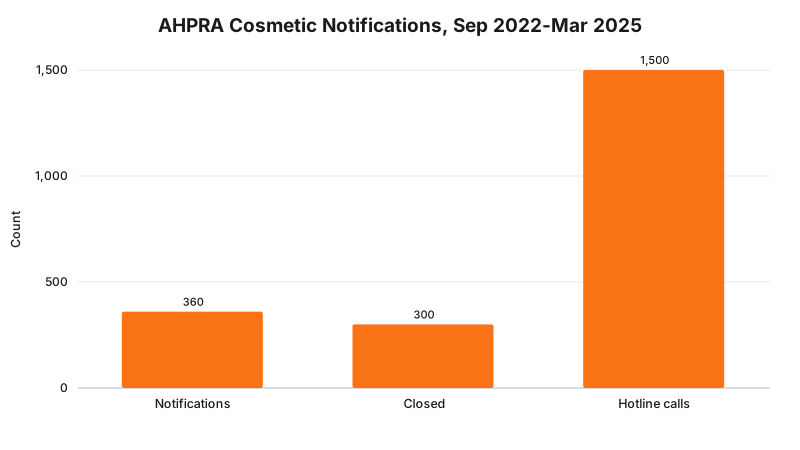
The volume is a reason to treat whatever content sits around your booking widget, embedded or not, as advertising content subject to the same rules as the rest of your site.
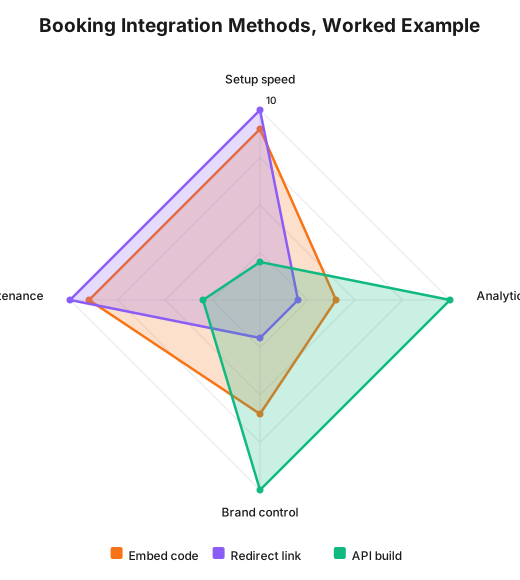
The scoring above is a RockingWeb build assessment for the worked example later in this post, not a Cliniko rating or an industry benchmark. Higher is better on each axis for that method.
Decision Matrix
| Factor | Embed code | Redirect link | API build |
|---|---|---|---|
| Who can set it up | Admin, no developer needed | Admin, no developer needed | Developer required |
| Patient stays on your domain | Yes | No | Yes |
| On-page analytics visibility | Partial (widget events not exposed to your GTM) | Lost at the redirect | Full, you build every event |
| Ongoing maintenance | None, Cliniko maintains the widget | None | Yours, indefinitely |
| Custom booking flow design | Limited to widget theming | None, Cliniko’s page design | Complete |
| Content next to the widget you control | Everything outside the iframe | Nothing, patient has left your page | Everything |
A Worked Example
Cosmetic clinic. A Perth injectables clinic ran Google Ads for anti-wrinkle treatment and lip filler, with conversion tracking set up in Google Tag Manager against form submissions and button clicks. Its developer pasted an embed code onto the treatments page. Because the booking steps run inside Cliniko’s iframe, GTM could see the click that opened the widget but not which appointment type or practitioner the visitor eventually picked. The clinic’s fix was not to move to the API, which its budget did not justify, but to add a GTM trigger on the outbound click into the widget as a proxy conversion, and to accept that step-level booking analytics would stay a Cliniko-side gap rather than a website-side one.
Cosmetic dental practice. A practice offering veneers, a procedure named in AHPRA’s visual examples material for higher-risk non-surgical cosmetic advertising, initially used a plain redirect link on its homepage “Book Now” button. The practice found that its patients frequently abandoned bookings after the domain switch, with no way to tell from its own analytics where in the Cliniko-hosted flow they dropped off. Moving to the embed code kept patients on-domain and restored at least page-level visibility of who reached the booking section, even though individual widget steps stayed opaque.
What to Check on Your Own Site
- Confirm all four Cliniko toggles are on: business, practitioner, online bookings, and each appointment type you expect patients to book.
- Open your site’s booking page in a private browser window and check whether the URL changes when you click “Book now”. If it does, you are on a redirect, not an embed.
- Check whether your analytics tool (GA4, GTM) fires any event when a visitor interacts with the booking widget, or only when they click into it.
- If you display practitioner names, treatment names or prices next to the booking widget, confirm that content follows the same AHPRA advertising rules as the rest of your site, since the widget itself does not enforce them for you.
- If you are on the API, confirm your build still respects the same booking-window and appointment-type visibility settings configured in Cliniko, rather than duplicating that logic separately and risking drift.
- Re-check after any Cliniko update. Vendor embed code and API responses can change without notice to your website codebase.
Enforcement Anchor
We could not find a published AHPRA, TGA or OAIC enforcement action naming the technical method a clinic used to integrate a booking platform, embed, redirect or API, as the issue. That is expected: the regulator’s rules attach to the advertising and privacy content around a booking flow, not to which of Cliniko’s three documented integration paths a clinic chose. The closest standing anchor is the Health Practitioner Regulation National Law’s testimonial and misleading advertising provision, which applies to whatever practitioner names, claims and prices appear on or around your booking widget regardless of how it was built.
Where This Gets Hard
The embed code is the right default for most clinics, but it hands you a real analytics blind spot in exchange for zero developer time. If a clinic’s marketing team cannot see which appointment type or practitioner actually converts inside the widget, budget decisions end up made on click-through data rather than completed-booking data. The API closes that gap completely, but it turns a vendor-maintained feature into a piece of software your own team now owns, including every future Cliniko API change. There is no version of this decision that gives you full analytics control and zero ongoing maintenance at the same time.
The regulator says AHPRA’s advertising guidelines apply to registered health practitioners’ cosmetic procedure content wherever it appears on your site; the build consequence is that practitioner names, treatment names and prices next to a Cliniko widget need the same compliance review as the rest of your pages; whether your specific booking page content meets that standard is a question for your medical defence organisation or your lawyer.
Status
Cliniko’s embed, redirect and API integration options are current vendor product features as documented on help.cliniko.com and docs.api.cliniko.com, checked 15 August 2026, not obligations with a commencement date. The AHPRA guidelines referenced for the compliance overlay have been in force since 2 September 2025 for all registered health practitioners except medical practitioners, who remain under the Medical Board of Australia’s 2023 guidelines.
Frequently Asked Questions
What are the three ways to add Cliniko bookings to a website?
An embed code snippet pasted into your site (Settings, then Online bookings, then “Code to embed in your website”), a direct redirect link to your Cliniko bookings URL, or a custom build on Cliniko’s REST API at api.au1.cliniko.com. Most clinics start with the embed code because it needs no developer and no ongoing maintenance.
Does embedding Cliniko bookings hurt my Google Analytics data?
It does not break tracking outright, but the booking steps happen inside a widget on your own URL, so a standard pageview setup will not see individual booking steps as separate pages. A redirect link sends the patient to a cliniko.com URL, which is a bigger analytics gap because the visit and the booking happen on two different domains. The API is the only method where you control every event yourself.
Do I need a developer to use the Cliniko API instead of the embed code?
Yes. The API returns JSON from endpoints such as available_times and individual_appointments, and your website has to call them, build its own booking screens, and handle errors and edge cases Cliniko’s own widget already handles for you. Reach for it only when the embed code cannot do something your business genuinely needs, such as a fully custom multi-step flow with your own branding.
Get Your Booking Flow Checked
Get in touch and RockingWeb will walk your Cliniko integration as a patient would, check what your analytics tools can and cannot see, and confirm whether the content around your widget meets AHPRA’s advertising rules.
Sources
- Cliniko - Help & Support page. Checked 15 August 2026.
- Cliniko Help - Embed online bookings in your website. Checked 15 August 2026.
- Cliniko Help - Set up online bookings. Checked 15 August 2026.
- Cliniko - Online booking software feature page, including the all-time bookings counter. Checked 15 August 2026.
- Cliniko API Docs - REST API reference, base URL and available-times endpoints. Checked 15 August 2026.
- Cliniko - Security and data hosting page. Checked 15 August 2026.
- AHPRA - New cosmetic procedure guidelines announcement, notification and hotline volumes. Direct fetch returned a 403 on 15 August 2026; figures confirmed against RockingWeb’s own verified source register for this page.
- AHPRA - Putting patients first: New guidelines for cosmetic procedures, 2 September 2025. Checked 15 August 2026.
Last reviewed: 15 August 2026.
Vikas Thakur
Founder of RockingWeb. 16 years building for companies like TPG, iiNet and Monadelphous, now focused on websites and marketing that comply with AHPRA's advertising guidelines and still book patients.