Cosmetic Clinic GBP Category: 1 Primary, 9 Backup Slots
Google Business Profile gives every business one primary category and up to nine more, and there's no category called Cosmetic Clinic on the list. Here's how to pick the primary category that actually matches a cosmetic clinic's registered-practitioner treatments.
 Vikas Thakur Founder, RockingWeb 12 min read
On this page 11
- Key takeaways
- What Google’s Category Rules Actually Say
- What That Means for the Build
- Category Options for a Cosmetic Clinic
- Worked Example: Choosing the Primary Category
- What to Check on Your Own Site
- Enforcement Anchor: Where the Teeth Actually Are
- Where This Gets Hard
- Frequently Asked Questions
- Status
- Sources and References
Type “cosmetic clinic” into the Google Business Profile category field and nothing comes up. That’s not a bug. Google has no category called Cosmetic Clinic, and every clinic in the country has to pick something else instead. Get that pick wrong and the map pack simply won’t show your clinic for the searches that actually convert. Google’s own help pages settle the mechanics: one primary category, chosen from a fixed list, plus up to nine more, ten in total, as at 2026. What they don’t settle is which one fits a business built around registered-practitioner cosmetic treatments, and that’s the call this guide walks through.
Key takeaways
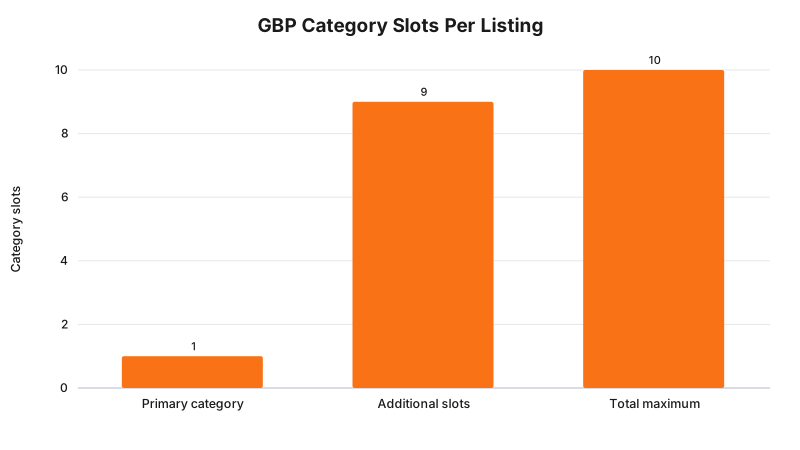
- Google Business Profile allows one primary category plus up to nine additional categories, ten in total, according to Google Business Profile Help.
- Google states “you can’t create your own category” and instructs businesses to pick the most specific option on the list rather than a broad one, per Google’s category management page.
- There is no Cosmetic Clinic category on Google’s list, so cosmetic clinics choose from adjacent options such as Medical Spa, Skin Care Clinic, Cosmetic Surgeon, or Dermatologist.
- Google states plainly that “the categories you select affect your local ranking on Google.”
- Editing an existing category can trigger a fresh business verification step, per Google’s own guidance.
- Any cosmetic procedure listed as a service on the profile is advertising content. Higher-risk non-surgical procedures fall under AHPRA’s Guidelines for advertising higher-risk non-surgical cosmetic procedures, in effect since 2 September 2025.
- Medical practitioners sit outside that AHPRA guideline. They remain under the Medical Board of Australia’s 2023 cosmetic guidelines instead.
- No independent regulator issues infringement notices over a Google category choice. Google enforces its own category rules directly on the platform.
What Google’s Category Rules Actually Say
Google runs two help pages that between them cover the whole mechanic, and it’s worth reading the exact wording rather than a paraphrase, because most agency blog posts round it off.
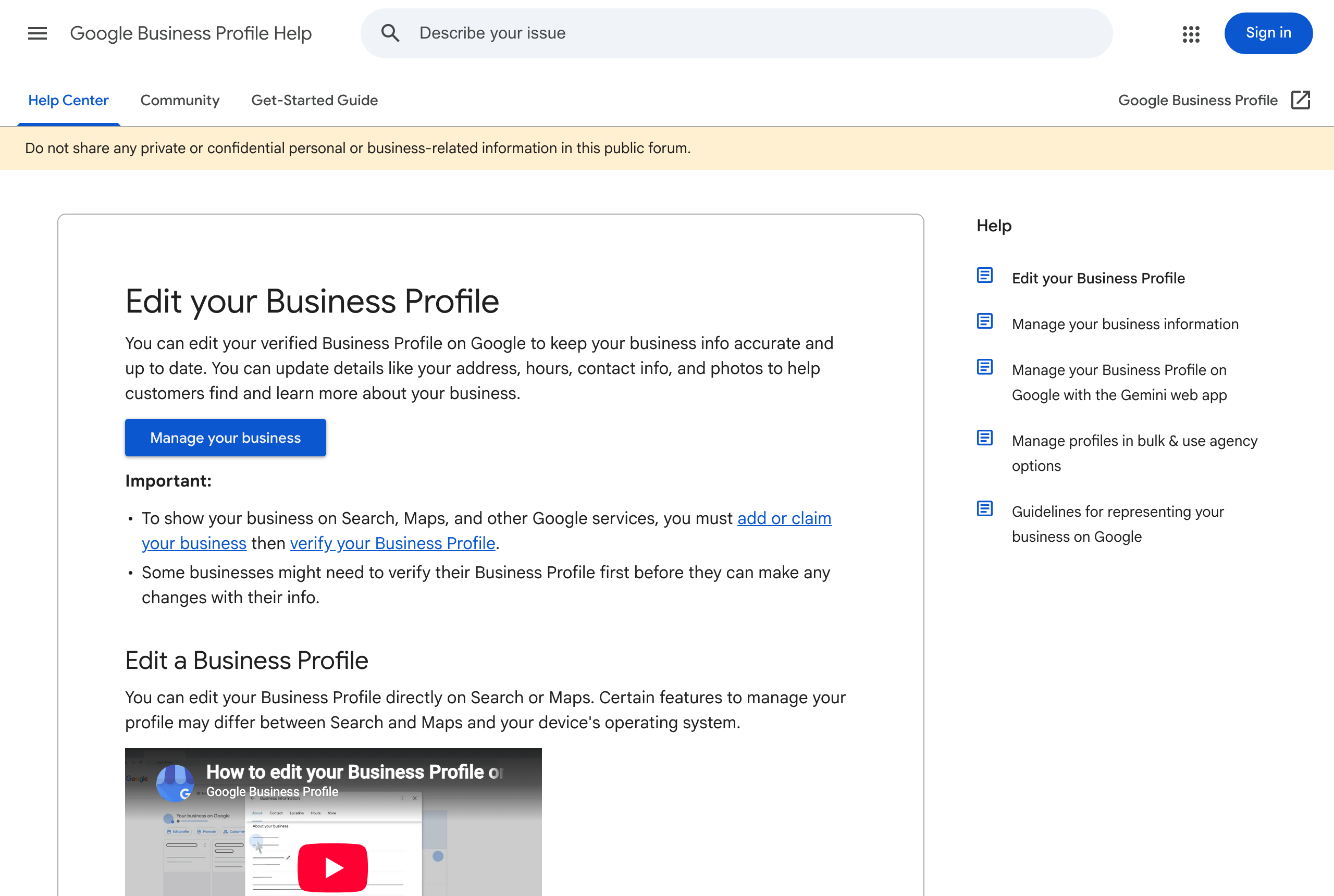
On the first, Edit your Business Profile, Google says: “Select the category that best matches what your business does. All locations of a business must share a ‘Primary category.‘” It goes on: “You can select up to 9 more categories. If you select several categories, the category in the first field will be your primary category.” That’s the whole slot structure. One field decides your primary category, and you get nine more shots to add context around it.
On the second, Manage your business category, the guidance gets more specific: “Select a specific category from the list that shows up. For example, instead of ‘Salon,’ choose ‘Nail salon.’” and, bluntly, “You can’t create your own category.” That page also states the category choice “affect[s] your local ranking on Google,” and that editing an existing category can trigger a fresh verification request on the profile.
Neither page is written for clinics. Neither mentions cosmetic treatments, injectables, or anything health-adjacent beyond a passing note that “health and beauty businesses” unlock a booking button and a services list once verified. The category rules are generic. Applying them to a business that performs registered-practitioner cosmetic procedures is where the judgement call starts.
Takeaway: Google’s rule is one primary category from a fixed list, up to nine more alongside it, no custom entries, and the specific option always beats the generic one.
What That Means for the Build
The category field lives in one place: Business Profile Manager, under Edit profile, then the Business information tab, then the Business category card. The first entry in that card is the primary category. A second control, usually labelled “Add another category,” opens the additional-category list, capped at nine entries as covered above.
Three build-level details matter more than they look:
- The field is a search, not a picklist. You type a term and Google returns matching categories from its internal taxonomy. There’s no browsable master list published anywhere, official or otherwise, so the only reliable way to check what’s available is to type variations of your actual service (injectables, laser, dermatology, medical spa) into the field itself and read what comes back.
- Changing the primary category can re-trigger verification. If the profile has an established address and phone match, this is usually quick, but plan for it. Don’t touch the category field the week before a launch or a paid campaign goes live.
- The category field and your website’s structured data are two separate systems. Nothing forces your site’s schema.org markup (
MedicalBusiness,Dentist, or a more specific subtype) to match the GBP category you picked, and Google doesn’t state that it cross-checks the two. But a mismatch, say a site marked up as aDentistwhile the Business Profile is filed underBeauty Salon, is exactly the kind of inconsistent signal that muddies how AI Overviews and local-pack results describe your business. Keep the on-site type and the GBP category pointed at the same specific business.
None of this touches what you’re allowed to say about the procedures themselves once the category is set. That’s a separate rule set, covered under “Where this gets hard” below.
Takeaway: fix the category by typing your actual service into the search field, expect a possible reverification, and match your on-site schema type to whatever you land on.
Category Options for a Cosmetic Clinic
Google publishes the rule, not a mapping of business types to categories. The table below is a working list built from what clinics commonly select in practice, not an official Google recommendation, and it’s the starting point for the search-field test above, not a substitute for it.
| Category | Best fit when | Note |
|---|---|---|
| Medical Spa | Clinic delivers registered-practitioner treatments (injectables, laser, skin needling) alongside cosmetic services | Most common primary pick for hybrid medical-aesthetic clinics |
| Skin Care Clinic | Primary service is skin treatment without injectable procedures | Narrower scope than Medical Spa |
| Cosmetic Surgeon | Surgical cosmetic procedures performed by a registered specialist | Reserve for genuinely surgical practices, not injectable-only clinics |
| Dermatologist | Practice is led by a registered dermatologist | Only if that qualification is actually on staff |
| Day Spa | Non-medical relaxation and beauty treatments only | Wrong primary if injectables are a listed service |
| Beauty Salon | General beauty services, no registered-practitioner procedures | Google’s own example of the generic option to avoid when a specific one exists |
Takeaway: no option on this table is officially “correct” for a cosmetic clinic, so test it in the search field against your actual services before you commit.
Worked Example: Choosing the Primary Category
Take a hypothetical clinic, call it Riverside Cosmetic Clinic, offering anti-wrinkle injections, dermal filler, and skin laser treatments delivered by a registered nurse injector working within a doctor’s authority. This is an illustrative example, not a real business.
Typing “cosmetic” into the category field returns nothing usable. Typing “medical spa” returns a match. Typing “skin care clinic” also returns a match, but it undersells the injectable side of the business. Typing “beauty salon” returns a match too, and it’s the one a lot of clinics default to because it feels closer to their branding, but Google’s own instruction is to pick the specific option over the generic one, and “Beauty Salon” doesn’t reflect a business built around registered-practitioner medical procedures.
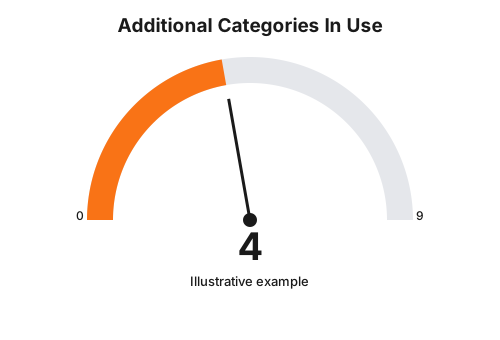
Riverside sets “Medical Spa” as the primary category. In the nine additional slots, it adds only categories it can genuinely justify against services actually delivered on site: Skin Care Clinic, Laser Hair Removal Service, and a small number of others, stopping well short of the cap of nine rather than filling every slot for keyword coverage. Google’s guidance is explicit that categories shouldn’t be used “solely as keywords,” so an unused slot is safer than a padded one.
Takeaway: pick the primary category that matches the core of what the clinic does, then add only the additional categories you can defend against services you actually deliver.
What to Check on Your Own Site
- Log into Business Profile Manager and confirm the exact wording currently sitting in the primary category field.
- Compare that wording against the services actually listed and delivered on site, not against the branding on your sign.
- Type two or three variations of your actual services into the category search field before assuming “Beauty Salon” or “Clinic” is the only option available.
- Count your additional categories. If you’re at or near nine, check each one is a real, currently delivered service rather than a keyword variant of another category already selected.
- Check whether your account has a scheduled campaign or launch coming up before you touch the category field, in case it triggers reverification.
- Confirm your website’s schema.org business type points at the same specific business type as the GBP category you landed on.
Enforcement Anchor: Where the Teeth Actually Are
There’s no regulator here. Google Business Profile category selection is a platform policy, not a statute, so there’s no infringement notice or tribunal determination to point to the way there is for AHPRA advertising breaches. That’s a genuine gap in this row, not an oversight, and worth saying plainly rather than inventing a penalty that doesn’t exist.
What does exist is Google enforcing its own rule directly. A business owner posted in Google’s own Business Profile Community forum, in a thread titled “Google enforcing ‘Medical Clinic’ primary category, we are an aesthetic medical spa,” reporting that Google’s system was overriding their chosen primary category with one Google’s own signals preferred instead. The thread is a real, public complaint on Google’s own support platform, and it shows the mechanism has teeth even without a regulator behind it: Google can and does reassign or reject a category choice it judges doesn’t match the business, independent of what the owner submitted.
Takeaway: the enforcement here is Google’s own system, not a regulator, and it can override your chosen category without a formal notice.
Where This Gets Hard
The category field is the easy part. What gets displayed once the category is set is the harder problem.
If your Business Profile lists cosmetic procedures as services, injectables, thread lifts, skin needling, that content functions as advertising. As at 2 September 2025, non-surgical cosmetic procedures fall under AHPRA’s Guidelines for advertising higher-risk non-surgical cosmetic procedures, which sit alongside a separate, consolidated Guidelines for registered health practitioners who perform non-surgical cosmetic procedures. That performance guideline applies to every registered health practitioner except medical practitioners, who instead remain under the Medical Board of Australia’s 2023 cosmetic guidelines. A nurse injector and a cosmetic doctor at the same clinic can be sitting under two different rule sets for the same procedure, even while the clinic’s Business Profile shows one category and one services list to the public.
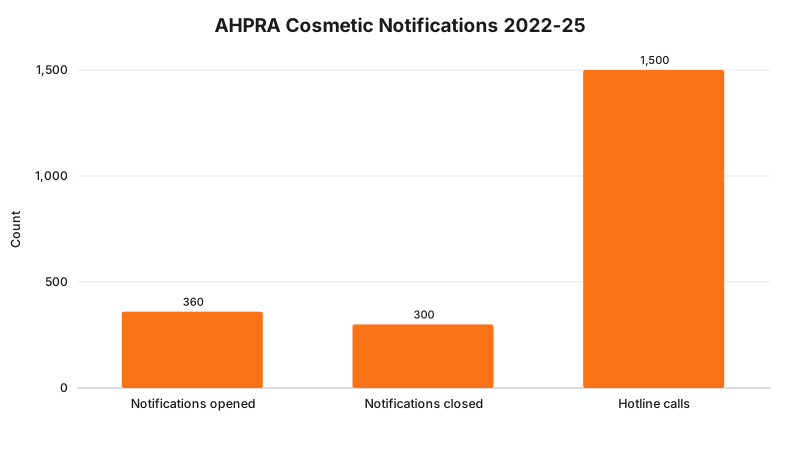
Between September 2022 and March 2025, AHPRA investigated about 360 notifications concerning non-surgical cosmetic procedures, closed around 300 of them, and logged more than 1,500 calls to its cosmetic surgery hotline over the same period, according to AHPRA’s own account of the guideline rollout. That volume is the reason a GBP services list isn’t a low-stakes formatting choice.
None of this is decided by which GBP category you pick. Changing the category field doesn’t change what you’re allowed to claim about a higher-risk procedure once someone can see it. The regulator says the advertising content must meet the guideline; the build consequence is that your services list, business description, and photos need the same compliance review your website already gets. Whether a specific listed service or claim on your profile meets the guideline for your practitioners is a question for your medical defence organisation or your lawyer.
Takeaway: the category field is a ranking mechanic, and the services list attached to it is regulated advertising content, and treating the two as one decision is where clinics get caught out.
Frequently Asked Questions
What is a Google Business Profile primary category?
It is the single category from Google’s fixed list that Google says “best matches what your business does,” and every location tied to that profile must share it. Google’s Business Profile Help allows up to nine more categories alongside it, for ten in total.
Should a cosmetic clinic pick Medical Spa or Beauty Salon as its primary category?
Google’s guidance is to choose the most specific category available rather than a broad one, so a clinic delivering registered-practitioner treatments such as anti-wrinkle injections or dermal filler is a closer fit for Medical Spa or Skin Care Clinic than for the generic Beauty Salon category. The final call still depends on what services the clinic actually delivers on site.
Can I create a custom Google Business Profile category for a cosmetic clinic?
No. Google states plainly that “you can’t create your own category,” so a cosmetic clinic has to select from Google’s existing list, even though no category called Cosmetic Clinic exists on it.
Status
As at 15 August 2026, Google Business Profile’s category structure, one primary category plus up to nine additional, ten in total, is Google’s current, live platform policy. It is not a law or a regulation, it carries no version number, and Google can change it without notice. It sits entirely outside the regulatory rules governing what a clinic can say about the procedures it lists: AHPRA’s Guidelines for advertising higher-risk non-surgical cosmetic procedures and the consolidated performance guideline have been in force since 2 September 2025, and the Medical Board of Australia’s 2023 cosmetic guidelines remain the separate, currently-in-force rule set for medical practitioners specifically.
If your clinic’s Google Business Profile category and your website are telling Google two different stories about what you do, that mismatch is exactly the kind of thing a site audit catches before it costs you rankings. Start a RockingWeb account to get your site and your Business Profile pulling in the same direction.
Sources and References
- Google Business Profile Help. “Edit your Business Profile.” support.google.com/business/answer/3039617. Date checked: 15 August 2026.
- Google Business Profile Help. “Manage your business category.” support.google.com/business/answer/7249669. Date checked: 15 August 2026.
- Google Business Profile Community. “Google enforcing ‘Medical Clinic’ primary category, we are an aesthetic medical spa.” support.google.com/business/thread/422927896. Date checked: 15 August 2026.
- AHPRA. “Guidelines for advertising higher-risk non-surgical cosmetic procedures.” ahpra.gov.au. In effect 2 September 2025. Date checked: 15 August 2026.
- AHPRA. “New guidelines for cosmetic procedures.” ahpra.gov.au. Consolidated performance guideline, applies to all registered health practitioners except medical practitioners. Date checked: 15 August 2026.
- AHPRA. “New cosmetic procedure guidelines,” notification and hotline volumes, September 2022 to March 2025. ahpra.gov.au. Date checked: 15 August 2026.
Last reviewed: 15 August 2026.
Vikas Thakur
Founder of RockingWeb. 16 years of experience from working at TPG, iiNet and Monadelphous, now building websites, software and digital marketing for local businesses in Rockingham and Perth.