5 Checks If Your Clinic Isn't Showing on Google Maps
Google ranks the map pack on relevance, distance and prominence, not on how good your website looks. Here are the five checks that find out which one is broken.
 Vikas Thakur Founder, RockingWeb 11 min read
Key Takeaways
- Google ranks local results on three published factors only, relevance, distance and prominence, according to Google’s own Business Profile support documentation, as at August 2026
- A verified profile is more likely to appear in local results, Google states directly
- Categories must describe what your business is, not what it has, and Google recommends using the fewest categories that accurately describe your core business
- Business name, address and category inconsistencies across the web quietly work against the distance and relevance factors
- Duplicate or old listings at a previous address actively compete with the correct profile for the same searches
- There is no paid way to buy local ranking. Google states this explicitly
- Five checks catch most invisible map pack listings: verification, name and address consistency, category accuracy, duplicate listings, and profile completeness
As at August 2026, Google ranks its local map pack results on three published factors, relevance, distance and prominence, and states plainly that there is no way to pay for a better position, according to Google’s own Business Profile support documentation. A clinic can have a live, unsuspended profile and still sit outside the map pack because one of those three factors is quietly broken.
Here is the situation. A practice manager searches the clinic’s own treatment name from her phone, standing in the car park. The clinic does not appear. The three competitors down the road do. She checks the listing exists, checks it is not suspended, and concludes the problem must be something mysterious about Google’s algorithm.
It usually is not mysterious. It is one of five specific, checkable things. This guide walks through what Google actually says about local ranking, what that means for the technical side of your listing and your website, and the five checks that find the fault fastest.
What Google Says About Local Ranking
Google publishes its local ranking factors directly rather than leaving them to guesswork. In its Improve your local ranking on Google support article, Google names three factors and defines each one:
- Relevance: “how well a Business Profile matches what someone is searching for”
- Distance: “how far each business is from the customer who’s searching”
- Prominence: “how well-known a business is”, noting that “prominent places are more likely to show up in search results”
The same article states that “businesses with complete and accurate info are more likely to show up in local search results” and that verifying a profile “tells Google that you’re authorised to represent the business, so it’s more likely to show up in search results.” It also states that “more reviews and positive ratings can help your business’s local ranking.”
Google’s separate Guidelines for representing your business on Google article sets the rules for what goes into a profile in the first place. On categories, it says to “use as few categories as possible to describe your overall core business” and that a category should answer “this business is a”, not “this business has a”. On business name, it says the name “should reflect your business’s real world name, as used consistently on your storefront, website, stationery, and as known to customers”, and rules out marketing taglines, phone numbers and location descriptors inside the name field. On address, it requires “a precise, accurate address” at a real, staffed location, ruling out PO boxes and virtual offices, and requires the business to “maintain permanent fixed signage” at that address.
One line is worth repeating because it settles an argument that comes up in almost every clinic marketing pitch: “There’s no way to request or pay for a better local ranking on Google.”
Takeaway: Google names its ranking factors openly. The fault is almost never the algorithm. It is one of a short, findable list of profile problems.
What That Means for the Build
Each of Google’s three factors maps to something concrete you can check in your Google Business Profile dashboard and in your website’s own code, not something abstract.
Relevance is driven mainly by category selection and the completeness of your business information. In the Business Profile dashboard, under Business information, your primary category should be the single most specific match, “Cosmetic Surgeon” rather than “Doctor”, “Cosmetic Dentist” rather than “Dentist”, where that option genuinely exists. On the website side, your structured data should carry a matching schema.org type in the LocalBusiness or MedicalClinic JSON-LD block, so the category story your site tells search engines matches the category story your Business Profile tells Google Maps.
Distance comes down to address precision and consistency. The address field in your Business Profile, the address in your website footer, and the address in your JSON-LD PostalAddress block need to be character-for-character identical, including whether you write “Suite 3” or “Ste 3”. A mismatch does not just look untidy. It works against the confidence Google places in the address it holds for you.
Prominence is built from verification status, review volume and recency, and how consistently your business name and address appear across third-party citation sites, directories, and health-specific listings. A dentistry practice listed as “SmileCo Dental” on its own site, “Smile Co” on a directory, and “Smile Co Dental Rockingham” on Google is telling three slightly different stories about the same business, and Google’s guidance frames the real-world, consistent name as the standard it checks against.
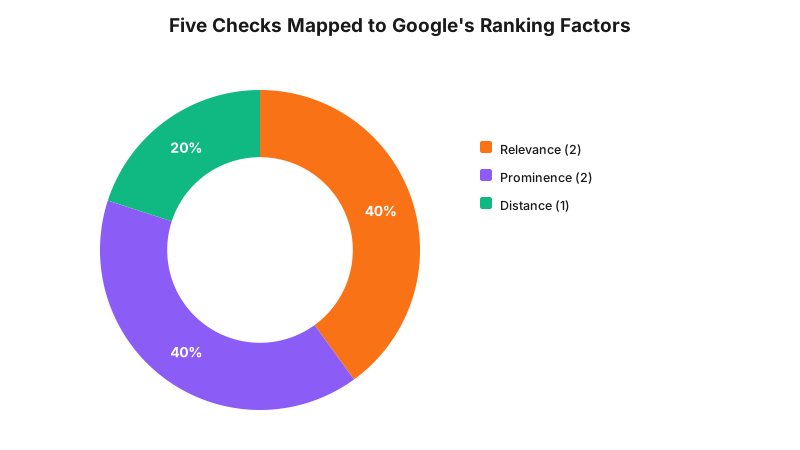
The chart above is not a weighting from Google, Google does not publish one. It is a structural map of where each of the five checks below lands against Google’s three named factors, so you know which lever you are pulling when you fix something.
Takeaway: Ranking factors are not abstract. Relevance is a category field, distance is an address string, and prominence is a verification tick plus a review count, and every one of them has an exact place to check it.
The Five Checks, Ranked by What They Find
| Check | What it verifies | Where to look | Typical fix |
|---|---|---|---|
| 1. Verification status | Whether Google has confirmed you as the authorised business owner | Business Profile Manager, Business information tab | Complete video or postcard verification for the unverified location |
| 2. Name, address, phone consistency | Whether relevance and distance signals agree across your site, GBP and citations | Website footer, JSON-LD LocalBusiness block, top 5 directory listings | Edit every instance to match Google’s guideline: the real world name, exactly |
| 3. Category accuracy | Whether your primary category is the most specific true match | Business information, Category field | Replace a broad category with the specific one, and remove categories that describe amenities rather than your core business |
| 4. Duplicate or zombie listings | Whether an old listing at a previous address is splitting your search visibility | Search Google Maps for your business name and past addresses | Request a merge or mark the duplicate as closed via Suggest an edit |
| 5. Profile completeness and engagement | Whether hours, photos, attributes and review activity are complete | Business Profile Manager, Profile strength indicator | Fill every field, add current photos, and reply to reviews within a set turnaround |
Run them in that order. Verification and duplicate listings are binary problems that can suppress a profile entirely regardless of how good everything else is, so they are worth ruling out first.
A Worked Example
Cosmetic clinic. A Perth cosmetic injectables clinic moved premises eighteen months before an audit. The old listing, still live and still showing the previous address, kept absorbing a share of searches for the clinic’s own name because Google had no signal that it was closed. The new listing, correctly addressed, was competing against its own predecessor. Marking the old listing as moved and merging the two resolved a problem that looked, from the practice manager’s side, exactly like “we don’t rank any more.”
Cosmetic dentistry. A dental practice offering veneers and whitening had its Business Profile name set to “BrightSmile Dental - Perth’s Best Cosmetic Dentist”. Google’s naming guideline explicitly rules out taglines and superlative claims inside the name field. The listing was not suspended, but the mismatch between the real-world name on the practice’s signage and the marketing name in the profile field was flagged during an audit as exactly the kind of inconsistency Google’s guidance describes as a real world name violation, a first step toward a suspension review rather than a ranking improvement.
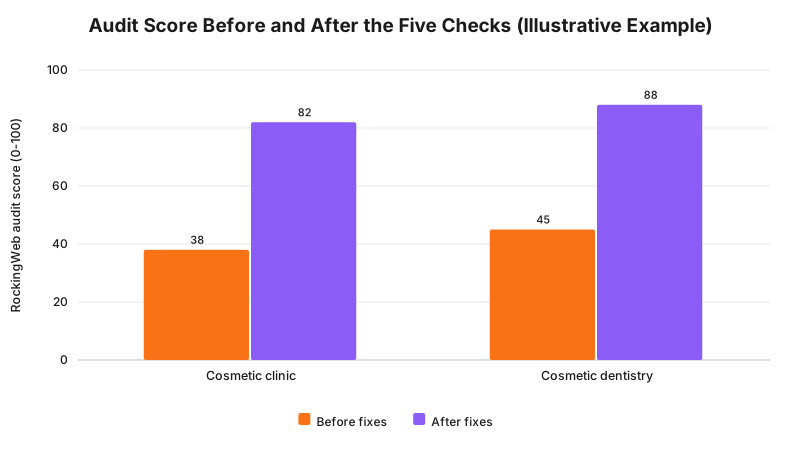
The scores in that chart are illustrative example numbers from the two audits described above, an internal scoring method RockingWeb uses across the five checks, not a metric Google publishes. They are shown to illustrate the scale of the gap a duplicate listing or a naming violation can create, not as a claimed industry average.
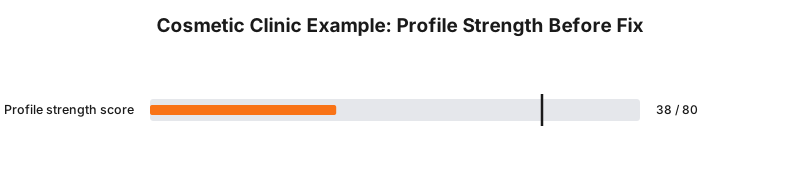
Takeaway: The failure is rarely one dramatic thing. It is a small, specific mismatch, an old address or a tagline in a name field, that both examples above resolved without touching a line of website code.
What to Check on Your Own Site
- Search your Business Profile Manager for verification status. Is every location you manage marked verified, not pending?
- Open your website footer and your JSON-LD
LocalBusinessblock side by side with your Google Business Profile. Do the name, address and phone number match exactly, character for character? - Check your primary category. Is it the single most specific match, or a broad fallback like “Doctor” or “Dentist”?
- Search Google Maps for your business name. Does anything come up from a previous address or a since-closed location?
- Open your Profile strength indicator in Business Profile Manager. Are hours, attributes, photos and the “from the business” description complete?
- Check your last 90 days of reviews. Have any been replied to, and how recently was the last one received?
- Check whether your listed name matches your real-world signage exactly, with no added tagline or claim.
The Enforcement Anchor
There is no infringement notice or regulator determination to cite here, and it would be misleading to invent one. Google’s ranking and profile rules are product policy, not law. The consequence for breaking them is not a fine, it is suppression: a profile that quietly stops appearing in the map pack, or in the worst cases gets suspended, with no published register of individual actions the way AHPRA or the TGA maintain for their own enforcement.
What Google does publish is intent. Its guidelines state directly that it “reserves the right to suspend” profiles that misrepresent business information, and every one of the five checks above targets a specific way that misrepresentation happens in practice, deliberately or through neglect.
Where This Gets Hard
Google does not disclose the relative weight of relevance, distance and prominence, and does not confirm individual ranking changes. Two identical profiles in two different suburbs can rank differently for the same search purely on distance to the searcher, which no amount of profile tidying will change. Duplicate listing merges and suspension appeals do not run on a published timeline. In practice they have taken clinics anywhere from a few days to several weeks, and Google does not guarantee an outcome either way.
The regulator says nothing here, because there is no regulator. Google’s own guidance sets the rule; the build consequence is the five checks above; whether a specific profile decision, suspension, or merge outcome is correct for your circumstances is a question for Google’s own support channels, since no external body reviews these decisions the way a legal regulator would.
Status
Not a legal obligation. This is Google’s current published product policy, checked 15 August 2026, and it can change without notice the way any platform policy can. There is no in-force, passed-but-not-commenced, or proposal status here because it sits outside legislation entirely.
Frequently Asked Questions
Why is my clinic not showing in the Google Maps pack even though I have a Google Business Profile?
A profile existing is not the same as a profile ranking. Google states it ranks local results on relevance, distance and prominence, so a profile that is unverified, uses a broad or wrong category, has inconsistent name and address details, or is competing against a duplicate listing will often sit outside the map pack even though it is live.
Can I pay Google to rank higher in the map pack?
No. Google states directly in its own help documentation that there is no way to request or pay for a better local ranking. Local Services Ads and Google Ads placements are separate paid products that appear alongside, not inside, the organic map pack.
How long does it take for map pack changes to show up after fixing my profile?
Google does not publish a fixed timeline. Category and business information edits can reflect within days, duplicate listing merges and suspension appeals have taken clinics several weeks in practice, and ranking movement depends on factors outside your control, including what nearby competitors are doing.
Get Your Profile Checked
Get in touch and RockingWeb will run the five checks against your Google Business Profile and your site’s structured data, and tell you exactly which one is holding you out of the map pack.
Sources
- Google Business Profile Help - Improve your local ranking on Google. Checked 15 August 2026.
- Google Business Profile Help - Guidelines for representing your business on Google. Checked 15 August 2026.
- Google Business Profile Help - Help centre hub. Checked 15 August 2026.
Last reviewed: 15 August 2026.
Vikas Thakur
Founder of RockingWeb. 16 years building for companies like TPG, iiNet and Monadelphous, now focused on websites and marketing that comply with AHPRA's advertising guidelines and still book patients.


![Local Link Building Australia 2025: Dominate Search [Part 1]](/assets/elizabeth-quay-perth-walk-bridge-at-dusk-DXFmlXVh.png)