How to Get a Page Off Google Today (and Keep It Off)
A clinic or dental practice page sometimes has to disappear from Google today, not next week. Here is Google's own sequence for a fast takedown that stays down, straight from Search Central's removal documentation.
 Vikas Thakur Founder, RockingWeb 12 min read
On this page 12
Imagine it’s a Friday afternoon and the practice manager finds a page that has to disappear before Monday. A before-and-after gallery a patient asked to have taken down. A staff bio for a practitioner who left under a cloud. A pricing page that quoted the wrong figure and someone has already screenshotted it. Panic sets in, and someone reaches for the CMS delete button and assumes the job is done.
It isn’t. Deleting a page and removing it from Google are two different jobs, and most clinics only do the first one.
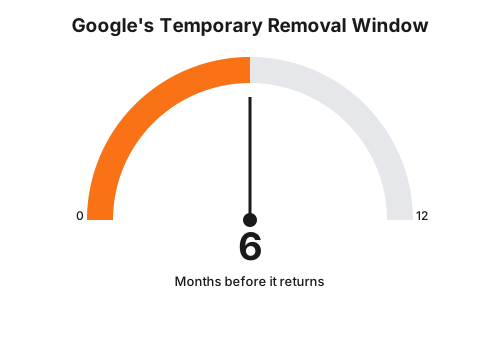
Getting a page out of Google Search fast, and keeping it out, takes two actions done in the right order: a Removals tool request in Search Console for immediate suppression, which Google says works within a day, and a permanent fix on the page itself before that quick removal expires at around the six-month mark. Skip the second step and the page can reappear in Search once the temporary suppression lapses, according to Google Search Central’s own removal documentation (last updated 10 December 2025).
Key takeaways
- Google’s Removals tool suppresses a URL from Search results within a day, per Google Search Central.
- A Removals tool request lasts about six months before the page can reappear if nothing else has changed.
- Google names three permanent fixes: delete or update the content, add a noindex tag, or password protect the page.
- Google explicitly warns against using robots.txt to hide a page, citing its own documented limitations.
- Every URL variant of the same page, including www versus non-www, http versus https, trailing slashes, and query strings, needs the same fix or the page can still surface under a different address.
- Google’s guidance was last updated 10 December 2025 and describes a product mechanism, not a law or regulation with a commencement date.
What Google Actually Says
Google publishes exactly one authoritative page for this: Search Central’s guide to removing information from Google. Three things in it matter for a clinic or dental practice that needs a page gone fast.
First, the quick option. Google’s own wording: “For quick removals, use the Removals tool to remove a page hosted on your site from Google’s search results within a day.” That request “last[s] for about 6 months,” after which the page can come back into Search results if the underlying problem was never actually fixed.
Second, the permanent options. Google names three, in this order of preference:
- Delete or update the content. Google calls this “the most secure way to prevent your information from appearing in other search engines,” because it removes the source, not just the listing.
- Add a noindex tag. Google is precise about what this does and does not do: “A noindex tag only blocks your page from showing up in Google search results.” The page still exists and still loads for anyone with the direct link.
- Password protect the page. Google frames this as controlling access at the source: “Limiting access to your page enables the right users to view your page, while preventing Googlebot and other web crawlers from accessing it.”
Third, the warning most agencies skip. Google states plainly: “Don’t use robots.txt as a way to block your page,” pointing to the tool’s documented limitations, chiefly that a robots.txt disallow rule stops Googlebot crawling the page but does not stop the URL itself from appearing in results, sometimes with no snippet at all. It looks like a fix. It isn’t one.
The same page also flags something most takedown checklists forget: URL variants. Google’s documentation notes the need to protect “all variations of the URL for the content that you want to remove,” because different URLs can point at identical content, its own example being example.com/puppies versus example.com/PUPPIES.
Takeaway: Google’s fast option buys six months, not forever, and only three actions make a removal stick.
What That Means for the Build
Translate Google’s three permanent methods into what actually changes in a clinic or dental practice’s CMS, and the sequence looks like this.
Step one, same day: file the Removals tool request. In Google Search Console, go to Removals under the Indexing section, choose “New Request,” and submit the exact URL. This is a suppression order, not a fix. It buys time while the real work happens underneath it.
Step two, same day if possible: pick the permanent method and apply it.
- To delete the page entirely, remove the route and let the server return a
404 Not Foundfor a page that’s simply gone, or a410 Goneif the deletion is intentional and permanent, since Google treats410as a stronger signal that the content isn’t coming back. Also pull the URL fromsitemap.xmland delete or redirect any internal links pointing to it, an orphaned 404 in your own navigation looks worse than the page you were trying to remove. - To keep the page live but out of Search, add
<meta name="robots" content="noindex">inside the<head>, or set theX-Robots-Tag: noindexHTTP response header if the page is a non-HTML file like a PDF where a meta tag isn’t possible. Either way, leave the page crawlable (don’t also block it in robots.txt) or Google can’t recrawl it to see the noindex tag in the first place, which is the exact trap the robots.txt warning above is about. - To restrict access outright, put the page behind a login or an
.htpasswdprompt so Googlebot gets a 401 or 403 on the next crawl attempt.
Step three: check every URL variant. Run the URL through both http:// and https://, with and without www, with and without a trailing slash, and with any UTM or tracking query strings the marketing team has used to link to it. Each variant is technically a different URL to Googlebot and needs the same fix, or a stray version can keep showing up in results after the main one is gone.
Step four: confirm with the URL Inspection tool. Search Console’s URL Inspection tool shows the last crawled version of the page and whether Google considers it indexed, which is the only way to confirm the permanent fix actually landed rather than assuming it did.
Takeaway: the Removals tool is the fire extinguisher; deletion, noindex, or password protection is the actual repair, and it has to happen on every URL variant, not just the one someone clicked on.
Choosing the Right Method
Not every urgent page needs the same fix. A decision matrix helps a practice manager pick the right one under time pressure.
| Method | How fast it acts | How long it lasts | Best for |
|---|---|---|---|
| Removals tool (Search Console) | Within a day, per Google | About 6 months, then it can reappear | Buying time while the permanent fix is applied |
| Delete content, return 404 or 410 | Days to weeks, depends on Google’s next recrawl | Permanent | A page that is genuinely retired for good |
| Noindex tag or X-Robots-Tag header | Days to weeks, depends on Google’s next recrawl | Permanent while the tag stays in place | A page that must stay live for direct links but not appear in Search |
| Password protection | Immediate for new crawl attempts | Permanent while access stays restricted | A page that needs to disappear from public view entirely |
| robots.txt disallow | Does not remove the URL from results | Not applicable | Never use this as a takedown method, per Google’s own warning |
Takeaway: the Removals tool and a permanent fix are not alternatives, they are two steps in the same sequence, done together, on the same day.
A Worked Example: Two Clinics, Same Afternoon
Cosmetic clinic. A patient asks a Perth injectables clinic to remove a written testimonial from a “Client Results” page. The practice manager deletes the paragraph from the CMS within the hour, but the page URL, and three other URL variants left over from an old campaign, are still indexed with the cached testimonial visible in Google’s snippet. The fix: submit the Removals tool request for the canonical URL immediately, then find and 404 or redirect the leftover http://, non-www, and UTM-tagged versions the marketing agency had been using in old ad campaigns.
Cosmetic dentistry practice. A dental practice’s “Meet Dr Chen” bio page is still live after the practitioner leaves, and the practice wants it gone the same day the departure is announced, both for accuracy and because the old page still lists a AHPRA registration number under a different practice name. The fix: delete the bio page and return a 410 Gone (it isn’t coming back), remove it from sitemap.xml, and update any internal “Our Team” links pointing to it, then confirm removal in Search Console’s URL Inspection tool a few days later.
The numbers below are an illustrative example, not measured client data, showing what a URL-variant check typically turns up on a page that’s been live for a while and linked from more than one place.
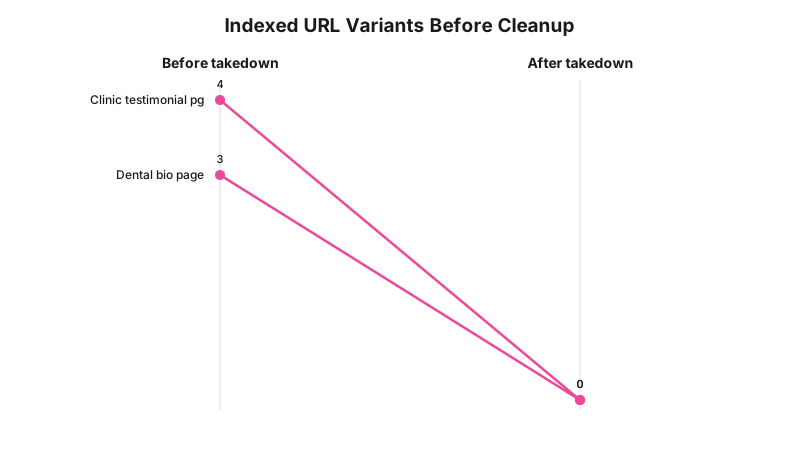
Takeaway: the page you meant to remove and the page Google actually has indexed are rarely the same single URL, check the variants before calling the job done.
What to Check on Your Own Site
- Search
site:yourdomain.com.au "the exact phrase"from the removed page to see what Google still has cached. - Confirm the Removals tool request is showing as “Removal approved” in Search Console, not still pending.
- Check the page returns a real
404or410status code, not a200with a “page not found” message, which tells Google the page is still there. - Confirm
sitemap.xmlno longer lists the URL. - Search the site’s own internal links and navigation menus for anything still pointing at the removed page.
- Check all URL variants:
http,https,www, non-www, trailing slash, and any tracking query strings used in old ads or emails. - If using noindex, confirm robots.txt is not also blocking the same page, or Google can never recrawl it to see the tag.
- Re-check the URL Inspection tool result about a week later to confirm the permanent fix has actually been picked up.
Does This Have Teeth?
There is no infringement notice or enforcement action to point to here, and it would be misleading to imply otherwise. This isn’t a regulatory rule with a penalty attached, it’s a documented feature of how Google Search works. The only real consequence Google states directly is the six-month expiry: a Removals tool request that isn’t backed by a permanent fix simply stops working, and the page can come back exactly as it was.
Where a page needed to come down because of an AHPRA advertising complaint or a similar regulatory trigger rather than an ordinary content error, the regulator’s own process, not Google’s removal mechanism, is what carries the actual penalty. RockingWeb’s breakdown of the first 48 hours of an AHPRA advertising complaint covers that separate process in detail. Whether a specific page needs to come down at all for regulatory reasons is a question for your medical defence organisation or your lawyer, not a question Google’s removal tool can answer.
Takeaway: the six-month clock is the only enforcement mechanism in play here, and it enforces nothing except its own expiry.
Where This Gets Hard
Google’s own tool only controls Google. Bing, DuckDuckGo, and any AI answer engine that has already crawled and cached the page are separate systems with separate removal processes, and a Google Removals tool request does nothing to them.
A cached snippet can also persist for a short window even after a successful removal, since search engine caches don’t update the instant a page changes. And if the content in question has already been copied, screenshotted, or republished by someone else, whether a patient, a review site, or a competitor, removing the original page from Google does nothing about that separate copy; that’s a different problem requiring a different process entirely, usually starting with a direct request to whoever republished it.
The decision to take a page down for a regulatory or legal reason, as opposed to a routine content error, is not a technical one. Google’s guidance says how to make a removal work; it says nothing about whether removing a specific page is the right call, or whether removing it changes anything about a complaint that’s already been lodged. That call sits with a medical defence organisation or a lawyer, not with whoever has Search Console access.
Takeaway: removing a page from Google only ever controls Google, nothing else, and it’s a technical fix, not a legal one.
Status Line
Google’s Removals tool and its documented six-month expiry are a live, standing product feature, last confirmed updated by Google on 10 December 2025, not a law or regulation with a commencement date, and not something that can be “in force” or “passed but not commenced” the way a piece of legislation can.
Frequently Asked Questions
How long does Google’s Removals tool keep a page out of search results?
About six months, per Google Search Central. After that, the page can reappear in Search unless it has also been permanently fixed by deletion, a noindex tag, or password protection.
Does adding a robots.txt disallow rule remove a page from Google?
No. Google’s own documentation explicitly warns against using robots.txt as a takedown method because of its limitations, and a disallowed page can still appear in results without a snippet.
What is the fastest way to get an urgent page out of Google Search?
Submit a request through the Removals tool in Search Console, which Google says works within a day, then fix the page itself with deletion, a noindex tag, or password protection before the six-month window runs out.
Need a hand with your website?
If you want a second pair of eyes on how this applies to your own site, request a callback and we will talk it through.
Sources and References
- Google Search Central, “Remove information from Google,” developers.google.com/search/docs/crawling-indexing/remove-information, page last updated 10 December 2025. Date checked: 15 August 2026.
Last reviewed: 15 August 2026.
If a page on your clinic or dental practice website needs to come down and you want someone to check the URL variants, the sitemap, and the noindex implementation for you, get in touch and RockingWeb will walk through it with you.
Vikas Thakur
Founder of RockingWeb. 16 years of experience from working at TPG, iiNet and Monadelphous, now building websites, software and digital marketing for local businesses in Rockingham and Perth.