Remove the Review Schema Your Clinic's WordPress Theme Adds
Most WordPress themes, page builders and review plugins write Review or AggregateRating schema into a clinic page's JSON-LD automatically, often without the site owner knowing it exists. Section 133 of the National Law bans testimonials about a clinical aspect of a regulated health service, and hidden structured data carrying a patient's outcome statement is still a publication. As at 14 September 2026, Google's own guidelines also will not show a rich result for a business's markup about its own reviews, so the schema creates compliance exposure with no ranking benefit to offset it.
 Vikas Thakur Founder, RockingWeb 12 min read

Key takeaways
- Many WordPress themes, page builders and review plugins write Review or AggregateRating schema into a page’s JSON-LD automatically, sometimes with no visible toggle to turn it off
- Section 133(1)(c) of the National Law bans testimonials about a clinical aspect of a regulated health service, and the ban covers structured, machine readable content the same as anything a visitor reads on screen
- The maximum penalty for a standard advertising breach is $60,000 for an individual and $120,000 for a body corporate per offence
- Google’s structured data guidelines, last updated 24 July 2026, state a business’s own LocalBusiness or Organization markup is ineligible for the star review rich result once the business controls the reviews about itself, so self-authored schema earns no ranking benefit
- WooCommerce, page builder testimonial widgets and dedicated review or schema plugins are the three most common sources, with theme-baked schema the hardest to find
- Removing the markup is a settings-and-code task, confirmed with Google’s Rich Results Test, not a content edit to what visitors already see
If your WordPress theme, page builder or a review plugin writes Review or AggregateRating schema into your clinic page’s JSON-LD, and that markup carries a patient’s statement about a clinical outcome, it is still a testimonial under section 133 even though most visitors never see the raw code. As at 14 September 2026, Google’s own structured data guidelines also state a business’s markup about its own reviews is ineligible for the star review rich result once the business controls those reviews, so the schema buys no ranking benefit to weigh against the risk. The fix sits in settings and template code, not in editing what visitors already see.
Open your clinic’s homepage, right click, view source, and search for the word Review. There is a reasonable chance you will find a block of JSON nobody at your practice wrote, added or reviewed. It arrived with your theme, your page builder’s testimonial widget, or a plugin installed for a different reason, and it has been publishing structured data about your patients since the day you activated it. Section 133 does not care whether a testimonial sits in bold text above the fold or a script tag nobody reads. It is still advertising. This guide finds where the markup hides, explains why removing it costs nothing on the ranking side, and works through the settings and code changes that turn it off.
What the Rule Actually Says
Section 133 of the Health Practitioner Regulation National Law restricts advertising a regulated health service. Subsection 133(1)(c) is the specific testimonial provision, prohibiting advertising that uses a testimonial about a clinical aspect, a symptom, a diagnosis, a treatment or an outcome. The maximum penalty for a standard advertising breach under section 133 is $60,000 for an individual and $120,000 for a body corporate per offence, stated in the current Act text. Some secondary compliance content circulates a lower figure, commonly $30,000, for the same breach. That lower figure does not appear in the current legislation and should not anchor a risk assessment.
The provision does not distinguish between a testimonial a visitor reads and one a crawler reads. Schema markup written as JSON-LD in a page’s head is sent to every browser that requests the page, whether or not the theme renders it visually, and it exists specifically so machines, search engines and increasingly AI answer engines can parse and reuse it. A Review or AggregateRating object carrying a patient’s name, a star count and reviewBody text describing an outcome is a machine readable republication of that content, on a channel the clinic controls.
AHPRA’s guidelines for advertising higher risk non-surgical cosmetic procedures, in effect since 2 September 2025, add detail for the cosmetic category and confirm the ban applies to registered health practitioners, non-registered individuals, and businesses, partnerships and corporate entities alike. A clinic company installing a plugin sits inside that scope the same way a personally written testimonial would.
Separately, Google’s own structured data guidelines for review snippets, last updated 24 July 2026, state that if the entity being reviewed controls the reviews about itself, pages using LocalBusiness or any other Organization structured data are ineligible for the star review rich result. That is a search visibility rule, not a health law. Together, the two facts remove the usual justification for keeping the markup live: it earns no ranking benefit under Google’s own rules, and it can carry compliance exposure under the National Law.
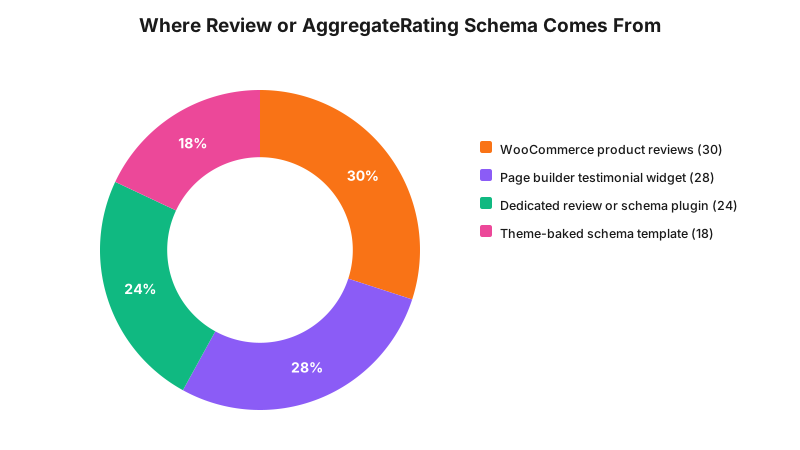
The split is an illustrative model of the four common sources, not a measured audit. The point holds regardless of the exact proportions: the markup rarely comes from one place, so a fix that checks only the obvious plugin usually leaves another source live.
What That Means for the Build
Finding the markup is a five-minute technical check, not a redesign.
View source and search for it directly. Load a page with reviews or a star rating displayed, view page source rather than just the rendered page, and search for Review, AggregateRating or ld+json. Most themes and plugins emit one or more script tags of type application/ld+json in the head.
Run the URL through Google’s Rich Results Test. search.google.com/test/rich-results parses a live URL and lists every structured data type Google’s crawler extracts, including a Review or AggregateRating type your theme might add with no visible interface for it.
Check Search Console’s Enhancements report. If Review snippets have been detected across your site over time, Search Console groups affected URLs under an Enhancements item, finding every page at once rather than one at a time.
Where it lives usually falls into one of four patterns.
- WooCommerce product reviews. Output Review and AggregateRating schema by default once reviews are enabled on a product, which matters for any clinic selling retail items, skincare, whitening kits, gift vouchers, alongside its clinical booking pages. Disable reviews on a specific product, or site-wide through WooCommerce’s product settings, to remove the schema with the visible review block.
- Page builder testimonial widgets. Tools like Elementor, Divi and Avada ship testimonial or review components. Some include a schema toggle in the widget’s advanced settings; others emit the markup regardless. Check the widget’s settings panel first. With no toggle, the widget itself needs replacing with a plain content block that carries no schema.
- Dedicated review or schema plugins. General SEO plugins with a schema module, Rank Math’s Schema Generator, for one example, includes a Review type and a Local SEO aggregate rating field, are usually the most straightforward to fix because they have a settings screen. Turn off the specific schema type rather than assuming an unused plugin adds nothing.
- Theme-baked schema. The hardest to find and highest-risk pattern. Some themes write the markup directly into a template file, with no settings screen at all. This needs a developer to open the theme files, through a child theme override where possible so the fix survives an update, and remove or filter the JSON-LD output.
Confirm the removal the same way you confirmed the problem: re-run the URL through the Rich Results Test and check the Review or AggregateRating type no longer appears.
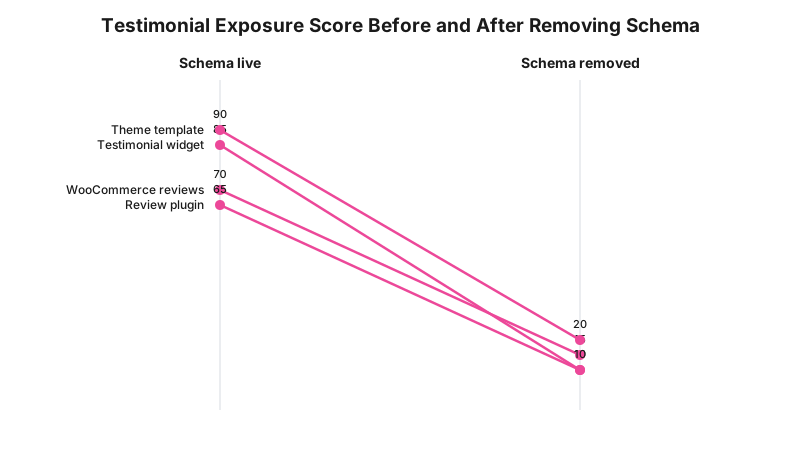
These are illustrative build-assessment scores, a judgement about relative exposure by source type, not a regulator’s scoring system. Theme-baked schema scores highest before removal because it is common and the least likely to have been noticed.
Schema Source Decision Matrix
| Source | How to find it | How to remove it | Removes visible content too |
|---|---|---|---|
| WooCommerce product reviews | Product page, view source | Disable reviews per product or site-wide in WooCommerce settings | Yes |
| Page builder testimonial widget | Widget settings panel or view source | Toggle schema off if available, otherwise replace the widget | No, if you keep the visible testimonial |
| Dedicated review or schema plugin | Plugin settings screen | Disable the specific schema type or module | Depends on the plugin |
| Theme-baked schema | View source or Rich Results Test, no settings screen | Child theme template override or a filter on the JSON-LD output, a developer task | No |
A Worked Example
Cosmetic clinic. A Perth injectables clinic ran a page builder testimonial carousel on its homepage, five cards pulling a patient’s name and a line about their results. The widget’s schema toggle sat on by default, untouched since setup. The Rich Results Test showed a Review type with all five reviewBody fields populated, one describing the best lip filler results the reviewer had ever had. Turning the toggle off removed the schema on the next page load. The visible carousel still needed a separate fix, since the cards themselves were a section 133 problem regardless of the schema, so the clinic replaced it with an aggregate star rating and a link to its Google profile.
Dental practice. A practice’s WordPress site ran a WooCommerce shop for retail products, an electric toothbrush and a teeth-whitening kit, alongside its clinical booking pages. Product reviews were enabled by default when WooCommerce was installed, and three reviews on the whitening kit’s page described the reviewer’s own veneer or whitening results at the practice rather than the product. That AggregateRating schema had been live for over a year. The developer disabled reviews on that one product rather than site-wide, since a review that stays on-topic for the product carries materially lower risk, and the three off-topic reviews came off display with their schema.
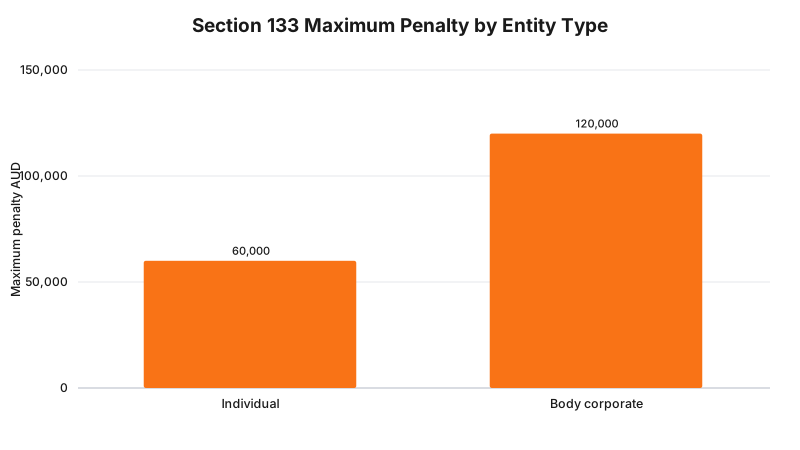
Both figures are the statutory ceiling per offence, not a typical fine, and apply to a testimonial published through structured data the same as one printed on a page.
What to Check on Your Own Site
- View source on your homepage and any page with reviews or testimonials, and search for ld+json, Review or AggregateRating.
- Run your five highest-traffic pages through Google’s Rich Results Test and note every structured data type Google extracts.
- If you run WooCommerce or any retail shop functionality, check whether product reviews are enabled and read what the existing reviews say.
- Open every page builder widget that displays a testimonial, rating or review and check its settings for a schema toggle.
- Check Search Console’s Enhancements report for a Review snippet item across your whole site.
- If your theme has no settings screen for this and the markup is still appearing, get a developer to check the theme’s template files before assuming it cannot be found.
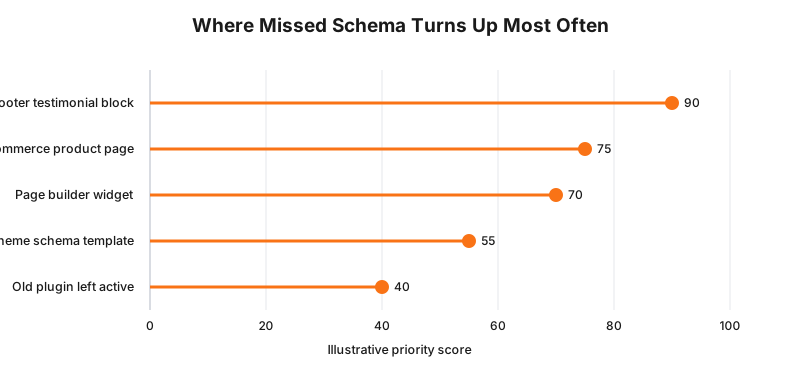
The footer ranks highest because it is the surface most commonly forgotten during a homepage-focused check.
The Enforcement Anchor
AHPRA’s guidelines state that National Boards and AHPRA deal with non-compliant advertising through Board disciplinary processes where conduct is considered unsatisfactory, and through prosecuting breaches of the National Law’s advertising provisions through the courts where prosecution guidelines are met.
A published Australian determination that turns specifically on Review or AggregateRating schema markup, as distinct from a visible testimonial, a reviews widget or a social feed embed, is not something we can point to. Structured data is a newer surface than a testimonial banner, and reported cases have not caught up to it. Reporting that gap plainly is more useful than inventing a case that does not exist.
Where This Gets Hard
Two things make this messier than it looks.
Some page builders and plugins change their own schema behaviour without asking. A widget with no schema toggle last year can ship one in an update, defaulted on, with no changelog anyone reads. A one-off check finds today’s problem, not next quarter’s.
The line between a product review and a clinical testimonial wearing a product’s schema type is not always clean either. A skincare product review mentioning the reviewer’s skin has never looked this good since starting treatment at the clinic describes the clinic’s service, not the product, even though it sits inside Product schema. Treat the content, not the schema type, as what decides the risk.
The regulator says advertising a regulated health service must not use a testimonial referring to a clinical aspect; the build consequence is that Review and AggregateRating schema carrying a patient’s clinical statement has to be found and removed from the page’s structured data, not just hidden from view; whether a specific piece of markup on your site meets that description is a question for your medical defence organisation or your lawyer.
Status
In force. Section 133 of the Health Practitioner Regulation National Law is current legislation, AHPRA’s guidelines for advertising higher risk non-surgical cosmetic procedures have applied since 2 September 2025, and Google’s structured data guidelines for review snippets were last updated 24 July 2026 and are live guidance now. Nothing in this post concerns a proposal or a provision pending commencement, as at 14 September 2026.
Frequently Asked Questions
Does removing Review or AggregateRating schema also mean removing the visible reviews from my page?
No, not automatically. Removing the schema stops the machine readable version from being published in your page’s JSON-LD, but a testimonial visible on the page is still a separate section 133 problem. Fixing the schema and fixing what a visitor can read are two separate steps.
How do I find out whether my WordPress theme or plugins are already emitting this schema?
View source and search for Review, AggregateRating or ld+json, or run the URL through Google’s Rich Results Test, which lists every structured data type Google’s crawler extracts. Search Console’s Enhancements report groups affected URLs across your whole site if the pattern has been detected before.
Will removing self review schema hurt my Google rankings?
Google’s own guidelines state a page using LocalBusiness or Organization markup is ineligible for the star review rich result once the business controls the reviews about itself, so that rich result was never available to begin with. Removing the schema does not remove a ranking benefit the page was receiving.
What is the actual penalty if a clinic leaves this schema live?
Section 133 sets a maximum penalty of $60,000 for an individual and $120,000 for a body corporate per offence for a standard advertising breach, including a testimonial published through structured data. Some secondary sources circulate a lower figure, commonly $30,000, and the current Act text does not support it.
Get Your Schema Audited
Get in touch with RockingWeb to check your site’s JSON-LD structured data alongside every visible testimonial surface and flag exactly which schema types are live on which pages.
Sources
- Federal Register of Legislation - Health Practitioner Regulation National Law, section 133(1)(c), testimonial prohibition and maximum penalties. Checked 14 September 2026.
- AHPRA - Guidelines for advertising higher risk non-surgical cosmetic procedures, in effect since 2 September 2025, including scope. Checked 14 September 2026.
- Google Search Central - Review snippet structured data guidelines, self-serving review restriction, last updated 24 July 2026. Checked 14 September 2026.
Related reading: why you cannot embed a reviews widget on a health website and social feed embeds that auto-pull testimonials.
Last reviewed: 14 September 2026.
Vikas Thakur
Founder of RockingWeb. 16 years of experience from working at TPG, iiNet and Monadelphous, now building websites, software and digital marketing for local businesses in Rockingham and Perth.