Why GA4 Shows Zero Bookings From Third-Party Widgets
When a booking finishes on a vendor's domain or inside an iframe, GA4 usually can't see it. Here's how to wire cross-domain measurement and the Measurement Protocol so bookings stop vanishing from your reports.
 Vikas Thakur Founder, RockingWeb 12 min read
On this page 12
- Key takeaways
- What Google’s Documentation Says
- What That Means for the Build
- Decision Matrix: Which Fix Applies to Your Setup
- Worked Example
- What to Check on Your Own Site
- Is There Regulatory Teeth Behind This
- Where This Gets Hard
- Status
- Frequently Asked Questions
- Need a hand with your website?
- Sources and References
Key takeaways
- Google’s GA4 Measurement Protocol reference describes the API as built to “augment automatic collection through gtag, Tag Manager, and Google Analytics for Firebase, not to replace it,” which is exactly why a bolted-on third-party booking step usually reports as zero conversions.
- Two GA4 mechanisms close the gap: cross-domain measurement, which uses a
_gllinker parameter, for bookings that redirect to a separate domain your GA4 tag can also run on; and the Measurement Protocol server API, for bookings your tag can never see at all. - The Measurement Protocol needs a join key, either
client_idorapp_instance_id, captured from your own site before the visitor leaves it, per Google’s documentation. - Google’s own reference states that event generation rules configured in the GA4 interface are not triggered by Measurement Protocol events, so a booking-complete event sent this way still has to be marked as a key event by hand.
- Server-to-server Measurement Protocol calls alone, with no client-side tag already firing on your own domain first, produce only partial reporting, according to Google’s documentation.
- As at August 2026, GA4 has no built-in connector for most clinic booking vendors. Closing this gap is a manual build task: usually a webhook plus a short script, not a checkbox in the GA4 interface.
Picture the practice manager opening GA4 on a Monday morning. Sessions are up. The bounce rate looks healthy. Conversions, though, sit at zero for the third week running, even though the front desk logged eleven new bookings from the website over the weekend. Nothing is broken in Google Analytics. The bookings are just happening somewhere GA4 was never told to look: a third-party booking platform running on its own domain, or inside an iframe your tag can’t see into. Here’s how to point GA4 at the part of the funnel it’s currently blind to, and where that fix runs into a wall.
GA4 cannot see a booking completed on a different domain or in an iframe unless you wire it up using cross-domain linking or Measurement Protocol. That’s the whole problem in one line. The fix depends on whether your booking vendor lets you run scripts on their domain (most don’t) and whether they offer a webhook or completion redirect you can hook into (many do, but not all).
What Google’s Documentation Says
Two GA4 features are relevant here, and both come straight from Google Analytics Help, not a third-party interpretation of it.
Cross-domain measurement. GA4’s cross-domain measurement guide explains that Analytics uses first-party cookies to set IDs for each unique user and session, and that these IDs are passed between domains through a _gl URL parameter attached to outbound links. Set up the linked domains in the GA4 admin interface, and a visitor who clicks from your site to a linked domain carries their client ID with them, letting GA4 stitch the two domains into a single session.
Measurement Protocol. GA4’s Measurement Protocol reference is built for exactly the case cross-domain linking can’t reach: sending events into GA4 from a server, with no browser page load involved. Google names the intended use cases directly: linking online-to-offline behaviour, measuring server-side interactions, recording offline conversions, and sending events from systems that lack automatic collection. A booking that completes inside a vendor’s system and is only confirmed by a webhook or an email receipt is precisely this case.
The catch, stated in the same reference: Measurement Protocol is meant to “augment automatic collection… not to replace it.” Google is explicit that if you use server-to-server calls alone, without a GA4 tag already running somewhere on your own site to establish the session, “only partial reporting may be available.” The Protocol closes a gap in an existing setup. It isn’t a standalone tracking solution.
Takeaway: Cross-domain measurement fixes the problem only if your vendor lets you run your GA4 tag on their domain. Measurement Protocol fixes it when they don’t, but it needs your own site’s tag doing the rest of the job first.
What That Means for the Build
In practice, three pieces have to line up.
1. Capture the client ID before the visitor leaves your domain. GA4’s JavaScript SDK exposes the current client ID via gtag('get', 'G-XXXXXXX', 'client_id', callback). Read it when the visitor clicks through to the booking widget and store it, either in a hidden form field the booking platform passes back to you, in a query string parameter if the vendor’s URL scheme allows custom parameters, or in your own backend keyed against the enquiry.
2. Configure cross-domain measurement if your tag can run on the vendor’s domain. In GA4, under Admin, then Data Streams, then your web stream, then Configure tag settings, then Configure your domains, add the booking platform’s domain to the list GA4 treats as belonging to you. This only helps if the vendor allows a custom GA4 tag on their pages. Most white-label consumer booking platforms don’t, for their own security reasons, which is why this step alone rarely finishes the job for a clinic.
3. Wire the vendor’s webhook or completion redirect to a Measurement Protocol call. When the vendor confirms a booking, either via a webhook to your server or a redirect back to a thank-you page on your own domain, fire an HTTP POST to https://www.google-analytics.com/mp/collect, authenticated with a measurement ID and API secret from your GA4 stream settings, containing the stored client_id, an event name such as booking_complete, and the relevant booking parameters (treatment type, value, location). Include timestamp_micros only if the booking was confirmed some time after the click, and include a session ID if you captured one, otherwise the event risks landing as an unassigned, direct-traffic session in GA4’s reports rather than attributing back to the campaign that drove the enquiry.
4. Mark the event as a key event manually. Because Measurement Protocol events don’t trigger GA4’s interface-configured event rules, booking_complete won’t automatically appear as a conversion. Go to Admin, then Events, and mark it as a key event once it shows up in the events list, which can take up to 24 to 48 hours after the first event is received.
Decision Matrix: Which Fix Applies to Your Setup
| Booking setup | Where GA4’s tag can run | Fix | Effort |
|---|---|---|---|
| Widget embedded on your own domain | On the same page, no issue | Standard GA4 event tags, no special work | Low |
| Redirect to a separate domain, vendor allows custom scripts | On the vendor’s domain, if permitted | Cross-domain measurement, _gl linker | Medium |
| Redirect to a separate domain, vendor blocks custom scripts | Nowhere on the vendor’s domain | Client ID capture plus Measurement Protocol via webhook or redirect | High |
| Booking form inside an iframe on your own page | Inside the iframe only, not visible to the parent page’s tag | postMessage from iframe to parent (if the vendor supports it), or a completion redirect back to your domain | Medium to high |
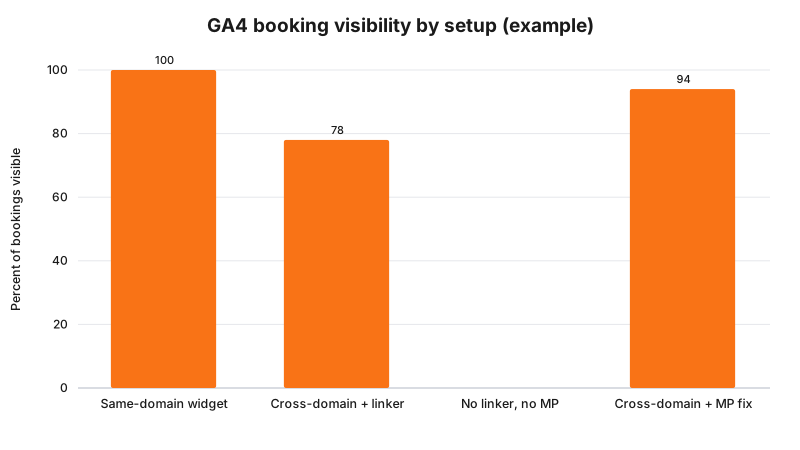
Illustrative example only, not measured data. The exact percentage you recover depends on how completely the webhook fires and how reliably you capture the client ID before handoff.
Takeaway: The harder the vendor makes it to run your own script on their domain, the more the fix shifts from a settings change to an actual build task.
Worked Example
Cosmetic clinic. A Perth injectables clinic embeds a third-party booking widget that redirects visitors to book.vendorplatform.com.au to complete the appointment. The vendor doesn’t allow custom scripts on their booking pages, so cross-domain measurement, even correctly configured, only tells GA4 the visitor left the site. It never sees the confirmation. The clinic’s developer adds a small script on the booking button that reads the GA4 client ID and appends it as a query parameter to the redirect URL. The vendor supports a webhook on successful booking, which the clinic’s server catches, extracts the client ID and treatment type from, and forwards to GA4 as a booking_complete Measurement Protocol event. Within a day, the event appears in GA4’s event list and gets marked as a key event.
Cosmetic dentistry. A dental practice runs its booking form inside an iframe embedded directly on its own homepage, so visitors never technically leave the practice’s domain. Cross-domain measurement doesn’t apply here at all, since there’s no cross-domain redirect, but the iframe’s own GA4 tag (if the vendor even has one) belongs to the vendor’s account, not the practice’s. The practice’s developer confirms with the vendor that the booking widget posts a window.postMessage event to the parent page on completion. The parent page listens for that message and fires a standard GA4 gtag event directly, no Measurement Protocol required, because the confirmation happens client-side in a browser the practice’s own tag can see.
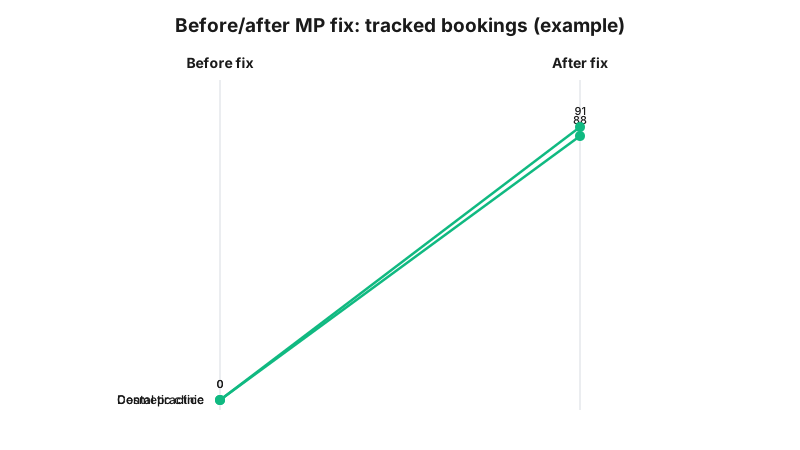
Illustrative example. Actual recovery rates depend on webhook reliability and how many visitors have cookies or ad blockers that strip the client ID before handoff.
Takeaway: The right fix depends entirely on whether the booking step happens on a separate domain or inside an iframe on your own, and the two need genuinely different builds.
What to Check on Your Own Site
- Open GA4’s Realtime report, click through your own booking widget on a test device, and confirm you see events after the vendor’s confirmation step, not just up to the point the visitor leaves your site.
- In GA4 Admin, under Data Streams, then Configure tag settings, then Configure your domains, check whether your booking vendor’s domain is already listed, and whether it needs to be.
- Ask your booking vendor directly whether they support a webhook, an API callback, or a completion redirect URL. Not all do, and the answer changes which fix is possible.
- If you’re capturing the client ID client-side, test in a private browsing window and with a common ad blocker enabled. Some blockers strip GA4’s cookie or query parameters, which silently breaks the join key.
- Check GA4 Admin, then Events, for whether your
booking_complete(or equivalent) event has been manually marked as a key event. Sending it via Measurement Protocol does not do this automatically. - If you export to BigQuery, note that Google’s BigQuery Export documentation states late-arriving events are attributed to their original event date once they land, which matters if your webhook fires hours after the actual booking rather than instantly.
Is There Regulatory Teeth Behind This
No. Failing to track a booking correctly isn’t a compliance breach, it’s a measurement gap, and there’s no infringement notice, determination, or complaint outcome attached to it because it isn’t against any law. The closest regulatory-adjacent risk sits one step over: if the client ID handoff to your booking vendor, or the webhook coming back, carries more than an anonymous identifier, such as a name, phone number, or treatment type tied to an identifiable person, that becomes personal information under the Privacy Act, and the OAIC’s Australian Privacy Principles guidelines apply to how it’s collected, disclosed, and secured. Whether a specific client ID or webhook payload counts as personal information in your setup is a question for your medical defence organisation or your lawyer, not this article.
Where This Gets Hard
Measurement Protocol closes the reporting gap, but it doesn’t recover data you never captured in the first place. If a visitor clears cookies, uses a browser that partitions storage by domain, or runs an ad blocker that strips your GA4 cookie or query parameters before the redirect happens, the client ID is gone, and no amount of server-side wiring can join that booking back to the session that generated it. You’ll always have a residual gap between bookings the front desk can count and bookings GA4 can attribute, particularly for return visitors on a different device to the one they first researched treatments on. Google’s own documentation is honest about this trade-off: server-to-server calls augment client-side tracking, they don’t substitute for it.
Status
Both cross-domain measurement and the Measurement Protocol are current, standing GA4 features as at August 2026, not proposals or beta functionality. Google’s Measurement Protocol reference notes that the newer Data Manager API is positioned as a future alternative for server-to-server integrations, but as at the date this article was checked, Measurement Protocol remains the documented, supported method, and there is no announced date by which it will be retired.
Frequently Asked Questions
Why doesn’t GA4 track bookings that complete on a third-party platform?
GA4 only counts events from pages carrying your GA4 tag. Once a visitor moves to a booking vendor’s own domain, or into an iframe you don’t control, your tag usually isn’t there to see the booking confirm, so the session ends untracked in your account.
Can I just add my GA4 tag to my booking platform’s website?
Only if the vendor allows it. Most clinic booking platforms don’t let clients inject custom scripts on their domain for security reasons, so cross-domain measurement alone often can’t finish the job and you need a server-side fix as well.
What is the GA4 Measurement Protocol and do I need a developer?
It’s Google’s server-to-server API for sending events straight into GA4 without a page load. Wiring it to a booking vendor’s webhook needs a short script that captures the client ID and posts the completed-booking event, so yes, budget developer time.
Need a hand with your website?
If you want a second pair of eyes on how this applies to your own site, request a callback and we will talk it through.
Sources and References
- Google Analytics Help. Date checked: 15 August 2026.
- Google Analytics 4 Measurement Protocol reference, Google Developers. Date checked: 15 August 2026.
- Cross-domain measurement, Google Analytics Help. Date checked: 15 August 2026.
- BigQuery Export overview, Google Analytics Help. Date checked: 15 August 2026.
- Australian Privacy Principles guidelines, Office of the Australian Information Commissioner. Date checked: 15 August 2026.
Last reviewed: 15 August 2026.
If your booking data is quietly disappearing between your website and your reports, that’s a build problem, not a Google Analytics problem, and it’s one we fix for clinics regularly. Get started with RockingWeb and we’ll wire up your booking flow’s tracking properly.
Vikas Thakur
Founder of RockingWeb. 16 years of experience from working at TPG, iiNet and Monadelphous, now building websites, software and digital marketing for local businesses in Rockingham and Perth.