Only One Halaxy Booking Embed Keeps Your Domain
Halaxy gives clinics two ways to put booking on their website, and only one of them keeps the visitor on your own domain. Here is what the embed code actually does and where a custom booking subdomain still is not on offer.
 Vikas Thakur Founder, RockingWeb 12 min read
If a patient clicks “Book Now” on your clinic’s website, does the page in their browser still say your domain, or does it jump to halaxy.com? The answer depends entirely on which of Halaxy’s two embed options your web developer used, and as at 15 August 2026 only one of them keeps the visitor on your site. The other, more common shortcut, a plain button link, hands the visitor straight to Halaxy’s own directory.
That distinction matters more than it sounds. A booking flow that quietly jumps to another company’s domain breaks the visual continuity you paid a developer to build, complicates your analytics, and can even confuse a patient who was not expecting to leave your site mid-booking. This post walks through what Halaxy’s own documentation says, what each option actually does on the page, and where the honest limit sits if you are hoping to run the whole booking engine on a custom subdomain like book.yourclinic.com.au.
What Halaxy’s own documentation says
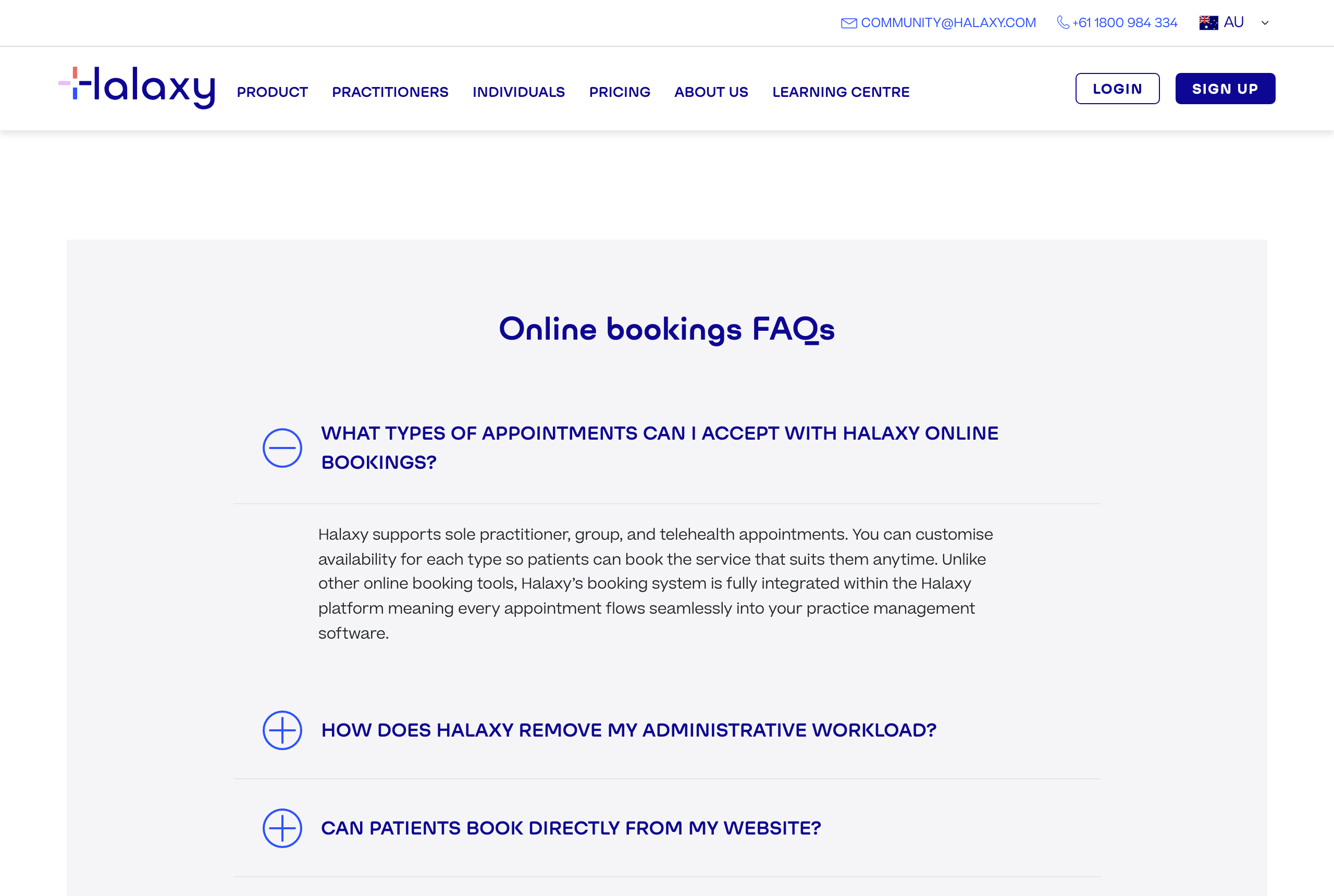
Halaxy is one of the practice management platforms named in RockingWeb’s vendor reference list alongside Cliniko, Power Diary, and Fresh Clinics, and its help centre publishes a dedicated article, Integrate online bookings in your website, on embedding the booking calendar into a practice site. Halaxy’s feature page states plainly: “Halaxy allows you to embed a branded calendar on your website so bookings are seamless, 24/7, and fully integrated into your practice management software” (halaxy.com/feature/online-bookings-and-directory, checked 15 August 2026).
Halaxy’s earlier help post, Accept bookings directly on your website (published 27 July 2018), describes the setup steps: go to Profile, click edit Directory Profile under Booking Preferences, then “copy HTML code from Embedded Online Booking Service” and “paste HTML embed code to your website.” The article notes that once the code is in, “when a patient books with you online, their information appears directly within your Halaxy, just like a regular booking.”
Separately, Halaxy’s help centre also documents a second, distinct option: an HTML button, rather than a full embed, that links out. One button variant “takes website visitors to your practitioner profile on the Halaxy directory,” and another “takes website visitors to your practitioner online booking page at that specific location.” Both button types navigate the visitor away from your site to a Halaxy-hosted page, which is the opposite behaviour of the full embed.
Halaxy also sells a White Label add-on. Its blog post How Halaxy helps you customise and manage your online bookings (published 29 September 2025) says the add-on lets a practice “customise your public facing pages to match your practice’s visual branding, including your bookings widget, online bookings header, directory profile, and much more.” Nowhere in that article, or in Halaxy’s 14 August 2025 post on practice website integrations and the Halaxy API, is a custom-domain or CNAME option mentioned. The API article confirms Halaxy also supports custom booking links “for specific fees, appointment types, practitioners, and locations” that can be embedded directly, and an API built on the FHIR standard for connecting other software, but none of that changes which domain actually serves the booking transaction.
Takeaway: Halaxy documents an embed that stays on your domain and a button that does not. Neither Halaxy’s help centre, blog, nor feature pages describe a way to serve the booking engine itself from a custom subdomain of your own site.
What that means for the build
For a developer briefing a client or building the integration, the practical difference sits in the markup, not the marketing copy.
The full booking page embed is an inline HTML snippet, sourced from your Halaxy account under Personal, then Profile, then Directory Profile Preferences, under the Embed tab. That snippet is pasted into the body of your page template, the same way you would paste a Google Maps embed or a review-widget script. Because it renders inline, the address bar keeps showing your domain (for example yourclinic.com.au/book) for the entire booking session. This is a client-side, CMS-level change, not a DNS or hosting-level one, and it does not require your web host or IT provider to touch nameservers.
The button embed is a different animal. It is an anchor tag styled as a button, and clicking it is a normal outbound link. The visitor’s browser navigates to a Halaxy-hosted URL on halaxy.com. If your site uses GA4, this is a cross-domain navigation, and unless cross-domain tracking is configured, that patient’s session gets recorded as a new, separate visit on Halaxy’s domain rather than a continuation of their journey on yours.
White Label changes what the visitor sees (colours, logo, header styling) inside the embed, but based on Halaxy’s own published description, it does not move the booking engine to a domain you control. Treat it as a skin, not a hosting migration.
If your goal is a fully custom-domain booking subdomain, one that a patient could bookmark as book.yourclinic.com.au and have it serve Halaxy’s actual booking engine at that address via a CNAME record, that is not a feature described anywhere in Halaxy’s public documentation as at this check date. The nearest workaround developers use elsewhere in the industry, a reverse proxy that rewrites the third-party booking domain to look like your own, sits outside anything Halaxy publishes support for, and carries its own risks around broken relative links, mixed-content warnings, and voided vendor support if something breaks.
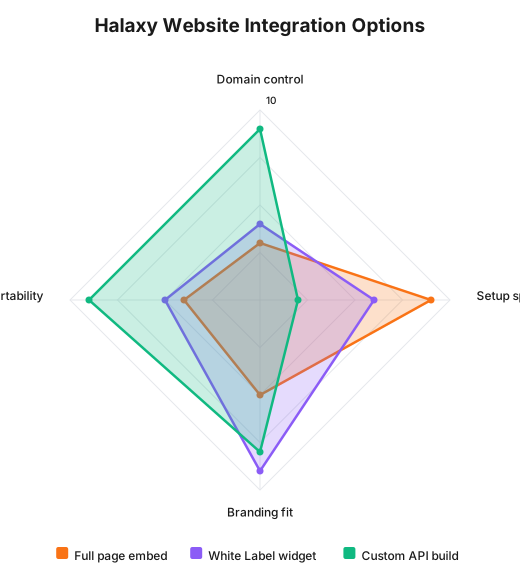
This chart is RockingWeb’s own build-experience rating out of 10 for each option, not a Halaxy-published figure. It illustrates the trade-off: the full page embed is fastest to set up but gives you the least control over the domain a booking session ultimately touches, and only a fully custom API build gets you close to full domain control, at the cost of far more build time.
Takeaway: The embed is a page-template change your web developer makes; the button is a link that leaves your site; White Label only re-skins whichever of those two you chose.
Decision matrix
| Option | Stays on your domain | Setup effort | Branding control | Best for |
|---|---|---|---|---|
| Full booking page embed | Yes, entire session | Low, paste HTML snippet | Basic, Halaxy default styling | Clinics wanting booking on-page fast |
| HTML button link | No, redirects to halaxy.com | Low, paste HTML snippet | None beyond button text/colour | A simple call-to-action, not a seamless flow |
| Embed plus White Label add-on | Yes, entire session | Moderate, add-on configuration | Full colour/logo match | Practices that need brand consistency |
| Custom build on Halaxy API | Yes, fully custom | High, developer-built integration | Complete, built from scratch | Multi-location groups needing a bespoke flow |
Worked example
Cosmetic clinic scenario. A Perth cosmetic injectables clinic asks its developer for “booking that looks like part of our site.” The developer pulls the full booking page embed code from Personal, Profile, Directory Profile Preferences, Embed tab, and pastes it into a new /book page template. The address bar reads theclinic.com.au/book throughout. The clinic then adds the White Label add-on so the calendar’s accent colour matches its brand palette, rather than Halaxy’s default styling. Nothing about the domain changes at that point, White Label is styling only.
Cosmetic dentistry practice scenario. A dental group with three locations wants each location’s booking page addressable and trackable separately for its Google Ads campaigns. Because the group already runs GA4 conversion tracking tied to on-site page views, the practice manager avoids the button-link embed (which would report bookings as Halaxy-domain sessions, breaking attribution) and instead embeds a separate full booking page per location page, using Halaxy’s custom booking links “for specific fees, appointment types, practitioners, and locations” referenced in Halaxy’s August 2025 integrations post. Each location’s booking still runs through Halaxy’s backend, but the visible page and the GA4 event both stay attributed to the practice’s own domain.
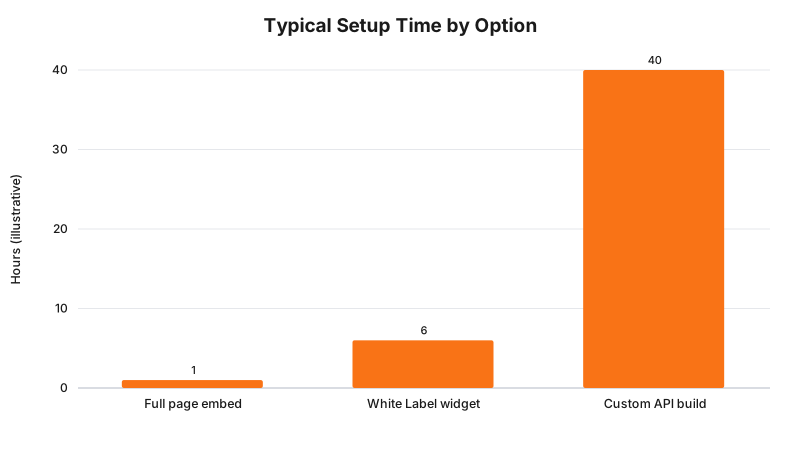
These hours are illustrative estimates based on typical build patterns for this kind of integration, not a Halaxy-published benchmark. Pasting the embed code is close to instant once you have it; White Label configuration adds a working session; a from-scratch API build is a proper development project.
Takeaway: Both examples use the same embed mechanism, the difference is whether the clinic also needs multi-location attribution, which pushes the build toward Halaxy’s custom booking links rather than the default single embed.
What to check on your own site
- Open your site’s booking page in an incognito window and click through to confirm the address bar never changes to halaxy.com. If it does, you are on the button-link embed, not the full page embed.
- Check your page source for the embed snippet inside the body content, not inside a header or footer include that might get stripped by a theme update.
- Confirm GA4 is not double-counting a booking as two separate sessions, one on your domain and one on Halaxy’s, a sign the button-link embed is in use somewhere it should not be.
- If you run the White Label add-on, verify the calendar’s colours and logo actually match your brand, since a lapsed subscription or a missed configuration step can silently revert the widget to Halaxy’s default styling.
- If you operate multiple locations, confirm each location page uses its own booking link rather than one shared embed, so conversion data does not get blended across sites.
- Ask whoever built your site whether the embed snippet is hardcoded into a template file or set through a CMS field, so you know who to contact when it needs updating.
Where the enforcement teeth are, and where they are not
We looked for a real AHPRA, TGA, or OAIC enforcement action tied specifically to a clinic’s choice of booking-widget embed type or domain handling, and found none. This is not a rule with its own penalty regime, it is a vendor product decision. The regulator says nothing directly about which Halaxy embed option a clinic uses; the build consequence is entirely about attribution accuracy, patient experience, and who controls the page a visitor is looking at. Where the domain choice does start to intersect with regulated territory is the data that flows through it: any booking form, on either embed type, still transmits patient contact and appointment details into Halaxy’s systems, and Australian health service providers are covered by the Privacy Act 1988 regardless of business turnover. Whether a specific booking-flow configuration meets your obligations under that Act is a question for your privacy officer or your lawyer, not this article.
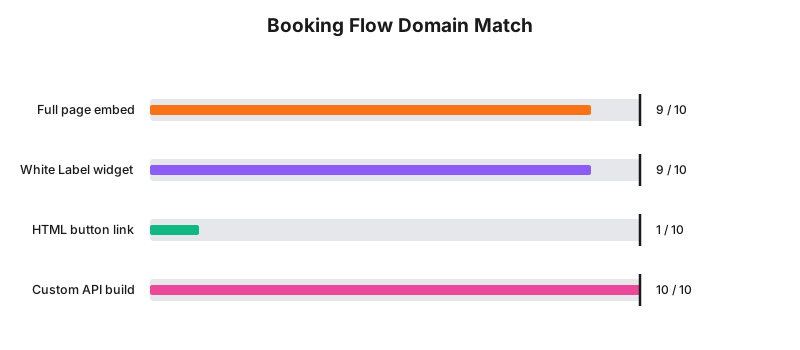
This is RockingWeb’s own scoring of how closely each option keeps the visible booking session on your domain, out of a maximum of 10, not a Halaxy metric.
Takeaway: No enforcement action exists for this decision because it is not a compliance rule, but the data flowing through whichever embed you pick still sits inside the Privacy Act’s health-provider coverage.
Where this gets hard
The honest limit is that Halaxy’s public documentation, help centre included, does not publish deep technical detail on exactly what markup the embed snippet contains (whether it is an iframe, a JavaScript widget, or something else), which makes it hard for a developer to fully audit page-speed impact or content security policy implications before pasting it in. Halaxy also does not publish a documented custom-domain or CNAME feature for the booking engine itself, so a practice that wants book.yourclinic.com.au to genuinely serve Halaxy’s booking backend at that address has no vendor-supported path to get there. The only route available is the custom API build listed in the decision matrix above, which trades setup speed for full control and puts the ongoing maintenance burden on your own developer rather than Halaxy’s support team. If a future Halaxy release adds a native custom-domain option, this section will need revisiting, treat the current gap as a feature Halaxy has not shipped yet, not a permanent architectural wall.
Status line
As at 15 August 2026, Halaxy’s HTML embed, button-link embed, and White Label add-on are current, live product features described in Halaxy’s own help centre, blog, and feature pages; no documented custom-domain or CNAME option for the underlying booking engine exists in any Halaxy material we could locate as of this check date, so this is an absence in current published functionality rather than a proposal under consultation or a rule pending commencement.
Frequently Asked Questions
Can I put the Halaxy booking calendar on my own website domain?
Yes. Halaxy’s full booking page embed is an HTML snippet you paste into your website’s page body, and it displays the calendar directly inside your page, so the visitor never leaves your domain. The separate button-link embed works differently and sends the visitor to Halaxy’s own directory or booking page instead.
Does Halaxy support a custom booking subdomain like book.yourclinic.com.au?
Not as a documented feature. Halaxy’s help centre, blog, and feature pages describe HTML embed codes and a White Label branding add-on, but none of them describe a CNAME or custom-domain option that serves the booking engine itself from your own subdomain.
What does the Halaxy White Label add-on actually change?
White Label customises the visual branding of your booking widget, online bookings header, and directory profile so they match your practice’s colours and logo. Halaxy’s own article on the add-on does not say it changes the URL or domain the booking page runs on.
Sources and References
- Halaxy, “Integrate online bookings in your website,” Halaxy Help Guide, support.halaxy.com/hc/en-au/articles/6033494318735, date checked 15 August 2026.
- Halaxy, “Online bookings and directories that run themselves,” halaxy.com/feature/online-bookings-and-directory, date checked 15 August 2026.
- Halaxy, “Accept bookings directly on your website,” Halaxy blog, published 27 July 2018, blog.halaxy.com/online-bookings-on-practice-website, date checked 15 August 2026.
- Halaxy, “How Halaxy helps you customise and manage your online bookings,” Halaxy blog, published 29 September 2025, blog.halaxy.com/how-halaxy-helps-you-customise-and-manage-your-online-bookings, date checked 15 August 2026.
- Halaxy, “New Halaxy customisations: online bookings, practice website integrations, Halaxy API,” Halaxy blog, published 14 August 2025, blog.halaxy.com/new-halaxy-customisations-online-bookings-practice-website-integrations-halaxy-api, date checked 15 August 2026.
- Office of the Australian Information Commissioner, Privacy Act 1988, legislation.gov.au, health service providers covered regardless of turnover, date checked 15 August 2026.
Last reviewed: 15 August 2026.
Vikas Thakur
Founder of RockingWeb. 16 years of experience from working at TPG, iiNet and Monadelphous, now building websites, software and digital marketing for local businesses in Rockingham and Perth.