Power Diary Website Integration: The 2024 Zanda Change
Power Diary rebranded to Zanda Health in late 2024. Here is exactly what changed in the iframe embed, the client portal URL, and the practitioner booking rules that matter for a multi-practitioner clinic or dental practice website.
 Vikas Thakur Founder, RockingWeb 10 min read
Power Diary is now called Zanda. The practice management software behind your clinic’s booking widget has not changed, but the name, the domain and the client portal branding all did, on 21 November 2024. If your website still has an iframe pointed at an old powerdiary.com link, or your developer built the embed before the rebrand, that widget is running on borrowed time.
What the Vendor Documentation Actually Says
Zanda’s own support article on embedding the client portal names the iframe as the primary method: Adding Your Client Portal to Your Website, Social Media and Google, published on Zanda’s knowledge base. It gives three region-specific example URLs, one each for Australia, the US and Canada, and the UK, and confirms the embed works in current browsers including Safari on Mac, iPhone and iPad, but not in very old browser versions (Safari iOS 12, macOS 10.14, Chrome 50 to 69).
Separately, Zanda’s name-change FAQ, Power Diary Becoming Zanda FAQs, states the website URL changed to zandahealth.com on 21 November 2024 and the app URL changed around 29 December 2024. It confirms redirects are in place for existing links, but recommends updating any bookmarks or links used regularly rather than relying on the redirect indefinitely.
Neither document is a regulation. Both are current vendor documentation, and the rebrand detail matters because it changes what a working embed looks like today versus what a developer copied from a tutorial written before November 2024.
What That Means for the Build
Three things follow directly from the documentation above.
The iframe source is a Zanda subdomain, not your domain. The documented pattern is <iframe src="https://clientportal.zandahealth.com/clientportal/xxxxxxx" height="75%" width="75%"></iframe> for Australian accounts, with clientportal.us.zandahealth.com and clientportal.uk.zandahealth.com as the regional equivalents. Whatever you build, check the src attribute matches the current domain for your account’s region, not an old powerdiary.com or app.powerdiary.com host copied from an older build.
Height and width need real values, not the documented placeholders. The example uses percentage values (height="75%" width="75%"), which only render sensibly if the parent container has an explicit height. A percentage height on an iframe inside a container with no set height collapses to near-zero in most browsers. Set an explicit pixel height on the wrapping div, or use a fixed pixel height on the iframe itself and let width scale.
The alternative to an iframe is a plain link, not a script tag. Zanda’s documentation also covers a “Book Now” button pattern, which is a standard HTML anchor tag, for example <a href="[your client portal URL]" target="_blank">Book Now</a>. There is no documented JavaScript widget or script-based embed in the current material. If a vendor or freelancer offers you a “custom booking widget” for Power Diary or Zanda beyond these two patterns, that is their own build, not something the platform ships natively.
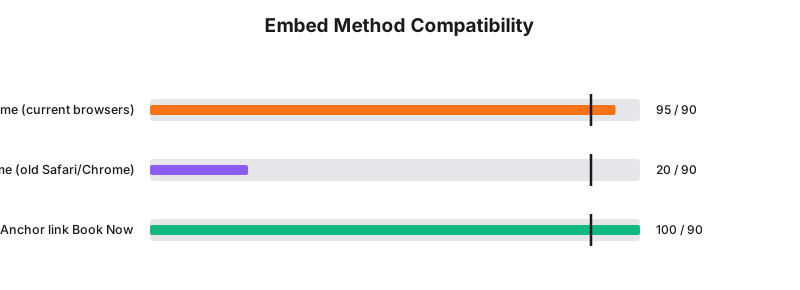
Iframe embeds cover the browsers most clinics see traffic from today. A plain anchor link degrades to nothing worse than a normal outbound link, which is why it is worth keeping as a fallback even if the iframe is your primary pattern.
Takeaway: check the region in your iframe src, set an explicit container height, and keep a plain link as a fallback.
Multi-Practitioner Booking Settings
This is where a general “how to embed a booking widget” guide stops being useful for a multi-practitioner clinic or a dental practice with several dentists on the roster. Zanda’s client portal setup documentation, Setting Up Online Bookings on Client Portal, names several settings that determine what a client actually sees once the embed loads.
| Setting | Controls | Scope |
|---|---|---|
| Clients Can Book With Any Practitioner | Whether a client can choose any practitioner or only ones already assigned to them | Account-wide |
| Online Bookings (per timeslot) | Whether a specific practitioner accepts online bookings in a given availability block | Per practitioner |
| Minimum Gap Between Bookings | Buffer time enforced between consecutive online bookings | Account-wide |
| Earliest Time Clients Can Book | Minimum advance notice before an appointment slot becomes bookable | Account-wide |
| Limit How Far Clients Can Book | Maximum advance window, documented as ranging from one week to twelve months | Account-wide |
| Cancellation Policy | Cut-off window and cancellation rules applied via the portal | Account-wide |
| Available Services (Client Portal) | Which services appear as bookable in the portal | Account-wide, filtered per practitioner via availability |
The pattern worth noticing: most booking rules are account-wide settings, not per-practitioner ones. A practitioner only gets individual control over one thing, whether their own availability blocks accept online bookings at all. If your clinic has five practitioners and wants three of them bookable online and two by phone only, the mechanism is toggling “Online Bookings” off inside those two practitioners’ availability, not a separate account-level rule.
Location is documented as a mandatory step in the booking flow that cannot be removed, though it auto-selects when the account only has one location. A single-site clinic will never see this step add friction; a two-site clinic will, and should test the flow as a new patient would experience it before assuming location selection is obvious.
Worked Examples
Cosmetic clinic, three injectors, one location. The clinic wants clients to book with a named injector, not “any available”. Practice manager sets “Clients Can Book With Any Practitioner” off, then confirms each injector has “Online Bookings” enabled inside their own availability blocks. Because there is one location, the mandatory location step auto-selects and adds no extra click. The iframe on the website’s booking page points at the AU regional URL, clientportal.zandahealth.com/clientportal/xxxxxxx, inside a container with an explicit 900px height so the percentage-based iframe height renders correctly on both desktop and mobile.
Cosmetic dental practice, four dentists, two locations. The practice wants any dentist bookable for a general check-up, but wants specific dentists shown by name for cosmetic consultations. This needs two different service categories in “Available Services”, one general and one cosmetic, with practitioner availability configured so only the practitioners who do cosmetic work show “Online Bookings” enabled against the cosmetic service’s timeslots. The location step is not auto-selected here, since there are two sites, so the practice tests the full flow from a patient’s phone to confirm the location step reads clearly before the first cosmetic booking goes live.
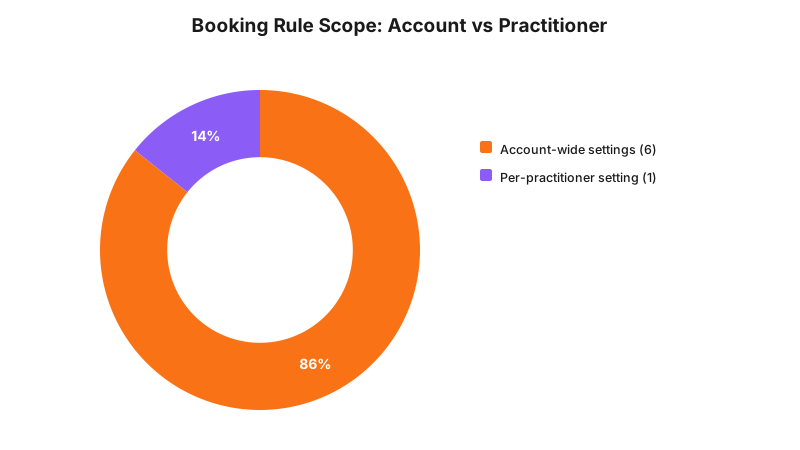
Six of the seven documented booking settings sit at the account level. Only the practitioner-level online bookings toggle gives an individual practitioner control, which is the setting a multi-practitioner clinic reaches for first and most often misses.
What to Check on Your Own Site
- Open your site’s booking page and inspect the iframe
srcattribute. Does it start withclientportal.zandahealth.com,clientportal.us.zandahealth.com, orclientportal.uk.zandahealth.com, matching your account’s region, or does it still referencepowerdiary.com? - Load the booking page on a phone and confirm the iframe renders at a usable height, not collapsed to a sliver. A percentage height with no explicit parent height is the most common cause.
- Confirm “Clients Can Book With Any Practitioner” is set the way your clinic actually wants it, not left on the default.
- For each practitioner who should not take online bookings, confirm “Online Bookings” is switched off in their own availability, not assumed off because it is off elsewhere.
- If your clinic has more than one location, book a test appointment yourself and check the location step is clear rather than confusing.
- Check whether your booking page still has a plain “Book Now” link as a fallback in case the iframe fails to load, particularly for visitors on an older browser version.
- Search your site’s HTML for any leftover
powerdiary.comreferences in scripts, meta tags, or footer credit links, not just the booking iframe itself.
Where This Gets Hard
None of this is enforced by a regulator. There is no infringement notice or determination tied to an outdated booking iframe URL, because embedding a third-party client portal is a vendor integration choice, not a statutory obligation. The consequence of getting it wrong is a broken or confusing booking flow, not a fine.
The genuine limit is that Zanda’s documentation does not cover custom domains or white-labelling. The booking flow itself always runs on a zandahealth.com subdomain, visible in the browser address bar if a client opens it directly rather than through your embedded iframe, and there is no documented option to serve it from your own domain instead. If your marketing or SEO plan assumes the booking flow will ever appear under your own domain in search results or analytics, that assumption does not match the current documented product. It is a client-side rendering choice within your page, not a change of where the booking transaction itself lives.
Because a booking flow collects health information, in the sense of an inference about what treatment someone is seeking, general Privacy Act obligations for health service providers still apply regardless of your clinic’s size, per the OAIC’s Australian Privacy Principles guidelines. That is a separate question from the iframe mechanics covered here, and whether your specific data flow meets those obligations is a question for your own privacy assessment, not something this post can confirm for your account.
Status
This is current vendor documentation, checked directly against Zanda’s live support site. The rebrand from Power Diary to Zanda is a completed change, not a pending one: the website domain moved on 21 November 2024 and the app URL moved around 29 December 2024, both according to Zanda’s own FAQ. There is no legislated rule requiring any particular embed method; this is a build-compatibility issue, not a compliance one.
Frequently Asked Questions
Is Power Diary still called Power Diary?
No. Power Diary rebranded to Zanda on 21 November 2024, according to the company’s own name-change FAQ. The underlying practice management software did not change, only the name, the domain (zandahealth.com), and the branding.
Do old Power Diary client portal links still work on my website?
Zanda’s FAQ says redirects are in place so existing links keep working, but recommends updating any bookmarks or embedded links you use regularly. An iframe pointed at an old URL that later stops redirecting will show a broken booking widget with no warning.
Can clients pick a specific practitioner when booking online through Zanda?
Only if your account has the setting that allows it. Zanda’s client portal documentation names a setting that controls whether clients can book with any practitioner or are restricted to specific ones, so a multi-practitioner clinic needs to check this setting explicitly rather than assume it is on.
Does the Zanda client portal run on my own website domain?
No. The documented embed method is an iframe pointing at a clientportal.zandahealth.com URL (or the US or UK regional equivalent), so the booking flow itself always runs on Zanda’s domain, not yours, even when it is visually embedded inside your page.
Get Your Booking Embed Checked
Talk to RockingWeb and we will check your live booking iframe against the current documented URLs and practitioner settings before a broken link costs you a new patient enquiry.
Sources
- Zanda Health - Adding Your Client Portal to Your Website, Social Media and Google. Checked 15 August 2026.
- Zanda Health - Power Diary Becoming Zanda FAQs. Checked 15 August 2026.
- Zanda Health - Setting Up Online Bookings on Client Portal. Checked 15 August 2026.
- OAIC - Australian Privacy Principles guidelines. Checked 15 August 2026.
Last reviewed: 15 August 2026.
Vikas Thakur
Founder of RockingWeb. 16 years of experience from working at TPG, iiNet and Monadelphous, now building websites, software and digital marketing for local businesses in Rockingham and Perth.