Website Assets to Secure Before an Associate Leaves
When the nurse injector or associate dentist who has been the public face of your marketing gives notice, at least six digital assets are at risk if nobody checks them first. Domain contact details, Google Business Profile admin, social accounts, testimonial content and booking profiles do not automatically follow the practice. Here is the checklist to run before, not after, the exit interview.
 Vikas Thakur Founder, RockingWeb 13 min read
Key takeaways
- Six asset layers are at risk when an associate leaves: domain registrant contact, GBP admin, social accounts, testimonial and bio content, booking-platform practitioner profiles, and CMS or hosting logins if they were technically involved
- auDA’s rules require registrant contact details to be updated within 14 calendar days of a change, a deadline most practices do not know exists until it is already missed
- Section 133 of the National Law carries maximum penalties of $60,000 for an individual and $120,000 for a body corporate per breach, for testimonials naming any practitioner, current or departed
- A Google Business Profile has one primary owner. If that was ever the associate personally rather than the practice, ownership does not follow them out the door automatically
- The fix is a fifteen-minute audit run before the exit interview, not a scramble after the practitioner has already left and stopped answering calls
- In force now. Every rule referenced here is a standing legal or platform obligation, not a proposal, as at 24 September 2026
An associate nurse or dentist who has spent two years as the face of a clinic’s Instagram, Google reviews and before-and-after gallery gives notice. The practice manager updates the roster and the phone system, and assumes the website will sort itself out. It does not. Six separate digital assets, from the domain registrant contact to the testimonials on the homepage, can each still be tied to that individual, and none of them transfer automatically just because their employment ends. Run the check below before the exit interview, while you still have their cooperation, not after.
What the Rules Actually Say
Three separate frameworks govern what happens to these assets, and a departure touches all three at once even though most practices only think about one.
Domain registrant contact details. auDA administers the licensing rules for every .au domain, and a domain licence “confers no proprietary rights in a domain name.” Most established practices already have the practice entity, not an individual, as the registrant, which settles ownership. What the rules also require, and what a departure specifically exposes, is that the registrant “inform the Registrar of any changes to the information used to apply for or renew a Licence and which is recorded in the Registry Data within 14 calendar days after becoming aware of that change.” If an associate’s personal mobile number or email address was ever entered as the registrant contact when the domain was first set up, that field is now stale the day they leave, and the clock on updating it starts immediately. (auDA .au Domain Administration Rules: Licensing, checked 24 September 2026.)
Testimonials and bio content. Section 133 of the Health Practitioner Regulation National Law makes it an offence to advertise a regulated health service in a way that is false, misleading or deceptive, or that uses testimonials or purported testimonials about the service. The maximum penalty is $60,000 for an individual and $120,000 for a body corporate per breach. Some marketing commentary circulates lower figures, around $30,000 and $60,000, but the legislation itself sets the higher maxima and that is the figure to cite. The provision does not switch off because the practitioner named in a testimonial has left. A testimonial or case study crediting a departed associate carries exactly the same exposure the day after they leave as the day before. (AustLII, Health Practitioner Regulation National Law, section 133, checked 24 September 2026.)
Google Business Profile admin. Google’s guidance for anyone managing a profile on someone else’s behalf says the representative must work directly with the business owner and transfer ownership back immediately on request. A profile has exactly one primary owner at a time. If an associate practitioner was ever set as that primary owner personally, rather than the practice holding ownership with the associate added only as a manager, the practice needs their active cooperation to get it back, and that cooperation gets harder to secure the further they get from their last shift. (Google Business Profile Help, business eligibility and ownership guidelines, checked 24 September 2026.)
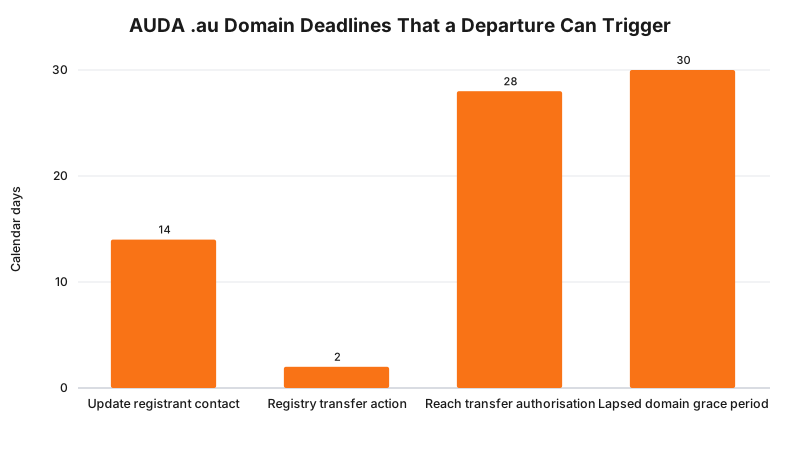
The 14-day figure is the one most practices have never heard of, because it only matters the moment a registrant contact detail goes stale, which is exactly what an associate departure does if their information was ever in that field.
What This Means for the Build
Six checks, run once, before notice period ends.
- Domain registrant contact. Pull up a WHOIS lookup. If the registrant is the practice entity, confirm the contact email and phone number belong to the practice, not the departing associate, and update them now if they do not.
- Google Business Profile. Open the profile’s user list. Confirm the practice’s own account, ideally a role-based email rather than a personal one, holds primary owner. Demote the associate to removed, not left as manager on an account nobody is using.
- Social media accounts. Check who has admin access on Instagram, Facebook and TikTok Business accounts. An associate who built the following personally often set themselves up as the only admin, which is a single point of failure the day they log out for good.
- Testimonials and bio content. Search the site for every mention of the associate’s name. Decide, for each one, whether it needs removing entirely for accuracy, or whether it was already a testimonial that should not have been published under section 133 regardless of who is named.
- Booking-platform practitioner profile. In your practice management or booking software, mark the associate as inactive or remove their bookable profile so patients cannot schedule a treatment with someone no longer there.
- CMS and hosting logins. If the associate ever had a content-management or hosting login, because they updated their own bio or posted their own content, revoke it the same day their employment ends, not on the next password rotation cycle.
The build consequence of skipping this is not abstract. A patient books an appointment with a practitioner who left three weeks ago through a booking profile nobody removed, or a testimonial crediting a departed nurse sits on the homepage generating exactly the exposure section 133 was written to stop, discovered only when a competitor or a patient complaint points it out.
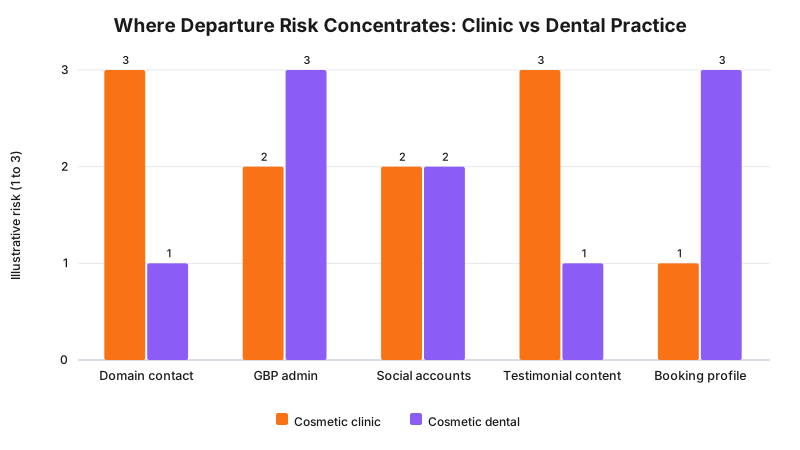
These scores are an illustrative 1 to 3 rating drawn from the two worked examples below, not a survey finding. The cosmetic clinic’s exposure concentrated in testimonial content and domain contact details, the dental practice’s in Google Business Profile admin and its booking-platform profile.
The Departure Asset Matrix
| Asset | Risk if not secured | Action before departure |
|---|---|---|
| Domain registrant contact | Renewal notices and transfer requests go to an address nobody at the practice reads | Confirm contact details in Registry Data name the practice, update within 14 days if not |
| Google Business Profile admin | Practice cannot edit hours, respond to reviews or add photos if the associate was primary owner | Confirm the practice entity is primary owner, demote the associate to no access |
| Social media admin | Practice locked out of an account with years of followers and content | Add a practice-controlled admin, remove the associate’s admin role |
| Testimonials and bio content | Section 133 exposure continues, plus inaccurate marketing showing a practitioner who has left | Audit every mention of the associate’s name, remove or rewrite as appropriate |
| Booking-platform practitioner profile | Patients book with someone no longer employed there | Deactivate or remove the bookable profile the day employment ends |
| CMS or hosting logins | A former staff member retains the ability to edit the live site | Revoke access the same day, not on the next scheduled review |
Checking all six matters because they fail independently. A practice can remove every testimonial and still have a departed associate as primary owner of its Google Business Profile, or lock down social media and still have a stale registrant contact quietly ageing toward a missed renewal.
A Worked Example
Cosmetic clinic. An injectables clinic’s most-booked nurse resigned after four years. Her name appeared in eleven testimonials across the homepage and treatment pages, all published years before anyone on staff had heard of section 133’s testimonial ban, and she had also set up the clinic’s Instagram account under her own personal login when the clinic first opened. The exit process removed her bookable profile the same week, but the testimonial audit took three weeks because nobody had a list of where her name appeared, and the Instagram handover needed her active cooperation to transfer admin rights before she deleted the app from her phone.
Cosmetic dental practice. An associate dentist who had built the practice’s Google Business Profile from scratch, and remained its primary owner three years later, left to open his own practice nearby. The principal dentist discovered the ownership gap only when trying to update holiday hours and finding the account belonged to an email address the departed associate no longer answered. Recovering it required Google’s formal request-ownership process, a seven-day wait built into that process before an appeal option opened, running in parallel with the associate’s own new practice launching under a name searchers could easily confuse with the original.
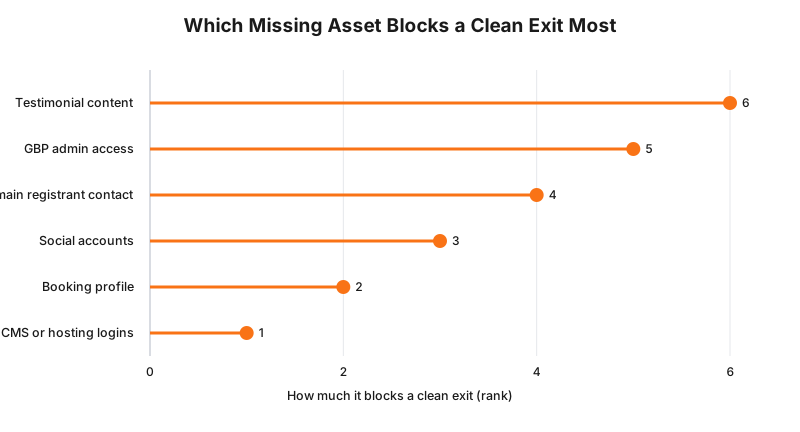
This ranking reflects build experience across departures like the two above, not a formal audit: losing GBP admin or leaving testimonial exposure unresolved causes the most ongoing disruption, while a stale CMS login is usually the easiest gap to close once noticed.
What to Check on Your Own Site
- Run a WHOIS lookup on your domain today, regardless of whether anyone is leaving. Confirm the registrant contact details belong to the practice.
- Open your Google Business Profile’s user list and confirm the practice, not an individual practitioner, holds primary owner.
- List every admin on every social media account the clinic uses, and confirm each one is still employed there.
- Search your site for the name of every current and former practitioner. Flag any testimonial, whether it names someone current or departed, for a section 133 review.
- Check your booking platform’s practitioner list for anyone marked active who no longer treats patients at the practice.
- Ask whoever manages your CMS or hosting for a list of active user accounts, and confirm every name on it still works there.
The Enforcement Anchor
There is no public infringement notice or determination naming a specific case of an outdated departed-practitioner testimonial, and it would be dishonest to invent one. What exists instead is the general enforcement backbone section 133 sits inside: AHPRA investigated around 360 notifications about non-surgical cosmetic procedures between September 2022 and March 2025, with over 1,500 calls to its dedicated hotline in the same period, and testimonials are a named, recurring category in that volume. A departed-practitioner testimonial is not a special or higher-risk category of breach under the law. It is an ordinary section 133 breach that happens to be easier to spot, because the practitioner’s own resignation is the prompt to go looking for it. (AHPRA, notification and hotline volumes, September 2022 to March 2025, checked 24 September 2026.)
Where This Gets Hard
The hardest case is an associate who leaves on bad terms and stops responding. Google’s request-ownership process, WHOIS contact updates and social media admin transfers all work far better with a departing practitioner’s active cooperation than without it, and a practice with none of that cooperation is looking at days to weeks of formal recovery processes instead of a same-day handover. Building the audit into the departure agreement itself, while goodwill and a final pay run still give the practice some leverage, is the practical fix, not a legal one.
The second hard case is a testimonial audit that turns up content that should never have been published regardless of who is named in it. Removing it is straightforward. Deciding whether historical exposure needs anything further done about it is not a marketing question.
auDA’s rules say a registrant must update contact details within 14 calendar days of a change; the build consequence is that a departure is exactly the kind of change that starts that clock, whether or not anyone at the practice noticed it start; whether a specific testimonial or an unresolved GBP ownership gap creates exposure beyond what this checklist covers is a question for your medical defence organisation or your lawyer.
Status
In force now, not pending. auDA’s .au Domain Administration Rules: Licensing (Policy 2019-01), section 133 of the Health Practitioner Regulation National Law, and Google’s current Business Profile ownership policies all apply today, as at 24 September 2026. None of the three is subject to a pending change that would alter this checklist.
Frequently Asked Questions
What is the single asset most practices forget to check when an associate leaves?
The domain registrant contact details. If the practice entity is already the registrant, that part is fine, but auDA’s rules require whoever holds the licence to update the registrant contact information within 14 calendar days of a change, and a departing associate’s personal email or phone number sitting in that field is exactly the kind of stale detail nobody notices until a renewal notice bounces or a transfer stalls.
Do we have to remove testimonials that name a practitioner who has left?
Check them regardless of who left. Section 133 of the Health Practitioner Regulation National Law bans testimonials about a regulated health service in advertising, for every practitioner, current or departed. A testimonial naming someone who no longer works at the practice is not a bigger breach because they left, but their departure is a natural prompt to audit content that should already have been reviewed.
Can we just leave the associate’s bio page up after they leave?
You can, but it stops being accurate the moment they are no longer treating patients there, and an outdated bio inviting bookings with someone who has left creates a different problem: patients turning up expecting a practitioner who is not there. Update or remove it as part of the departure process, not as an afterthought when someone complains.
Who should hold admin access to the clinic’s Google Business Profile if an associate managed it?
The practice entity, not the individual practitioner. Google’s own guidance on managing a profile for someone else says a representative must transfer ownership back on request. If the associate was ever made primary owner personally rather than the practice being the owner with the associate as a manager, that is the exact gap this checklist exists to catch before they walk out the door.
What if the associate also built or maintained parts of the website themselves?
Treat it as a small-scale vendor exit on top of the personnel change. Check CMS logins, hosting account access and any developer accounts in their name the same way you would check a departing agency, because the access risk is identical even though the relationship was employment rather than a contract.
Run the Audit Before They Give Notice
If an associate is leaving in the next few weeks and you are not sure which of these six assets are actually tied to them, get in touch and tell us what is happening. We reply personally within 24 hours, and a same-day audit is often enough to catch the gap before it becomes a lockout.
For the mechanics behind related layers, see who actually owns a clinic website, a vendor exit checklist, keeping control of your Google Business Profile, and getting patient data out of a booking platform.
Sources
auDA
- .au Domain Administration Rules: Licensing (Policy 2019-01), no proprietary rights, registrant contact update obligation, transfer and renewal timelines. Checked 24 September 2026.
AustLII
- Health Practitioner Regulation National Law, section 133, Advertising. Checked 24 September 2026.
Google Business Profile Help
- Business eligibility and ownership guidelines, including obligations of an authorised representative. Checked 24 September 2026.
AHPRA
- Booming billion-dollar cosmetic industry on notice with new cosmetic procedures guidelines, 3 June 2025 (notification and hotline volumes, September 2022 to March 2025). Checked 24 September 2026.
Last reviewed: 24 September 2026.
Vikas Thakur
Founder of RockingWeb. 16 years of experience from working at TPG, iiNet and Monadelphous, now building websites, software and digital marketing for local businesses in Rockingham and Perth.